
如何让ipywidget在木星实验室工作?
在木星笔记本中,ipywidget工作得很好,但是在木星实验室(据说比Notebook更好),它们似乎不起作用。
我跟踪了这些航向。
步骤1: Installed Node.js (https://nodejs.org/en/)
步骤2:使用conda在Python3上安装要求:
conda install -c conda-forge ipywidgets
jupyter labextension install @jupyter-widgets/jupyterlab-manager
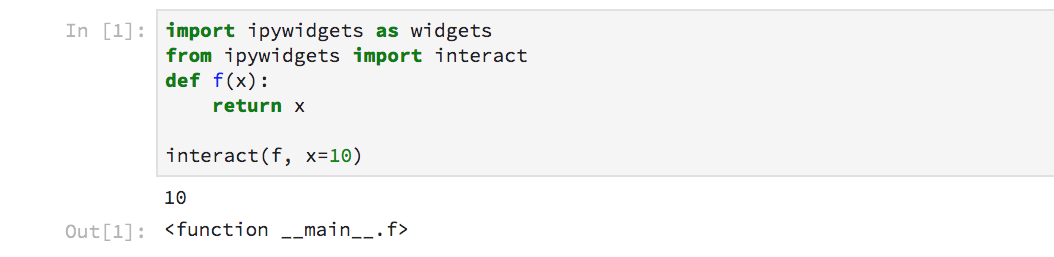
不幸的是,基本部件无法在jupyter实验室笔记本中工作:
回答 11
Stack Overflow用户
发布于 2018-04-02 14:27:58
JupyterLab现在更喜欢在单元格的输出中嵌入不再允许任意javascript。的模型,这就是曾经有多少交互式朱庇特笔记本模块可以工作。他们现在要求具有交互性的模块创建JupyterLab扩展。ipywidgets提供了满足这一需求的@jupyter-widgets/jupyterlab-manager扩展。
在JupyterLab 3.0或更高版本中使用ipywidgets 7.6或更高版本时,您不需要做任何事情:它是默认安装。您可以通过运行以下命令来检查是否安装了该程序:
jupyter labextension list其中应包括一行,如:
@jupyter-widgets/jupyterlab-manager v3.0.0 enabled OK (python, jupyterlab_widgets)如果您使用的是JupyterLab 1或2(或ipywidget的旧版本),则需要在命令行上运行此扩展手动来安装这个扩展手动(假定您已经安装了NodeJS ):
jupyter labextension install @jupyter-widgets/jupyterlab-managerStack Overflow用户
发布于 2018-04-24 12:31:38
我有同样的pbm,并尝试了这个解决方案(希望它能帮助其他人):
在我的例子中,jupyter labextension install @jupyter-widgets/jupyterlab-manager给出了这样的错误:
> /Users/user/.nvm/versions/node/v8.7.0/bin/npm pack @jupyter-widgets/jupyterlab-manager
jupyter-widgets-jupyterlab-manager-0.35.0.tgz

Errored, use --debug for full output:
ValueError:
"@jupyter-widgets/jupyterlab-manager@0.35.0" is not compatible with the current JupyterLab
Conflicting Dependencies:
JupyterLab              Extension            Package
>=0.15.4-0 <0.16.0-0    >=0.16.0-0 <0.17.0-0 @jupyterlab/application
>=1.1.4-0 <2.0.0-0      >=2.0.0-0 <3.0.0-0   @jupyterlab/services
>=0.15.4-0 <0.16.0-0    >=0.16.0-0 <0.17.0-0 @jupyterlab/rendermime
>=0.15.4-0 <0.16.0-0 >=0.16.0-0 <0.17.0-0 @jupyterlab/notebook然后,我所做的是使用以前的版本0.34,而不是0.35:jupyter labextension install @jupyter-widgets/jupyterlab-manager@0.34
事实上,根据这的说法,有时候团队会有时间考虑最后一个版本。
向上(根据评论):您可以检查jupyter lab --version并在其版本兼容性上找到匹配项。
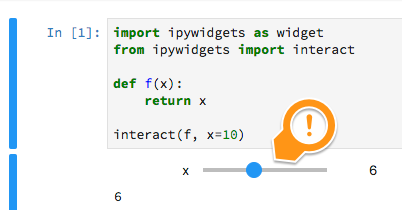
现在起作用了!
Stack Overflow用户
发布于 2019-02-12 20:54:11
有同样的问题,今天对我起作用的是运行“干净”命令,如这里提到的:install.html#installing-the-jupyterlab-extension
所以:
jupyter lab clean
jupyter labextension install @jupyter-widgets/jupyterlab-manager
而这件事刚刚对我起了作用。
https://stackoverflow.com/questions/49542417
复制相似问题
腾讯云开发者

Copyright © 2013 - 2026 Tencent Cloud. All Rights Reserved. 腾讯云 版权所有
深圳市腾讯计算机系统有限公司 ICP备案/许可证号:粤B2-20090059  粤公网安备44030502008569号
腾讯云计算(北京)有限责任公司 京ICP证150476号 | 京ICP备11018762号