
ng-重复使用if repeat条件Angularjs (前端[HTML]部件)
ng-重复使用if repeat条件Angularjs (前端[HTML]部件)
提问于 2018-03-28 02:11:01
寻找解决方案
实际数据
tier_price:
    0:
      price: "29.0000"
      price_qty: 1
    1:
      price: "28.5000"
      price_qty: 2
    2:
      price: "28.0000"
      price_qty: 4
    3:
      price: "27.1500"
      price_qty: 6
这是我的输入
price_qty = 1,2,4,6 注:数组是动态的
$index = 0,1,2,3 注:索引取决于数组大小
计数=1继续前进(按下按钮将手动增加)
注意:下面的代码将运行4倍,每次计数增加,例如1,2,4,6
而且一旦条件匹配,它进一步不应该检查其他条件,类中断语句。
<div ng-repeat="tier in model.selected.tier_price">

  <div ng-if="model.item.count == tier.price_qty">
     Matching Items (This is working perfect)
  </div>

  <div ng-if="model.item.count < tier.price_qty && model.item.count == tier.price_qty+$index-3">
      /** Facing issue at this place, Look like need to add One more
          condition to achieve and don't know what should be the
          condition because now if i use [model.item.count == tier.price_qty+$index-3]
          Until Count==4 it work fine but when Count==5
          then it wrong again because condition is not perfect**/
  </div>

  <div ng-if="model.item.count > tier.price_qty">
     When Count is More than price_qty
  </div>

</div>
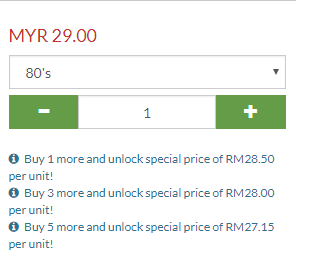
以下是我真正想要达到的目标
买1,买3,买5是我的数
回答 3
Stack Overflow用户
发布于 2018-03-28 04:11:07
好了,开始吧!首先,我很难理解你想要达到的目标,所以我希望这接近于回答你。显示ng-repeat元素并对给定表达式隐藏它们的最灵活的方法是使用自定义筛选器。下面的代码显示了一个简单的示例。
 <body ng-app="app">
  <div ng-controller="MyCtl">
    <input type="text" ng-model="count"> <!--to get my count.-->
    <div ng-repeat="qty in tier | MyFilter:count">buy {{ qty.p_qty }} more and get price of RM{{ qty.price }}</div>
  </div>

  <script src="./node_modules/angular/angular.js"></script>
  <script>
    angular.module('app', [])
    .controller('MyCtl', ['$scope', function ($scope) { //Simple controller to hold values
      $scope.count = 0; //
      $scope.tier = [ // Took from your question
        { price: "29.0000", p_qty: 1},
        { price: "28.5000", p_qty: 2},
        { price: "28.0000", p_qty: 4},
        { price: "27.1500", p_qty: 6}
      ];
    }])
    .filter('MyFilter', function () { This is where the magic happens!
      return function (items, count) { // items is the ng-repeat array or object
//count is the argument passed to the filter
        console.log(count);
        var filtered = []; // To hold filtered items.
        for (var i = 0; i < items.length; i++) {
          var item = items[i];
          if (item.p_qty > count) { // Check if my quantity is greater than count, if so, add item to filtered array
            filtered.push(item);
          }
        }
        return filtered; // Elements/items to be repeated
      };
    });
  </script>
</body>Stack Overflow用户
发布于 2018-03-28 04:11:19
尝尝这个
<div ng-repeat="qty in model.selected.tier_price">

<div ng-show="count == qty.price_qty">
 Matching Items (This is working perfect)
</div>

<div ng-show="count < qty.price_qty">
 HERE i am facing issue as when the Count is below price_qty, and it needs   to be stay in same INDEX as well, not really sure what should be other if-condition beside above if-condition.

  Let say if you Take Count==3, you will see 3 not exist in price_qty[], So first if-Condition will be false and it will jump inside this condition because 3<4 and Index==2, next also same 3<6 and Index==3
</div>

<div ng-show="count > qty.price_qty">
 When Count is More than price_qty
</div>
Stack Overflow用户
发布于 2018-03-28 04:46:32
看到上面的图片后更新。
在controller.js中
$scope.myArr = [];
$scope.checkAndValidate = function (type) {
  let tier = model.selected.tier_price.find(t => t.price_qty === $scope.count);
  if (type === 'ADD') {
    if (tier) {
      $scope.myArr.push({
        count: $scope.count,
        description: `Buy ${$scope.count} more and unlock special price of RM${tier.price_qty} per unit.` }
      );
    } else {
      if ($scope.count === 3) {
        //set tier for count == 3 by selecting where price is 28.5
        tier = model.selected.tier_price.find(t => t.price_qty === 1);
        $scope.myArr.push({
          count: $scope.count,
          description: `Buy ${$scope.count} more and unlock special price of RM${tier.price_qty} per unit.` }
        );
      }
    }
  } else if (type === "SUBTRACT") {
    //remove from the array
    // check first if record exist in array otherwise it will throw an error on splice.
    tier = $scope.myArr.find(t => t.count === $scope.count)
    if(trier) {
       $scope.myArr.splice(($scope.count - 1), 1);
    }
  }
}

$scope.$on('[MyAddbtnEvent]', function () {
  $scope.count++;
  $scope.checkAndValidate('ADD');
});

$scope.$on('[MySubtractBtntEvent]', function () {
  $scope.count = $scope.count - 1;
  $scope.checkAndValidate('SUBTRACT');
});
在.html中
<div ng-repeat="tier in myArr">
   {{myArr.description}}
</div>
仔细尝试上面的逻辑/代码,它应该适用于您。您也可以轻松地进行调试。
页面原文内容由Stack Overflow提供。腾讯云小微IT领域专用引擎提供翻译支持
原文链接:
https://stackoverflow.com/questions/49525010
复制相关文章
相似问题
腾讯云开发者

Copyright © 2013 - 2026 Tencent Cloud. All Rights Reserved. 腾讯云 版权所有
深圳市腾讯计算机系统有限公司 ICP备案/许可证号:粤B2-20090059  粤公网安备44030502008569号
腾讯云计算(北京)有限责任公司 京ICP证150476号 | 京ICP备11018762号