
有办法扫描条形码吗?
基本上,我正在制作一个应用程序来扫描一个QR代码来连接到一个服务器。然后,应用程序将扫描产品条形码,并拍摄该项目的照片,并将其发送到服务器。我的问题如下:
是否有可扫描与image_picker冲突的QR代码和条形码的颤振插件?
这是我到目前为止发现的。
barcode_scan。在您添加对camera或image_picker的依赖之前,它工作得很好。问题。- 。一个问题是开放的,它与以前的插件有相同的问题。
flutter_qrcode_reader,不推荐。显然,它是建不成。flutterZebraEmdk是一个没有README.md的空项目。flutter_qr_mobile_vision不支持条形码。问题。
我很感激你能提供的任何帮助。谢谢!
更新
barcode_scan的问题已经解决了。最后我使用了这个方法,因为它比公认的答案更快,而且它的问题很快就解决了。请注意,它在iOS上的行为是由苹果公司修改的,所以您可能会得到不同的校验和数字或其他结果。
回答 5
Stack Overflow用户
发布于 2018-03-28 14:23:11
我以前也遇到过类似的问题,在像你一样搜索之后,我找不到很多。我决定最好的办法是自己写一个插件.如此无耻的插件在这里=D,并不是说我受益于其他人使用它。
你可以看到它,这里。然而,我没有时间记录它,对它进行广泛的测试,或者在Pub上正确地发布它。所以你的里程可能会不同。不过,它应该适用于android (可能在下面),以及支持4.4+的iOS设备上。我也没有测试它与相机插件,但我不明白为什么它会有问题。
它采用了与大多数其他qr代码插件不同的方法;它没有制作安卓或iOS窗口,而是进行扫描,然后返回颤振,而是使用flutter的纹理渲染功能让相机直接渲染为颤振。
还有几件事情要考虑的是,它使用的Google Mobile Vision SDK具有相应的许可和功能(并且需要在Android上提供最新版本的Play Services );而且它目前只支持从条形码扫描中提取最基本的信息--我只需要原始文本,所以这就是我所做的一切。
要使用它,请将其添加到pubspec.yaml中:
dependencies:
  qr_mobile_vision: '^0.0.7'
并执行如下:
import 'package:qr_mobile_vision/QrCamera.dart';

...

new Container(
  constraints: new BoxConstraints.loose(
  new Size(cameraSize, cameraSize)),
  child: new QrCamera(
    qrCodeCallback: (code) {
      print(code);
    }
  ),
)
我确实计划最终完成文档/测试/等,但同时欢迎您尝试。如果您决定使用它并且需要它不支持的特性,我可能可以帮助实现它.但是PRs是受欢迎和鼓励的!
更新:现在确实包括条形码支持。您可以在实例化QrCamera时传递您希望支持的QR代码/条码类型。它默认为all,这需要更多的处理,因此如果您需要某个类型,则建议您传递它。
Stack Overflow用户
发布于 2018-03-28 02:27:34
我正在工作,目前作为我的QR代插件(https://github.com/lukef/qr.flutter)的伙伴,但我没有一个具体的时间表,不幸的。
我的计划是使用Texture对象并连接一个摄像机(或叉/使用相机插件),然后使用Google (https://developers.google.com/vision/android/barcodes-overview)。
这应该是体面的琐碎,我只需要找出时间。无论哪种方式,如果您想这样做的话,这就是您的计划:)
Stack Overflow用户
发布于 2018-03-29 02:30:54
您可以在Flutter项目中使用开源SDK (例如ZXing)或商业SDK (例如Dynamsoft条形码阅读器SDK)。实现条码扫描功能简单。
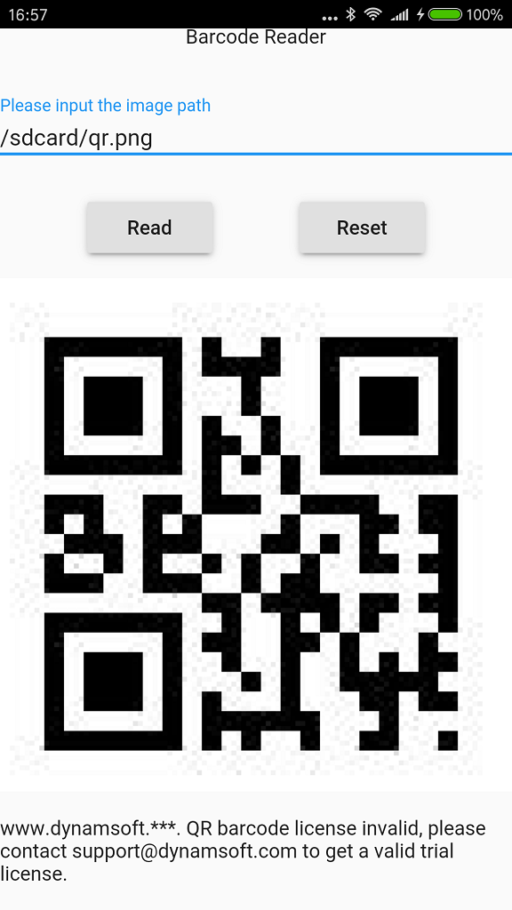
我写了一篇文章- 利用Android文件进行颤振编程,分享如何在颤振项目中扫描QR代码。源代码也可以在GitHub上使用。
Java代码
private String onGetBarcode(String json) {
        String filename;
        try {
            JSONObject message = new JSONObject(json);
            filename = message.getString("filename");
        } catch (JSONException e) {
            Log.e(TAG, "JSON exception", e);
            return null;
        }

        String locationProvider;
        String barcodeResult = "No barcode detected";
        File file = new File(filename);
        if (!file.exists()) {
            barcodeResult = "No file exists: " + file.toString();
            Toast.makeText(BarcodeReaderActivity.this, barcodeResult, Toast.LENGTH_LONG).show();

            return null;
        }
        else {
            Bitmap bitmap = BitmapFactory.decodeFile(file.toString());
            BarcodeReader reader = new BarcodeReader("license");
            ReadResult result = reader.readSingle(bitmap, Barcode.QR_CODE);
            Barcode[] all = result.barcodes;
            if (all != null && all.length == 1) {
                barcodeResult = all[0].displayValue;
            }
            else {
                barcodeResult = "no barcode found: " + file.toString();
            }

            bitmap.recycle();

        }

        JSONObject reply = new JSONObject();
        try {
            if (barcodeResult != null) {
              reply.put("result", barcodeResult);
            } else {
              reply.put("result", "No barcode detected");
            }
        } catch (JSONException e) {
            Log.e(TAG, "JSON exception", e);
            return null;
        }

        return reply.toString();
    }
Dart代码
@override
  Widget build(BuildContext context) {
    if (_isExisted) {
      return new Material(
          child: new Center(
              child: new Column(
                  mainAxisAlignment: MainAxisAlignment.spaceEvenly,
                  children: <Widget>[
                    new Text('Barcode Reader'),
                    new Input(
                      labelText: 'Please input the image path',
                      value: new InputValue(text: _filename),
                      onChanged: onTextChanged,
                      autofocus: true,
                    ),
                    new Row(
                        mainAxisAlignment: MainAxisAlignment.spaceEvenly,
                        children: <Widget>[
                          new RaisedButton(
                              child: new Text('Read'),
                              onPressed: _getBarcode
                          ),
                          new RaisedButton(
                              child: new Text('Reset'),
                              onPressed: _resetResult
                          ),
                        ]
                    ),
                    new Image.file(new File(_filename)),
                    new Text('$_result'),
                  ]
              )
          )
      );
    }
    else {
      return new Material(
          child: new Center(
              child: new Column(
                  mainAxisAlignment: MainAxisAlignment.spaceEvenly,
                  children: <Widget>[
                    new Text('Barcode Reader'),
                    new Input(
                      labelText: 'Please input the image path',
                      onChanged: onTextChanged,
                      autofocus: true,
                    ),
                    new Row(
                        mainAxisAlignment: MainAxisAlignment.spaceEvenly,
                        children: <Widget>[
                          new RaisedButton(
                              child: new Text('Read'),
                              onPressed: _getBarcode
                          ),
                          new RaisedButton(
                              child: new Text('Reset'),
                              onPressed: _resetResult
                          ),
                        ]
                    ),
                    new Text('$_result'),
                  ]
              )
          )
      );
    }
  }

  Future<Null> _readBarcode() async {
    final Map<String, String> message = <String, String>{'filename':_filename};
    final Map<String, dynamic> reply = await HostMessages.sendJSON('getBarcode', message);
    // If the widget was removed from the tree while the message was in flight,
    // we want to discard the reply rather than calling setState to update our
    // non-existent appearance.
    if (!mounted)
    return;
    setState(() {
    _result = reply['result'].toString();
    });
  }
截图
所以花点时间自己做吧:)
https://stackoverflow.com/questions/49521283
复制相似问题
腾讯云开发者

Copyright © 2013 - 2026 Tencent Cloud. All Rights Reserved. 腾讯云 版权所有
深圳市腾讯计算机系统有限公司 ICP备案/许可证号:粤B2-20090059  粤公网安备44030502008569号
腾讯云计算(北京)有限责任公司 京ICP证150476号 | 京ICP备11018762号