
在QML中,如何使MapItemGroup成为MapItemView的委托组件?
场景:--我能够使用带有模型/视图/委托的QML项。我能处理个别物品。
问题:作为下一步,我希望能够绘制多个项目。我需要放置多个QML MapItems (如MapCircle、MapRectangle等)在单个委托组件中。通常,QML支持委托中的多个项。问题在于MapItemView的委托:它不支持多个子项。
我的方法:
- 我认为使用MapItemGroup是可行的。但我好像漏掉了什么。关于如何使它作为委托组件工作的文档也不太广泛。附加的代码段显示了此实现。 Qt的文档
在以下守则中:
- delegateCircle,delegateRect工作得很好
- 不显示delegateGroup
一个简单的实现:
import QtQuick 2.10
import QtPositioning 5.6
import QtLocation 5.9
import QtQuick.Controls 2.3 as QQc2

QQc2.ApplicationWindow {
    visible: true
    width: 640
    height: 480
    // Some list model
    ListModel {
        id: someModel
        ListElement {lat: 0; lon: 0}
        ListElement {lat: 5; lon: 0}
        ListElement {lat: 5; lon: 5}
        ListElement {lat: 0; lon: 5}
    }

    Map {
        id: map
        anchors.fill: parent
        plugin: Plugin {name: "osm"}
        center: QtPositioning.coordinate(2.5, 2.5)
        zoomLevel: 6

        // Some views to test the model
        // delegateCircle, delegateRect work fine
        // delegateGroup is not displayed
        MapItemView {
            model: someModel
            delegate: MapCircle {
                id: delegateCircle
                border.color: "red"
                border.width: 1
                center: QtPositioning.coordinate(model.lat, model.lon)
                radius: 50*1000
            }
        }

        MapItemView {
            model: someModel
            delegate: MapRectangle {
                id: delegateRect
                border.color: "green"
                border.width: 3
                topLeft     : QtPositioning.coordinate(model.lat+1, model.lon-1)
                bottomRight : QtPositioning.coordinate(model.lat-1, model.lon+1)
            }
        }

        MapItemView {
            model: someModel
            delegate: MapItemGroup {
                id: delegateGroup
                MapCircle {
                    id: innerCircle
                    border.color: "green"
                    border.width: 3
                    center: QtPositioning.coordinate(model.lat, model.lon)
                    radius: 75*1000
                }

                MapRectangle {
                    id: innerRect
                    border.color: "red"
                    border.width: 6
                    topLeft     : QtPositioning.coordinate(model.lat+2, model.lon-2)
                    bottomRight : QtPositioning.coordinate(model.lat-2, model.lon+2)
                }
            }
        }
    }
}
上述代码的输出如下:
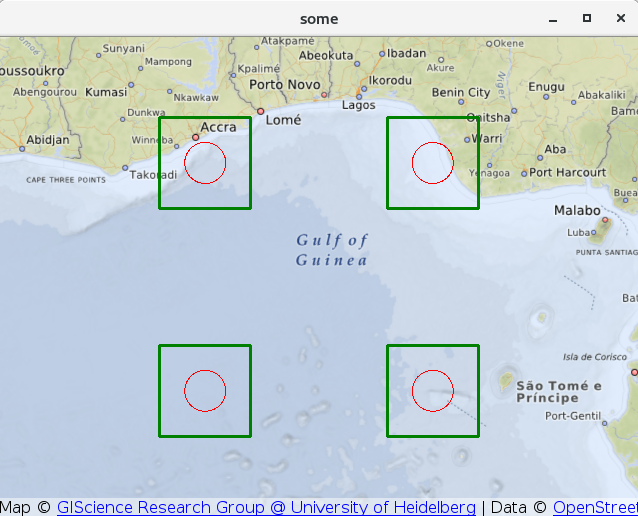
- 我还尝试使用MapItemGroup作为sourceItem of MapQuickItem类型。这也不起作用。
我想要达到的目标:
井。我需要使用MapItemView绘制多个地图项。欢迎任何其他解决方案/方法(包括c++后端程序)。
编辑
谢谢GrecKo和Yoann。你的两种解决方案都有效。但是,我选择继续使用Instantiator,因为它更适合我的应用程序。
在看到您的解决方案:和之后,我也发现了这个有趣的地方。
回答 3
Stack Overflow用户
发布于 2018-03-27 22:30:53
不幸的是,MapItemView只适用于MapItem-derived项,而MapItemGroup不是其中之一。
您可以使用Repeater,它将用于从一开始就创建的委托,但是如果稍后在模型中添加行,它将无法工作。我在另一个答案中解释了为什么Repeater不适合Map。
在我的回答中,我建议使用MapItemView,但在这里不适用。希望还有最后一个可用的解决方案:
Instantiator与Map.addMapItemGroup()和Map.removeMapItemGroup()。
import QtQuick 2.10
import QtPositioning 5.6
import QtLocation 5.9
import QtQuick.Controls 2.3 as QQc2
import QtQml 2.2

QQc2.ApplicationWindow {
    visible: true
    width: 640
    height: 480

    ListModel {
        id: someModel
        ListElement {lat: 0; lon: 0}
        ListElement {lat: 5; lon: 0}
        ListElement {lat: 5; lon: 5}
        ListElement {lat: 0; lon: 5}
    }

    Timer {
        interval: 1000
        running: true
        repeat: true
        property bool toggle: true
        onTriggered: {
            if (toggle)
                someModel.append({lat: 2.5, lon: 2.5});
            else
                someModel.remove(4);
            toggle = !toggle;
        }
    }

    Map {
        id: map
        anchors.fill: parent
        plugin: Plugin {name: "osm"}
        center: QtPositioning.coordinate(2.5, 2.5)
        zoomLevel: 6

        Instantiator {
            model: someModel
            delegate: MapItemGroup {
                id: delegateGroup
                MapCircle {
                    id: innerCircle
                    border.color: "green"
                    border.width: 3
                    center: QtPositioning.coordinate(model.lat, model.lon)
                    radius: 75*1000
                }

                MapRectangle {
                    id: innerRect
                    border.color: "red"
                    border.width: 6
                    topLeft     : QtPositioning.coordinate(model.lat+2, model.lon-2)
                    bottomRight : QtPositioning.coordinate(model.lat-2, model.lon+2)
                }
            }
            onObjectAdded: map.addMapItemGroup(object)
            onObjectRemoved: map.removeMapItemGroup(object)
        }
    }
}Stack Overflow用户
发布于 2019-12-13 19:17:49
那是Qt 5.12固定,所以您可以像现在这样使用代码
import QtLocation 5.12
import QtPositioning 5.12Stack Overflow用户
发布于 2018-03-27 14:41:39
您可以使用一个简单的Repeater而不是MapItemView
import QtQuick 2.10
import QtPositioning 5.6
import QtLocation 5.9
import QtQuick.Controls 2.3

ApplicationWindow {
    visible: true
    width: 640
    height: 480
    // Some list model
    ListModel {
        id: someModel
        ListElement {lat: 0; lon: 0}
        ListElement {lat: 5; lon: 0}
        ListElement {lat: 5; lon: 5}
        ListElement {lat: 0; lon: 5}
    }

    Map {
        id: map
        anchors.fill: parent
        plugin: Plugin {name: "osm"}
        center: QtPositioning.coordinate(2.5, 2.5)
        zoomLevel: 6

        Repeater
        {
            model: someModel
            MapItemGroup {
                id: delegateGroup
                MapCircle {
                    id: innerCircle
                    border.color: "green"
                    border.width: 3
                    center: QtPositioning.coordinate(model.lat, model.lon)
                    radius: 75*1000
                }

                MapRectangle {
                    id: innerRect
                    border.color: "red"
                    border.width: 6
                    topLeft     : QtPositioning.coordinate(model.lat+2, model.lon-2)
                    bottomRight : QtPositioning.coordinate(model.lat-2, model.lon+2)
                }

                Component.onCompleted: map.addMapItemGroup(this)
            }
        }
    }
}正如GrecKo所指出的,为了使其与动态模型一起工作,必须将itemGroup“手动”添加到映射中,因此必须将行Component.onCompleted: map.addMapItemGroup(this)添加到地图中。
https://stackoverflow.com/questions/49513803
复制相似问题
腾讯云开发者

Copyright © 2013 - 2026 Tencent Cloud. All Rights Reserved. 腾讯云 版权所有
深圳市腾讯计算机系统有限公司 ICP备案/许可证号:粤B2-20090059  粤公网安备44030502008569号
腾讯云计算(北京)有限责任公司 京ICP证150476号 | 京ICP备11018762号