
maven未编译测试代码/未运行测试代码
maven未编译测试代码/未运行测试代码
提问于 2018-03-25 11:18:08
我有一个简单的带有期望目录结构的Mavenized -一个没有“业务”类的类:
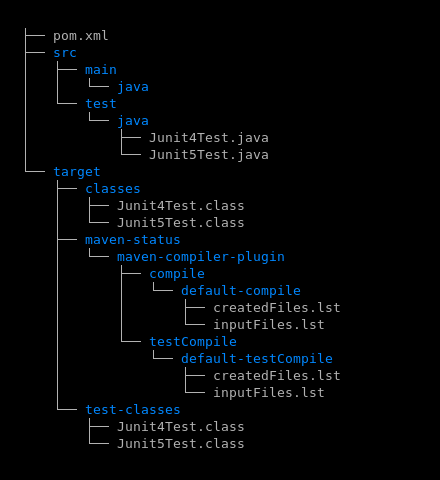
pom.xml是相当平凡的。它声明了对JUnit4和JUnit5的依赖,并声明了“尽力而为”插件(包含project噪声):
<properties>
    <junit5Version>5.1.0</junit5Version>
    <junit4Version>4.12</junit4Version>
    <commonsCodecVersion>20041127.091804</commonsCodecVersion>
    <mavenCompilerPluginVersion>3.7.0</mavenCompilerPluginVersion>
    <junitPlatformSurefireProviderVersion>1.1.0</junitPlatformSurefireProviderVersion>
    <mavenSurefirePluginVersion>2.21.0</mavenSurefirePluginVersion>
    <project.build.sourceEncoding>UTF-8</project.build.sourceEncoding>
</properties>

<build>
    <sourceDirectory>src</sourceDirectory>
    <plugins>
        <plugin>
            <artifactId>maven-compiler-plugin</artifactId>
            <version>${mavenCompilerPluginVersion}</version>
            <configuration>
                <release>9</release>
            </configuration>
        </plugin>

        <plugin>
            <artifactId>maven-surefire-plugin</artifactId>
            <version>${mavenSurefirePluginVersion}</version>
            <dependencies>
                <dependency>
                    <groupId>org.junit.platform</groupId>
                    <artifactId>junit-platform-surefire-provider</artifactId>
                    <version>${junitPlatformSurefireProviderVersion}</version>
                </dependency>
                <dependency>
                    <groupId>org.junit.vintage</groupId>
                    <artifactId>junit-vintage-engine</artifactId>
                    <version>${junit5Version}</version>
                </dependency>

                <dependency>
                    <groupId>org.junit.jupiter</groupId>
                    <artifactId>junit-jupiter-engine</artifactId>
                    <version>${junit5Version}</version>

                </dependency>
            </dependencies>
        </plugin>
    </plugins>
</build>

<!-- https://www.petrikainulainen.net/programming/testing/junit-5-tutorial-running-unit-tests-with-maven/ -->

<dependencies>

    <!-- https://mvnrepository.com/artifact/commons-codec/commons-codec/ -->
    <dependency>
        <groupId>commons-codec</groupId>
        <artifactId>commons-codec</artifactId>
        <version>${commonsCodecVersion}</version>
    </dependency>

    <!-- https://mvnrepository.com/artifact/junit/junit -->
    <dependency>
        <groupId>junit</groupId>
        <artifactId>junit</artifactId>
        <version>${junit4Version}</version>
    </dependency>

    <!-- https://mvnrepository.com/artifact/org.junit.jupiter/junit-jupiter-api -->
    <dependency>
        <groupId>org.junit.jupiter</groupId>
        <artifactId>junit-jupiter-api</artifactId>
        <version>${junit5Version}</version>
    </dependency>

</dependencies>
问题:
- 在上面,我不将
junit:junit和org.junit.jupiter.junit-jupiter-api依赖关系限定为test作用域。实际上,如果我这样做,mvn compile就会失败,因为它找不到JUnit4和JUnit5的符号。这是出乎意料的,我希望它根本不会编译测试代码。实际上,示例通常显示对test作用域的限制。怎么了? - 如果没有对
test作用域的限制,那么mvn compile可以工作,但是mvn test不会运行任何测试。这个万无一失的插件似乎没有发现任何JUnit测试,既不是4的,也不是5的。这里有什么问题?
最后,版本信息:
$ mvn -version
Apache Maven 3.5.2
Maven home: /usr/local/java/maven
Java version: 9.0.4, vendor: Oracle Corporation回答 1
Stack Overflow用户
回答已采纳
发布于 2018-03-25 12:54:00
maven-surefire-plugin 2.21.0与junit-platform-surefire-provider的1.1.0版本不兼容。
要么将maven-surefire-plugin回滚到2.19.1,要么将junit-platform-surefire-provider更新为1.2.0 -快照(或者1.2.0发行版(如果它退出)。
要使用的pom.xml,如果使用快照,配置了Sonatype插件存储库:
<?xml version="1.0"?>
<project xmlns="http://maven.apache.org/POM/4.0.0" xmlns:xsi="http://www.w3.org/2001/XMLSchema-instance" xsi:schemaLocation="http://maven.apache.org/POM/4.0.0 http://maven.apache.org/xsd/maven-4.0.0.xsd">
  <modelVersion>4.0.0</modelVersion>
  <groupId>TestJava</groupId>
  <artifactId>TestJava</artifactId>
  <version>0.0.1-SNAPSHOT</version>
  <pluginRepositories>
    <pluginRepository>
      <id>oss-sonatype</id>
      <name>oss-sonatype</name>
      <url>https://oss.sonatype.org/content/repositories/snapshots/</url>
      <snapshots>
        <enabled>true</enabled>
      </snapshots>
    </pluginRepository>
  </pluginRepositories>
  <properties>
    <junit5Version>5.1.0</junit5Version>
    <junit4Version>4.12</junit4Version>
    <mavenCompilerPluginVersion>3.7.0</mavenCompilerPluginVersion>
    <junitPlatformSurefireProviderVersion>1.2.0-SNAPSHOT</junitPlatformSurefireProviderVersion>
    <mavenSurefirePluginVersion>2.21.0</mavenSurefirePluginVersion>
    <project.build.sourceEncoding>UTF-8</project.build.sourceEncoding>
  </properties>
  <build>
    <plugins>
      <plugin>
        <artifactId>maven-compiler-plugin</artifactId>
        <version>${mavenCompilerPluginVersion}</version>
        <configuration>
          <release>9</release>
        </configuration>
      </plugin>
      <plugin>
        <artifactId>maven-surefire-plugin</artifactId>
        <version>${mavenSurefirePluginVersion}</version>
        <!-- https://www.petrikainulainen.net/programming/testing/junit-5-tutorial-running-unit-tests-with-maven/ -->
        <dependencies>
          <dependency>
            <groupId>org.junit.platform</groupId>
            <artifactId>junit-platform-surefire-provider</artifactId>
            <version>${junitPlatformSurefireProviderVersion}</version>
          </dependency>
          <dependency>
            <groupId>org.junit.vintage</groupId>
            <artifactId>junit-vintage-engine</artifactId>
            <version>${junit5Version}</version>
          </dependency>
          <dependency>
            <groupId>org.junit.jupiter</groupId>
            <artifactId>junit-jupiter-engine</artifactId>
            <version>${junit5Version}</version>
          </dependency>
        </dependencies>
      </plugin>
    </plugins>
  </build>
  <dependencies>
    <!-- https://mvnrepository.com/artifact/junit/junit -->
    <dependency>
      <groupId>junit</groupId>
      <artifactId>junit</artifactId>
      <version>${junit4Version}</version>
      <scope>test</scope>
    </dependency>
    <!-- https://mvnrepository.com/artifact/org.junit.jupiter/junit-jupiter-api -->
    <dependency>
      <groupId>org.junit.jupiter</groupId>
      <artifactId>junit-jupiter-api</artifactId>
      <version>${junit5Version}</version>
      <scope>test</scope>
    </dependency>
  </dependencies>
</project>运行mvn -U test强制检查缺少的版本和更新后的远程存储库快照。
页面原文内容由Stack Overflow提供。腾讯云小微IT领域专用引擎提供翻译支持
原文链接:
https://stackoverflow.com/questions/49475205
复制相关文章
相似问题
腾讯云开发者

Copyright © 2013 - 2026 Tencent Cloud. All Rights Reserved. 腾讯云 版权所有
深圳市腾讯计算机系统有限公司 ICP备案/许可证号:粤B2-20090059  粤公网安备44030502008569号
腾讯云计算(北京)有限责任公司 京ICP证150476号 | 京ICP备11018762号