
C# Bunifu UI System.NullReferenceException未处理
C# Bunifu UI System.NullReferenceException未处理
提问于 2018-03-25 01:00:03
我使用的是bunifuFlatButton,一切都很好,直到我从Bunifu (也就是bunifuFlatButton)中添加了一个"Exit“按钮,我尝试了this.Close()和Close();对于这两个选项,我得到的System.NullReferenceException都是未处理的错误。
按钮:

错误:
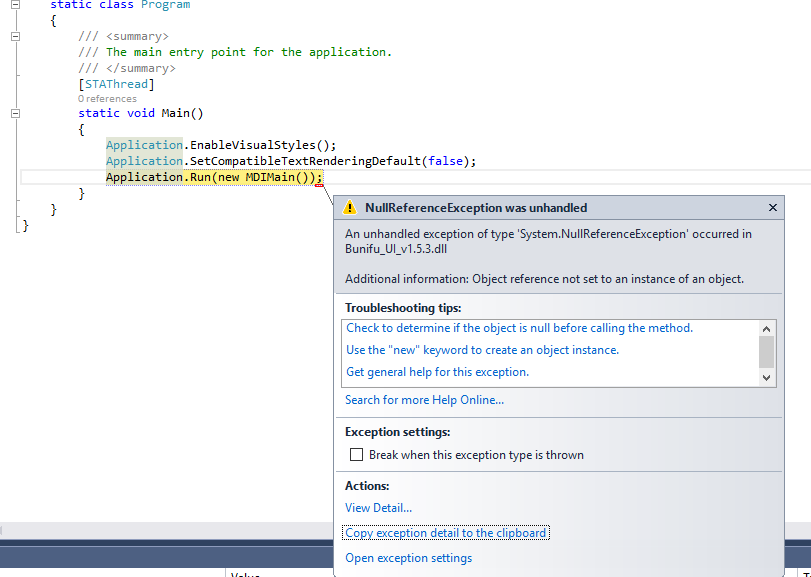
System.NullReferenceException was unhandled
  HResult=-2147467261
  Message=Object reference not set to an instance of an object.
  Source=Bunifu_UI_v1.5.3
  StackTrace:
       at Bunifu.Framework.UI.BunifuFlatButton.method_5()
       at Bunifu.Framework.UI.BunifuFlatButton.BunifuFlatButton_MouseClick(Object sender, MouseEventArgs e)
       at System.Windows.Forms.Control.OnMouseClick(MouseEventArgs e)
       at System.Windows.Forms.Control.WmMouseUp(Message& m, MouseButtons button, Int32 clicks)
       at System.Windows.Forms.Control.WndProc(Message& m)
       at System.Windows.Forms.Label.WndProc(Message& m)
       at System.Windows.Forms.Control.ControlNativeWindow.OnMessage(Message& m)
       at System.Windows.Forms.Control.ControlNativeWindow.WndProc(Message& m)
       at System.Windows.Forms.NativeWindow.DebuggableCallback(IntPtr hWnd, Int32 msg, IntPtr wparam, IntPtr lparam)
       at System.Windows.Forms.UnsafeNativeMethods.DispatchMessageW(MSG& msg)
       at System.Windows.Forms.Application.ComponentManager.System.Windows.Forms.UnsafeNativeMethods.IMsoComponentManager.FPushMessageLoop(IntPtr dwComponentID, Int32 reason, Int32 pvLoopData)
       at System.Windows.Forms.Application.ThreadContext.RunMessageLoopInner(Int32 reason, ApplicationContext context)
       at System.Windows.Forms.Application.ThreadContext.RunMessageLoop(Int32 reason, ApplicationContext context)
       at System.Windows.Forms.Application.Run(Form mainForm)
       at Project.Program.Main() in C:\Project\Project\Program.cs:line 19
       at System.AppDomain._nExecuteAssembly(RuntimeAssembly assembly, String[] args)
       at System.AppDomain.ExecuteAssembly(String assemblyFile, Evidence assemblySecurity, String[] args)
       at Microsoft.VisualStudio.HostingProcess.HostProc.RunUsersAssembly()
       at System.Threading.ThreadHelper.ThreadStart_Context(Object state)
       at System.Threading.ExecutionContext.RunInternal(ExecutionContext executionContext, ContextCallback callback, Object state, Boolean preserveSyncCtx)
       at System.Threading.ExecutionContext.Run(ExecutionContext executionContext, ContextCallback callback, Object state, Boolean preserveSyncCtx)
       at System.Threading.ExecutionContext.Run(ExecutionContext executionContext, ContextCallback callback, Object state)
       at System.Threading.ThreadHelper.ThreadStart()
  InnerException:
谢谢
回答 2
Stack Overflow用户
回答已采纳
发布于 2018-03-26 06:18:34
Stack Overflow用户
发布于 2018-05-07 22:38:37
我认为这是因为bunifu按钮有“在悬停时改变颜色,鼠标单击时改变颜色”等方法,
当您单击按钮时,表单会关闭,但可能应用程序尝试在该按钮上调用一个方法,例如鼠标单击后更改颜色,但表单被关闭,然后出现错误。
I通过禁用表单关闭前的按钮来修复此问题:
private void bunifuFlatButton1_Click(object sender, EventArgs e)
{
    bunifuFlatButton1.Enabled = false;
    this.Close();
}页面原文内容由Stack Overflow提供。腾讯云小微IT领域专用引擎提供翻译支持
原文链接:
https://stackoverflow.com/questions/49471536
复制相关文章
相似问题
腾讯云开发者

Copyright © 2013 - 2026 Tencent Cloud. All Rights Reserved. 腾讯云 版权所有
深圳市腾讯计算机系统有限公司 ICP备案/许可证号:粤B2-20090059  粤公网安备44030502008569号
腾讯云计算(北京)有限责任公司 京ICP证150476号 | 京ICP备11018762号