
在Template.docx中插入HTML而不是从Spire.Doc中的键
在Template.docx中插入HTML而不是从Spire.Doc中的键
提问于 2018-03-24 20:26:49
我想用Template.docx和Spire.Doc创建一个Word文档。为此,我编写了如下代码:
//sample file path
string samplePath = Application.StartupPath + Path.DirectorySeparatorChar + "Template.docx";
//result docs paths
string docxPath = Application.StartupPath + Path.DirectorySeparatorChar + "Result.docx";
按钮提交事件:
private void btnSubmit_Click(object sender, EventArgs e)
{
    //initialize word object
    document = new Document();
    document.LoadFromFile(samplePath);
    //get strings to replace
    Dictionary<string, string> dictReplace = GetReplaceDictionary();
    //Replace text
    foreach (KeyValuePair<string, string> kvp in dictReplace)
    {
        document.Replace(kvp.Key, kvp.Value, true, true);
    }
    //Save doc file.
    document.SaveToFile(docxPath, FileFormat.Docx);
    document.Close();

}最后,GetReplaceDictionary()法的内容:
Dictionary<string, string> GetReplaceDictionary()
{
    Dictionary<string, string> replaceDict = new Dictionary<string, string>();
    replaceDict.Add("#name#", txtName.Text.Trim());
    replaceDict.Add("#age#",txtAge.Text);
    replaceDict.Add("#address#", txtAddress.Text.Trim());
    replaceDict.Add("#phonenumber#",txtPhonenumber.Text);
    replaceDict.Add("#emailaddress#",txtEmailaddress.Text);
    replaceDict.Add("#experience#", txtExperience.Text.Trim());
    replaceDict.Add("#position#", txtPosition.Text.Trim());
    replaceDict.Add("#salary#", txtSalary.Text);
    replaceDict.Add("#applydate#",dateTimePicker.Text);
    string isEmployed= this.radio_isEmployed_Yes.Checked ? "Yes" : "No";
    replaceDict.Add("#isemployed#", isEmployed);
    replaceDict.Add("#education#", txtEducation.Text.Trim());

    return replaceDict;
}
我想写这样的工作体验文本框:
Lorem ipsum <b>dolor sit amet</b>, consectetur <i>adipiscing</i> elit.这是屏幕:
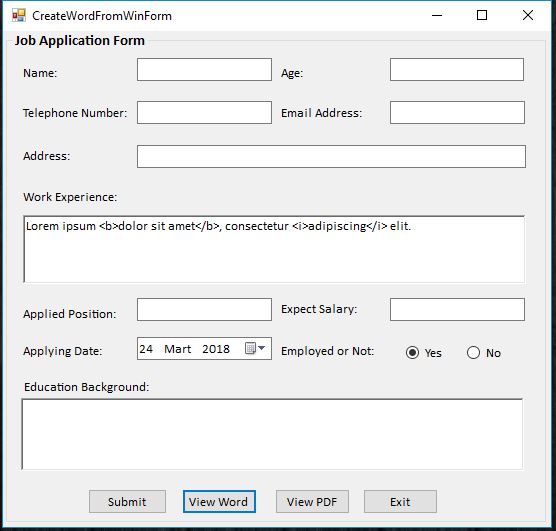
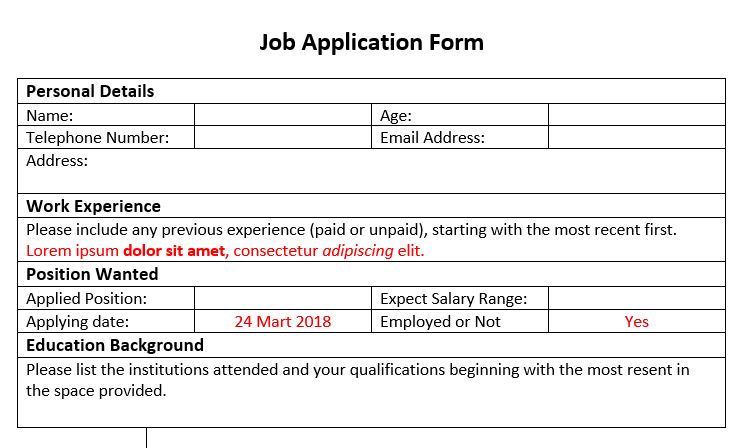
我想在word文档中将dolor sit amet显示为粗体,adipiscing显示为斜体,如下所示:
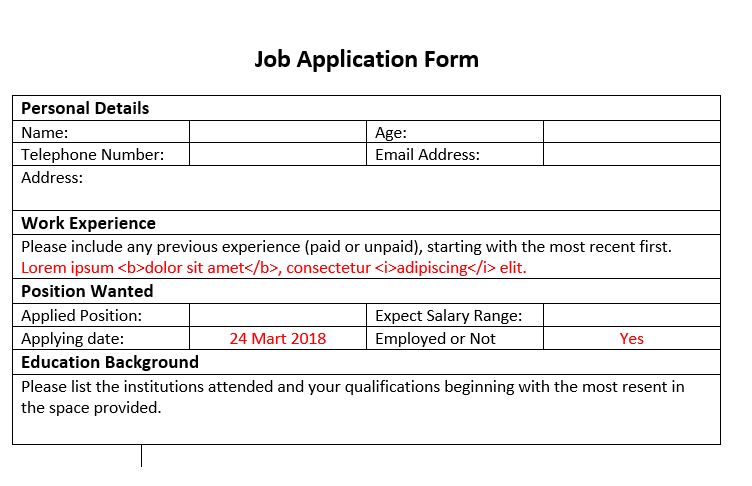
但是不幸的是,HTML标记显示在Word文档中如下所示:
这是我的Template.docx文件:
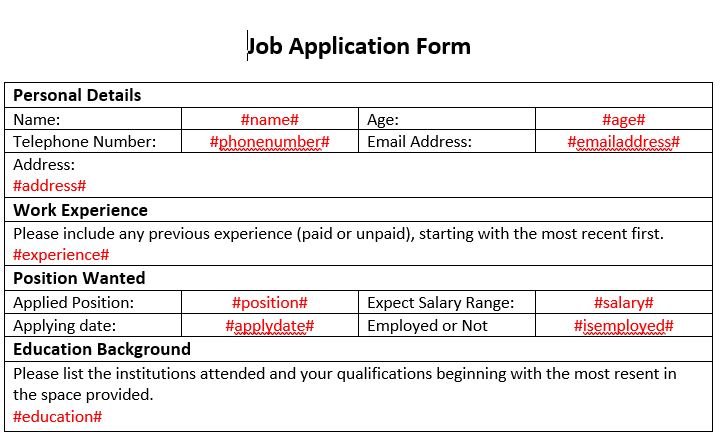
如何正确显示HTML文本而不是#experience#变量?
回答 1
Stack Overflow用户
回答已采纳
发布于 2018-03-24 22:00:12
不幸的是,据我所知,用Spire做这件事并不容易。正如您已经发现的那样,document.Replace只是将一个字符串替换为另一个字符串。Spire程序指南确实建议使用解决这一问题,但它并不特别优雅。
您需要为要替换的文本在模板文档中添加书签。因此,如果您选择文本#experience#并将其添加为名为experience的书签:
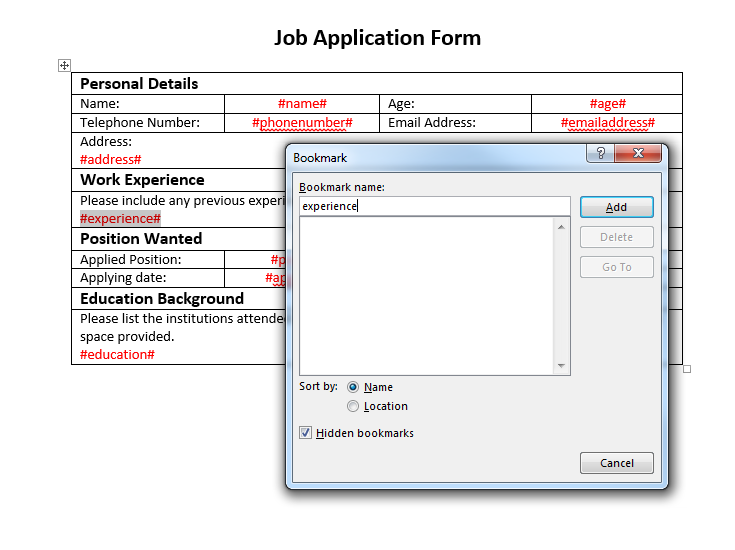
然后,您可以使用下面这样的函数将文本替换为提供的html:
public void ReplaceBookmarkHTML(Document doc, string bookmarkName, string htmlString)
    {
        Section tempSection = doc.AddSection();
        tempSection.AddParagraph().AppendHTML(htmlString);

        ParagraphBase replacementFirstItem = tempSection.Paragraphs[0].Items.FirstItem as ParagraphBase;
        ParagraphBase replacementLastItem = tempSection.Paragraphs[tempSection.Paragraphs.Count - 1].Items.LastItem as ParagraphBase;
        TextBodySelection selection = new TextBodySelection(replacementFirstItem, replacementLastItem);
        TextBodyPart part = new TextBodyPart(selection);

        BookmarksNavigator bookmarkNavigator = new BookmarksNavigator(doc);
        bookmarkNavigator.MoveToBookmark(bookmarkName);
        bookmarkNavigator.ReplaceBookmarkContent(part);
        doc.Sections.Remove(tempSection);
    }
然后,您可以像下面这样调用它来获取HTML来替换书签:
ReplaceBookmarkHTML(document, "experience", "Lorem ipsum <b>dolor sit amet</b>, consectetur <i>adipiscing</i> elit.");页面原文内容由Stack Overflow提供。腾讯云小微IT领域专用引擎提供翻译支持
原文链接:
https://stackoverflow.com/questions/49469581
复制相关文章
相似问题
腾讯云开发者

Copyright © 2013 - 2026 Tencent Cloud. All Rights Reserved. 腾讯云 版权所有
深圳市腾讯计算机系统有限公司 ICP备案/许可证号:粤B2-20090059  粤公网安备44030502008569号
腾讯云计算(北京)有限责任公司 京ICP证150476号 | 京ICP备11018762号