
启用分页时,对水平滚动集合视图的单元格进行中心化,并使其他单元格也部分可见。
我有一个水平滚动的集合视图。上面有几个细胞。为该集合视图启用分页。
我想让它显示中心细胞左右的部分细胞(当它不是第一个细胞或最后一个细胞时),如下所示:
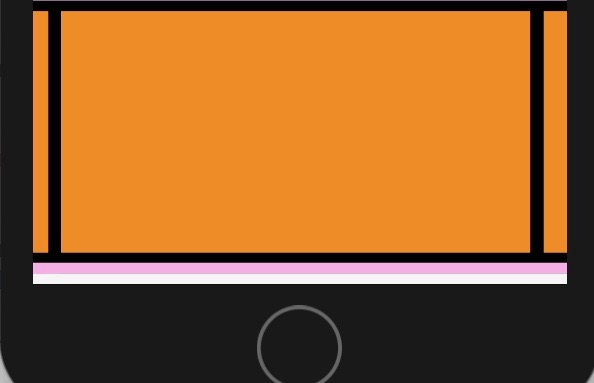
下面是UICollectionViewDelegateFlowLayout的代码:
func collectionView(_ collectionView: UICollectionView, layout collectionViewLayout: UICollectionViewLayout, sizeForItemAt indexPath: IndexPath) -> CGSize {
    return CGSize(width: collectionView.frame.width - 50, height: collectionView.frame.height - 16)
}

func collectionView(_ collectionView: UICollectionView, layout collectionViewLayout: UICollectionViewLayout, insetForSectionAt section: Int) -> UIEdgeInsets {

    return sectionInsets
}


func collectionView(_ collectionView: UICollectionView, layout collectionViewLayout: UICollectionViewLayout, minimumLineSpacingForSectionAt section: Int) -> CGFloat {
    return 10
}sectionInsets是这样的:
private var sectionInsets = UIEdgeInsetsMake(8, 20, 8, 20)当前,当我向右滚动时,右边的单元格变得越来越可见(单元格之间的间隔线向左边缘移动)。
我尝试使用不同的值,根据答案,这里和这里,但我无法达到我想要的效果。
如果你对此有建议,我将感谢你的帮助。
回答 2
Stack Overflow用户
发布于 2018-04-03 23:30:35
事实上,解决办法并不难。由于这文章展示了实现此特性的正确方法,我终于实现了它。
主要要了解的是,在这种情况下,构建在集合视图中的分页无法工作,因为单元格的大小小于屏幕的大小。因此,我们需要实现自定义分页技术。
首先,在自定义帮助器struct中,我们定义了一个在拖动之前保存单元格索引的属性:
var indexOfCellBeforeDragging: Int = 0然后,我们创建一个计算单元格节内嵌的方法:
 //Setting the inset
func calculateSectionInset(forCollectionViewLayout collectionViewLayout: UICollectionViewFlowLayout, numberOfCells: Int) -> CGFloat {
    let inset = (collectionViewLayout.collectionView!.frame.width) / CGFloat(numberOfCells)
    return inset
}
现在我们可以使用上面的方法来设置集合视图的项的大小。
  //Setting the item size of the collection view
func configureCollectionViewLayoutItemSize(forCollectionViewLayout collectionViewLayout: UICollectionViewFlowLayout) {

    let inset: CGFloat = calculateSectionInset(forCollectionViewLayout: collectionViewLayout, numberOfCells: 5)

    collectionViewLayout.sectionInset = UIEdgeInsets(top: 0, left: inset/4, bottom: 0, right: inset/4)

    collectionViewLayout.itemSize = CGSize(width: collectionViewLayout.collectionView!.frame.size.width - inset / 2, height: collectionViewLayout.collectionView!.frame.size.height)
    collectionViewLayout.collectionView?.reloadData()
}我们需要得到主要单元格的索引(目前最大的单元格)。为此,我们在contentOffset轴上使用有关items宽度和集合视图的x的信息:
//Getting the index of the major cell
func indexOfMajorCell(in collectionViewLayout: UICollectionViewFlowLayout) -> Int {
    let itemWidth = collectionViewLayout.itemSize.width
    let proportionalLayout = collectionViewLayout.collectionView!.contentOffset.x / itemWidth
    return Int(round(proportionalLayout))
}
接下来,使用上面的方法,在开始拖动之前设置单元格的索引:
 //Setting the index of cell before starting dragging
mutating func setIndexOfCellBeforeStartingDragging(indexOfMajorCell: Int) {
    indexOfCellBeforeDragging = indexOfMajorCell
}
现在我们应该处理拖拽的结束。此外,我们还注意到细胞上可能出现的抓拍手势。在这里,我们使用一些自定义的阈值作为滑动速度。
  //Handling dragging end of a scroll view
func handleDraggingWillEndForScrollView(_ scrollView: UIScrollView, inside collectionViewLayout: UICollectionViewFlowLayout, withVelocity velocity: CGPoint, usingIndexOfMajorCell indexOfMajorCell: Int) {

    //Calculating where scroll view should snap
    let indexOfMajorCell = indexOfMajorCell

    let swipeVelocityThreshold: CGFloat = 0.5

    let majorCellIsTheCellBeforeDragging = indexOfMajorCell == indexOfCellBeforeDragging
    let hasEnoughVelocityToSlideToTheNextCell = indexOfCellBeforeDragging + 1 < 5 && velocity.x > swipeVelocityThreshold
    let hasEnoughVelocityToSlideToThePreviousCell = ((indexOfCellBeforeDragging - 1) >= 0) && (velocity.x < -swipeVelocityThreshold)

    let didUseSwipeToSkipCell = majorCellIsTheCellBeforeDragging && (hasEnoughVelocityToSlideToTheNextCell || hasEnoughVelocityToSlideToThePreviousCell)

    if didUseSwipeToSkipCell {

        let snapToIndex = indexOfCellBeforeDragging + (hasEnoughVelocityToSlideToTheNextCell ? 1 : -1)
        let toValue = collectionViewLayout.itemSize.width * CGFloat(snapToIndex)

        // Damping equal 1 => no oscillations => decay animation
        UIView.animate(withDuration: 0.3, delay: 0, usingSpringWithDamping: 1, initialSpringVelocity: velocity.x, options: .allowUserInteraction, animations: {
            scrollView.contentOffset = CGPoint(x: toValue, y: 0)
            scrollView.layoutIfNeeded()
        }, completion: nil)

    } else {
        let indexPath = IndexPath(row: indexOfMajorCell, section: 0)
        collectionViewLayout.collectionView!.scrollToItem(at: indexPath, at: .centeredHorizontally, animated: true)
    }
}现在,在scrollViewWillBeginDragging(_:)方法中的视图控制器中,我们需要在开始拖动之前获取主单元格的索引并将其设置为索引(commentsPagingHelper是帮助器结构的一个实例):
  func scrollViewWillBeginDragging(_ scrollView: UIScrollView) {

    let indexOfMajorCell = commentsPagingHelper.indexOfMajorCell(in: collectionViewLayout)
    commentsPagingHelper.setIndexOfCellBeforeStartingDragging(indexOfMajorCell: indexOfMajorCell)
}最后,我们在scrollViewWillEndDragging(_:, withVelocity:, targetContentOffset:)方法中处理一个主要单元格索引的变化:
 func scrollViewWillEndDragging(_ scrollView: UIScrollView, withVelocity velocity: CGPoint, targetContentOffset: UnsafeMutablePointer<CGPoint>) {

    //Stop scrollView sliding:
    targetContentOffset.pointee = scrollView.contentOffset


    let indexOfMajorCell = commentsPagingHelper.indexOfMajorCell(in: collectionViewLayout)

    commentsPagingHelper.handleDraggingWillEndForScrollView(scrollView, inside: collectionViewLayout, withVelocity: velocity, usingIndexOfMajorCell: indexOfMajorCell)
}
就这样。希望,这会对有类似问题的人有所帮助。
Stack Overflow用户
发布于 2018-03-23 15:39:47
NSInteger lastOffset,currentIndex;
-(void)scrollViewWillBeginDecelerating:(UIScrollView *)scrollView{
      [self.collectionView scrollToItemAtIndexPath:[NSIndexPath indexPathForItem:currentIndex inSection:0] atScrollPosition:UICollectionViewScrollPositionCenteredHorizontally animated:YES];
 }

-(void)scrollViewWillBeginDragging:(UIScrollView *)scrollView{
      lastOffset = scrollView.contentOffset.x;
 }

-(void)scrollViewWillEndDragging:(UIScrollView *)scrollView withVelocity:(CGPoint)velocity targetContentOffset:(inout CGPoint *)targetContentOffset{

     CGFloat newOffset = scrollView.contentOffset.x;

    if (currentIndex > 0 && lastOffset > 0 && (newOffset < lastOffset - (collectionViewCellwidth / 2.0) || velocity.x < -0.5)) {
         currentIndex -= 1;
    }

   if (currentIndex < (totalNumberOfRows - 1) && lastOffset < ((totalNumberOfRows - 1) * collectionViewCellwidth) && (newOffset > (lastOffset + (collectionViewCellwidth / 2.0)) || velocity.x > 0.5)) {
         currentIndex += 1 ;
   }
   targetContentOffset->x = currentIndex * collectionViewCellwidth;

}
在您的例子中,collectionViewCellwidth将是"collectionView.frame.width - 50“。
https://stackoverflow.com/questions/49452632
复制相似问题
腾讯云开发者

Copyright © 2013 - 2026 Tencent Cloud. All Rights Reserved. 腾讯云 版权所有
深圳市腾讯计算机系统有限公司 ICP备案/许可证号:粤B2-20090059  粤公网安备44030502008569号
腾讯云计算(北京)有限责任公司 京ICP证150476号 | 京ICP备11018762号