
在另一个控制器中将责任从短URL重定向到完整URL
作为一个家庭作业,我必须做一个简单的网址简写,在那里我可以添加完整的链接到列表,这是由Hashids.net库处理,我得到一个网址的短版本。
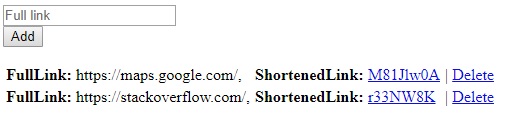
我现在有了类似的东西,但是我不得不把它重定向回完整的链接。
我想添加一个新的控制器,它将承担重定向短URL到完整URL的责任。点击短网址后,它应该转到localhost:xxxx/ShortenedUrl,然后重定向到完整链接。有什么小窍门我怎么能创建这个呢?
我试图通过@Html.ActionLink(@item.ShortenedLink, "Index", "Redirect")和return Redirect(fullLink)在重定向控制器中完成它,但它并没有像我预期的那样工作。
还有一个关于路由的问题,在单击短URL之后,我如何实现它将给我localhost:XXXX/ShortenedURL (即localhost:XXXX/FSIAOFJO2@)。现在我有了
<a href="@item.ShortenedLink">@Html.DisplayFor(model => item.ShortenedLink)</a> 和
app.UseMvc(routes =>
{
    routes.MapRoute("default", "{controller=Link}/{action=Index}");
});但它给了我localhost:XXXX/Link/ShortenedURL,所以我想省略这个链接在网址。
View (包含短URL的部分):
<td>@Html.ActionLink(item.ShortenedLink,"GoToFull","Redirect", new { target = "_blank" }))</td>链路控制器:
public class LinkController : Controller
{
    private ILinksRepository _repository;

    public LinkController(ILinksRepository linksRepository)
    {
        _repository = linksRepository;
    }

    [HttpGet]
    public IActionResult Index()
    {
        var links = _repository.GetLinks();
        return View(links);
    }

    [HttpPost]
    public IActionResult Create(Link link)
    {
        _repository.AddLink(link);
        return Redirect("Index");
    }

    [HttpGet]
    public IActionResult Delete(Link link)
    {
        _repository.DeleteLink(link);
        return Redirect("Index");
    }
}
重定向控制器,我正在尝试这样做:
private ILinksRepository _repository;

public RedirectController(ILinksRepository linksRepository)
{
    _repository = linksRepository;
}

public IActionResult GoToFull()
{
    var links = _repository.GetLinks();
    return Redirect(links[0].FullLink);
}
是否有更好的方法来访问重定向控制器中的链接列表?
回答 2
Stack Overflow用户
发布于 2018-03-20 20:41:21
这是我的建议,通过AJAX触发链接,下面是工作示例:
这是通过模型绑定的HTML元素:
@Html.ActionLink(Model.ShortenedLink, "", "", null,
new { onclick = "fncTrigger('" + "http://www.google.com" + "');" })
这是javascript ajax代码:
function fncTrigger(id) {

            $.ajax({
                url: '@Url.Action("TestDirect", "Home")',
                type: "GET",
                data: { id: id },
                success: function (e) {
                },
                error: function (err) {
                    alert(err);
                },
            });
    }
然后在您的控制器上单击以接收ajax:
 public ActionResult TestDirect(string id)
    {
        return JavaScript("window.location = '" + id + "'");
    }
基本上,我在这里要做的是,在单击链接之后,它将调用TestDirect操作,然后将其重定向到使用传递的url参数。您可以在此操作中进行转换。
Stack Overflow用户
发布于 2018-03-20 22:51:17
要创建动态数据驱动的URL,您需要创建一个自定义IRouter。以下是如何做到这一点:
CachedRoute<TPrimaryKey>
这是一个可重用的泛型类,它将一组动态提供的URL映射到单个操作方法。您可以注入一个ICachedRouteDataProvider<TPrimaryKey>来提供数据(一个到主键映射的URL )。
缓存数据以防止多个同时请求重载数据库(在每个请求上运行的路由)。默认缓存时间为15分钟,但您可以根据需要进行调整。
如果您希望它“立即”运行,您可以构建一个更高级的缓存,该缓存是在成功地更新其中一条记录之后更新的。也就是说,相同的操作方法将同时更新数据库和缓存。
using Microsoft.AspNetCore.Routing;
using Microsoft.Extensions.Caching.Memory;
using System;
using System.Collections.Generic;
using System.Linq;
using System.Threading.Tasks;

public class CachedRoute<TPrimaryKey> : IRouter
{
    private readonly string _controller;
    private readonly string _action;
    private readonly ICachedRouteDataProvider<TPrimaryKey> _dataProvider;
    private readonly IMemoryCache _cache;
    private readonly IRouter _target;
    private readonly string _cacheKey;
    private object _lock = new object();

    public CachedRoute(
        string controller,
        string action,
        ICachedRouteDataProvider<TPrimaryKey> dataProvider,
        IMemoryCache cache,
        IRouter target)
    {
        if (string.IsNullOrWhiteSpace(controller))
            throw new ArgumentNullException("controller");
        if (string.IsNullOrWhiteSpace(action))
            throw new ArgumentNullException("action");
        if (dataProvider == null)
            throw new ArgumentNullException("dataProvider");
        if (cache == null)
            throw new ArgumentNullException("cache");
        if (target == null)
            throw new ArgumentNullException("target");

        _controller = controller;
        _action = action;
        _dataProvider = dataProvider;
        _cache = cache;
        _target = target;

        // Set Defaults
        CacheTimeoutInSeconds = 900;
        _cacheKey = "__" + this.GetType().Name + "_GetPageList_" + _controller + "_" + _action;
    }

    public int CacheTimeoutInSeconds { get; set; }

    public async Task RouteAsync(RouteContext context)
    {
        var requestPath = context.HttpContext.Request.Path.Value;

        if (!string.IsNullOrEmpty(requestPath) && requestPath[0] == '/')
        {
            // Trim the leading slash
            requestPath = requestPath.Substring(1);
        }

        // Get the page id that matches.
        TPrimaryKey id;

        //If this returns false, that means the URI did not match
        if (!GetPageList().TryGetValue(requestPath, out id))
        {
            return;
        }

        //Invoke MVC controller/action
        var routeData = context.RouteData;

        // TODO: You might want to use the page object (from the database) to
        // get both the controller and action, and possibly even an area.
        // Alternatively, you could create a route for each table and hard-code
        // this information.
        routeData.Values["controller"] = _controller;
        routeData.Values["action"] = _action;

        // This will be the primary key of the database row.
        // It might be an integer or a GUID.
        routeData.Values["id"] = id;

        await _target.RouteAsync(context);
    }

    public VirtualPathData GetVirtualPath(VirtualPathContext context)
    {
        VirtualPathData result = null;
        string virtualPath;

        if (TryFindMatch(GetPageList(), context.Values, out virtualPath))
        {
            result = new VirtualPathData(this, virtualPath);
        }

        return result;
    }

    private bool TryFindMatch(IDictionary<string, TPrimaryKey> pages, IDictionary<string, object> values, out string virtualPath)
    {
        virtualPath = string.Empty;
        TPrimaryKey id;
        object idObj;
        object controller;
        object action;

        if (!values.TryGetValue("id", out idObj))
        {
            return false;
        }

        id = SafeConvert<TPrimaryKey>(idObj);
        values.TryGetValue("controller", out controller);
        values.TryGetValue("action", out action);

        // The logic here should be the inverse of the logic in
        // RouteAsync(). So, we match the same controller, action, and id.
        // If we had additional route values there, we would take them all
        // into consideration during this step.
        if (action.Equals(_action) && controller.Equals(_controller))
        {
            // The 'OrDefault' case returns the default value of the type you're
            // iterating over. For value types, it will be a new instance of that type.
            // Since KeyValuePair<TKey, TValue> is a value type (i.e. a struct),
            // the 'OrDefault' case will not result in a null-reference exception.
            // Since TKey here is string, the .Key of that new instance will be null.
            virtualPath = pages.FirstOrDefault(x => x.Value.Equals(id)).Key;
            if (!string.IsNullOrEmpty(virtualPath))
            {
                return true;
            }
        }
        return false;
    }

    private IDictionary<string, TPrimaryKey> GetPageList()
    {
        IDictionary<string, TPrimaryKey> pages;

        if (!_cache.TryGetValue(_cacheKey, out pages))
        {
            // Only allow one thread to poplate the data
            lock (_lock)
            {
                if (!_cache.TryGetValue(_cacheKey, out pages))
                {
                    pages = _dataProvider.GetPageToIdMap();

                    _cache.Set(_cacheKey, pages,
                        new MemoryCacheEntryOptions()
                        {
                            Priority = CacheItemPriority.NeverRemove,
                            AbsoluteExpirationRelativeToNow = TimeSpan.FromSeconds(this.CacheTimeoutInSeconds)
                        });
                }
            }
        }

        return pages;
    }

    private static T SafeConvert<T>(object obj)
    {
        if (typeof(T).Equals(typeof(Guid)))
        {
            if (obj.GetType() == typeof(string))
            {
                return (T)(object)new Guid(obj.ToString());
            }
            return (T)(object)Guid.Empty;
        }
        return (T)Convert.ChangeType(obj, typeof(T));
    }
}
LinkCachedRouteDataProvider
在这里,我们有一个简单的服务,它从数据库中检索数据并将其加载到字典中。最复杂的部分是需要设置的范围,以便在服务中使用DbContext。
public interface ICachedRouteDataProvider<TPrimaryKey>
{
    IDictionary<string, TPrimaryKey> GetPageToIdMap();
}

public class LinkCachedRouteDataProvider : ICachedRouteDataProvider<int>
{
    private readonly IServiceProvider serviceProvider;

    public LinkCachedRouteDataProvider(IServiceProvider serviceProvider)
    {
        this.serviceProvider = serviceProvider
            ?? throw new ArgumentNullException(nameof(serviceProvider));
    }

    public IDictionary<string, int> GetPageToIdMap()
    {
        using (var scope = serviceProvider.CreateScope())
        {
            var dbContext = scope.ServiceProvider.GetService<ApplicationDbContext>();

            return (from link in dbContext.Links
                    select new KeyValuePair<string, int>(
                        link.ShortenedLink.Trim('/'),
                        link.Id)
                    ).ToDictionary(pair => pair.Key, pair => pair.Value);
        }
    }
}
RedirectController
我们的重定向控制器接受主键作为id参数,然后查找数据库记录以获得要重定向到的URL。
public class RedirectController
{
    private readonly ApplicationDbContext dbContext;

    public RedirectController(ApplicationDbContext dbContext)
    {
        this.dbContext = dbContext
            ?? throw new ArgumentNullException(nameof(dbContext));
    }

    public IActionResult GoToFull(int id)
    {
        var link = dbContext.Links.FirstOrDefault(x => x.Id == id);
        return new RedirectResult(link.FullLink);
    }
}
在生产场景中,您可能希望使这成为一个永久的重定向
return new RedirectResult(link.FullLink, true),但是浏览器会自动缓存这些内容,这使得测试变得困难。
Startup.cs
我们在DI容器中设置了DbContext、内存缓存和LinkCachedRouteDataProvider,以便以后使用。
public void ConfigureServices(IServiceCollection services)
{
    services.AddDbContext<ApplicationDbContext>(options =>
        options.UseSqlServer(Configuration.GetConnectionString("DefaultConnection")));

    services.AddMvc();

    services.AddMemoryCache();
    services.AddSingleton<LinkCachedRouteDataProvider>();
}然后,我们使用CachedRoute<TPrimaryKey>设置路由,提供所有依赖项。
app.UseMvc(routes =>
{
    routes.Routes.Add(new CachedRoute<int>(
        controller: "Redirect",
        action: "GoToFull",
        dataProvider: app.ApplicationServices.GetService<LinkCachedRouteDataProvider>(),
        cache: app.ApplicationServices.GetService<IMemoryCache>(),
        target: routes.DefaultHandler)
        // Set to 60 seconds of caching to make DB updates refresh quicker
        { CacheTimeoutInSeconds = 60 });

    routes.MapRoute(
        name: "default",
        template: "{controller=Home}/{action=Index}/{id?}");
});
要在用户界面上构建这些短URL,您可以使用标记帮助程序(或HTML帮助程序),就像使用任何其他路由一样:
<a asp-area="" asp-controller="Redirect" asp-action="GoToFull" asp-route-id="1">
    @Url.Action("GoToFull", "Redirect", new { id = 1 })
</a>
其产生形式为:
<a href="/M81J1w0A">/M81J1w0A</a>当然,在生成id参数时,可以使用模型将其传递到视图中。
<a asp-area="" asp-controller="Redirect" asp-action="GoToFull" asp-route-id="@Model.Id">
    @Url.Action("GoToFull", "Redirect", new { id = Model.Id })
</a>我做了一个基于GitHub的演示。如果在浏览器中输入短URL,它们将被重定向到长URL。
M81J1w0A->https://maps.google.com/r33NW8K->https://stackoverflow.com/
我没有创建任何视图来更新数据库中的URL,但是这种类型的内容在几个教程(如使用Visual开始使用ASP.NET Core和实体框架核心 )中都有介绍,而且看起来您对这个部分没有任何问题。
参考文献:
https://stackoverflow.com/questions/49391997
复制相似问题
腾讯云开发者

Copyright © 2013 - 2026 Tencent Cloud. All Rights Reserved. 腾讯云 版权所有
深圳市腾讯计算机系统有限公司 ICP备案/许可证号:粤B2-20090059  粤公网安备44030502008569号
腾讯云计算(北京)有限责任公司 京ICP证150476号 | 京ICP备11018762号