
用Vivus.js绘制多个SVG
用Vivus.js绘制多个SVG
提问于 2018-03-19 15:04:50
我如何用Vivus.js绘制多个SVG,这样我就不必为每个绘图调用函数,例如下面的函数。另外,第二幅画似乎有一个问题,即它没有动画.有人可能对这些有经验吗?
这里有一支笔,因为svg代码大小:https://codepen.io/anon/pen/KoNjjy
new Vivus(welcome, {
    type: 'async',
    start: 'autostart',
    duration: 50
});

new Vivus(tablet, {
    type: 'async',
    start: 'autostart',
    duration: 50
});回答 1
Stack Overflow用户
回答已采纳
发布于 2018-03-19 15:34:03
关于图像不能动画的问题,我相信这是由两个分离的问题引起的:
首先,代码中有一个小语法错误。您需要将ID作为字符串传递:
new Vivus('welcome', { // note the quotes around 'welcome'
    type: 'async',
    start: 'autostart',
    duration: 50
});
其次,您的代码页中的平板映像是由单个填充路径组成的,而不是单个行,Vivus不知道如何将其动画化(除此之外,它看起来像一台笔记本电脑:):
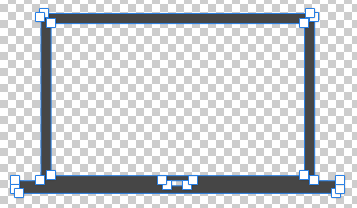
(编辑:您可以动画,如果您设置填充/正确的笔画,见@wwv的评论和链接下面)
关于在多个对象上运行Vivus,它不支持直接传递多个对象/ID,但可以避免为每个图像编写new Vivus …:
const animate = ["welcome", "tablet"];

animate.forEach(svgId =>
    new Vivus(svgId, {
      type: "async",
      start: "autostart",
      duration: 50
    })
);
或者,在旧的ES5语法中:
var animate = ["welcome", "tablet"];

animate.forEach(function (svgId) {
  return new Vivus(svgId, {
    type: "async",
    start: "autostart",
    duration: 50
  });
});
工作片段,使用更简单/更小的SVG:
const animate = ["circle", "square"];

animate.forEach(
  svgId =>
    new Vivus(svgId, {
      type: "async",
      start: "autostart",
      duration: 50
    })
);<script src="https://cdnjs.cloudflare.com/ajax/libs/vivus/0.4.3/vivus.min.js"></script>
<svg id="circle" viewBox="0 0 60 60" width="60" height="60" xmlns="http://www.w3.org/2000/svg">
<circle cx="30" cy="30" r="25" fill="none" stroke="#ff005c" stroke-width="2" />
</svg>
<svg id="square" viewBox="0 0 60 60" width="60" height="60" xmlns="http://www.w3.org/2000/svg">
<rect x="5" y="5" width="50" height="50" fill="none" stroke="#09f" stroke-width="2" />
</svg>
页面原文内容由Stack Overflow提供。腾讯云小微IT领域专用引擎提供翻译支持
原文链接:
https://stackoverflow.com/questions/49366119
复制相关文章
相似问题
腾讯云开发者

Copyright © 2013 - 2026 Tencent Cloud. All Rights Reserved. 腾讯云 版权所有
深圳市腾讯计算机系统有限公司 ICP备案/许可证号:粤B2-20090059  粤公网安备44030502008569号
腾讯云计算(北京)有限责任公司 京ICP证150476号 | 京ICP备11018762号