
C# OnMouseUp()不工作
C# OnMouseUp()不工作
提问于 2018-03-19 01:43:12
我已经搜索了很多相关的问题,但是我仍然不知道为什么我的OnMouseUp()不能工作。
当游戏对象被选中时,我想使用脚本移动器来提升游戏对象,然后用右键单击对象取消游戏对象。
这是游戏对象的信息。它确实有一个对撞机,所以我不知道我哪里做错了。
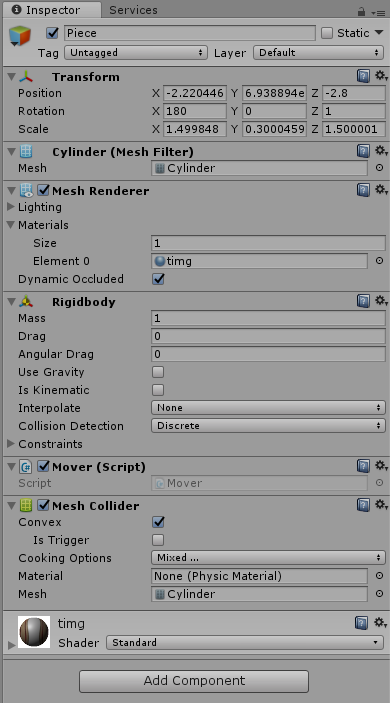
这是搬运工的代码。
using System.Collections;
using System.Collections.Generic;
using UnityEngine;

public class Mover : MonoBehaviour {

    private bool selected;

    // Use this for initialization
    void Start () {
        selected = false;
    }

    // Update is called once per frame
    void Update () {
        Vector3 pos = GetComponent<Rigidbody>().position;
        if (Input.GetMouseButtonUp(1) && selected)
        {
            GetComponent<Rigidbody>().position = new Vector3(pos.x, pos.y - 1f, pos.z);
            selected = false;
        }
    }

    void OnMouseUp()
    {
        Vector3 pos = GetComponent<Rigidbody>().position;
        if (!selected)
        {
            GetComponent<Rigidbody>().position = new Vector3(pos.x, pos.y + 1f, pos.z);
            selected = true;
        }
        Debug.Log("OnMouseUp!");
    }
}
debug.log也没有出现。
-最新消息
using System.Collections;
using System.Collections.Generic;
using UnityEngine;
using UnityEngine.EventSystems;

public class Mover : MonoBehaviour, IPointerEnterHandler
{

    private bool selected;

    void Start () {
        selected = false;
        addPhysicsRaycaster();
    }

    void Update () {
        Vector3 pos = GetComponent<Rigidbody>().position;
        if (Input.GetMouseButtonUp(1) && selected)
        {
            GetComponent<Rigidbody>().position = new Vector3(pos.x, pos.y - 1f, pos.z);
            selected = false;
        }
    }

    void addPhysicsRaycaster()
    {
        PhysicsRaycaster physicsRaycaster = GameObject.FindObjectOfType<PhysicsRaycaster>();
        if (physicsRaycaster == null)
        {
            Camera.main.gameObject.AddComponent<PhysicsRaycaster>();
        }
    }

    public void OnPointerEnter(PointerEventData eventData)
    {
        Vector3 pos = GetComponent<Rigidbody>().position;
        if (!selected)
        {
            GetComponent<Rigidbody>().position = new Vector3(pos.x, pos.y + 1f, pos.z);
            selected = true;
        }
        Debug.Log("OnPointerEnter!");
    }
}回答 1
Stack Overflow用户
发布于 2018-03-19 01:50:23
检查网格对撞机中的“是触发器”,也要确保您的对撞机在那里,如果对撞机仍然不工作,可以尝试不同的对撞机(例如箱对撞机)。
对于属于忽略Raycast层的对象,不调用此函数。 在标记为触发器的对撞机上调用此函数的当且仅当Physics.queriesHitTriggers为真。
请了解有关统一文档https://docs.unity3d.com/ScriptReference/MonoBehaviour.OnMouseUp.html的更多信息
页面原文内容由Stack Overflow提供。腾讯云小微IT领域专用引擎提供翻译支持
原文链接:
https://stackoverflow.com/questions/49354657
复制相关文章
相似问题
腾讯云开发者

Copyright © 2013 - 2026 Tencent Cloud. All Rights Reserved. 腾讯云 版权所有
深圳市腾讯计算机系统有限公司 ICP备案/许可证号:粤B2-20090059  粤公网安备44030502008569号
腾讯云计算(北京)有限责任公司 京ICP证150476号 | 京ICP备11018762号