
基于opencv的HSV颜色分类
我试图识别一个图片中的四个HSV间隔,结果图像应该由0,1,2,3组成,这些代表被识别的颜色指数。
我希望尽可能多地使用opencv,以减少执行时间和循环开销。我尝试过使用inRange和addWeighted,但是我没有想出一个实用的算法。你能帮我一下吗?
例如,让我们假设我要对
110<H<130 && S > 100 && V > 100 as color0
140<H<160 && S > 100 && V > 100 as color1
50<H<70 && S > 100 && V > 100 as color2
问题是,我必须同时处理这三个通道,以不同的间隔,所以我认为LUT方式(1通道或3不同通道)不是从三维输入矩阵得到一维分类输出矩阵的正确方法。
回答 1
Stack Overflow用户
发布于 2018-03-17 12:28:46
我还没有试过,但我认为查找表(LUT)将是理想的。假设你的范围是0-30,31-78,79-91和92-100,你将做出一个256元素LUT,其中前31项为0,接下来的48项为1,依此类推。然后打电话给cv::LUT()。
LUT的优点是输出值只是从由Hue值索引的表中获取,这意味着每个像素没有多个if语句,这意味着在确定分支目的地时,CPU不会停止--因此它应该非常快。
我做了一些实验,但无法让内置的LUT()函数为这个设置快速执行,也不得不使用split()来减缓速度。我用这个HSL色轮作为测试图像。

这是密码。它首先使用if语句处理条件和时间,然后重复处理,但使用3 LUTs来确定输出值:
// https://stackoverflow.com/q/49333257/2836621
#include <iostream>
#include <cstdio>
#include <chrono>
#include <thread>
#include <opencv2/opencv.hpp>

using namespace cv;
using namespace std;

int
main(int argc,char*argv[])
{
   // Open input and check success
   Mat img = cv::imread("start.png",-CV_LOAD_IMAGE_ANYDEPTH);
   if (img.empty()){
      cerr << "ERROR: Failed to open start.png" << endl;
      exit(1);
   }

   // Create HSV version
   Mat hsvMat;
   cv::cvtColor(img,hsvMat,CV_BGR2HSV);

   // Create result Mat, same dimensions as input, and pointer to its data
   Mat result;
   cv::cvtColor(img,result,CV_BGR2GRAY);
   unsigned char* r;

   // Various constants
   const int Sthreshold = 100;
   const int Vthreshold = 100;
   const int Hthreshold[]={110,130,140,160,50,70};

   // Process with if statements and time it
   double t = (double)getTickCount();

   // Iterate over rows and columns of hsvMat
   Vec3b *thisRow;
   for(int j=0;j<hsvMat.rows;++j)
   {
       // Get pointers to input and output rows
       thisRow = hsvMat.ptr<Vec3b>(j);
       r = result.ptr<unsigned char>(j);
       // Iterate over cols
       for(int i=0;i<hsvMat.cols;++i)
       {
          auto H=thisRow[i][0];  // Pick up this pixel's Hue
          auto S=thisRow[i][1];  // Pick up this pixel's Sat
          auto V=thisRow[i][2];  // Pick up this pixel's Value
          // Pre-set output colour to black
          unsigned char v=0;
          if((V>Vthreshold) && (S>Sthreshold)){
             // Set result based on Hue
             if((H>Hthreshold[0]) && (H<Hthreshold[1])){
                v=64;
             } else if((H>Hthreshold[2]) && (H<Hthreshold[3])){
                v=128;
             } else if((H>Hthreshold[4]) && (H<Hthreshold[5])){
                v=192;
             }
          }
          r[i]=v;
       }
   }

   t = (((double)getTickCount() - t)*1000000)/getTickFrequency();
   cout << "Time with if statements: " << t << "us" << std::endl;

   // Write to disk for checking
   imwrite("resultptr.png",result);

   // Now do setup for LUT method

   // Pre-create LUTs for Hue, Saturation, Value
   unsigned char HLUT[256]={0};
   unsigned char SLUT[256]={0};
   unsigned char VLUT[256]={0};
   for(int i=0;i<256;i++){
      if(i>Sthreshold){SLUT[i]=1;}
      if(i>Vthreshold){VLUT[i]=1;}
      if((i>Hthreshold[0]) && (i<Hthreshold[1])){
         HLUT[i]=64;
      } else if((i>Hthreshold[2]) && (i<Hthreshold[3])){
         HLUT[i]=128;
      } else if((i>Hthreshold[4]) && (i<Hthreshold[5])){
         HLUT[i]=192;
      }
   }

   // Process with LUT and time it
   t = (double)getTickCount();

   // Iterate over rows and columns of hsvMat
   for(int j=0;j<hsvMat.rows;++j)
   {
       // Get pointers to input and output rows
       thisRow = hsvMat.ptr<Vec3b>(j);
       r = result.ptr<unsigned char>(j);
       // Iterate over cols
       for(int i=0;i<hsvMat.cols;++i)
       {
          auto H=thisRow[i][0];              // Pick up this pixel's Hue
          auto S=thisRow[i][1];              // Pick up this pixel's Sat
          auto V=thisRow[i][2];              // Pick up this pixel's Value
          r[i]=HLUT[H] * SLUT[S] * VLUT[V];  // Lookup output pixel
       }
   }

   t = (((double)getTickCount() - t)*1000000)/getTickFrequency();
   cout << "Time with LUT: " << t << "us" << std::endl;

   // Write to disk for checking
   imwrite("resultLUT.png",result);
}
结果是:
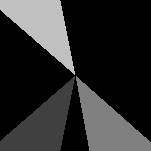
我的iMac (使用clang++ -march=native -O3)上的时间表是:
Time with if statements: 38.429us
Time with LUT: 24.31us
如果有人想要为第二组循环使用代码并尝试替代方法,请随时尝试发布您得到的内容,但是保持第一组循环不变,以供参考。
https://stackoverflow.com/questions/49333257
复制相似问题
腾讯云开发者

Copyright © 2013 - 2026 Tencent Cloud. All Rights Reserved. 腾讯云 版权所有
深圳市腾讯计算机系统有限公司 ICP备案/许可证号:粤B2-20090059  粤公网安备44030502008569号
腾讯云计算(北京)有限责任公司 京ICP证150476号 | 京ICP备11018762号