
ExtReact中未调用的对话框
ExtReact中未调用的对话框
提问于 2018-03-13 09:36:36
所以,我想结合面板和对话框,一旦我点击齿轮按钮(显示在图片上),我想要一个对话框弹出。但是它甚至不调用函数showDialog()。代码的大部分重要部分如下所示,在图片之后。
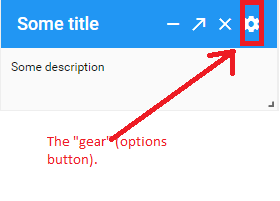
-Needed函数:
constructor(props){
        super(props);
        this.state = {
            showDialog: false,
            idOfPortletLocation: '',
            text: '',
            portletlocation: []
        };
    }

    showDialog(){
        this.setState({ showDialog: true });
    }

    onOk(){
        this.setState({ showDialog: false });
    }

    onCancel(){
        this.setState({ showDialog: false });
    }
代码的-Render部分:
<Container layout="fit">
                <Panel
                    ref={panel => this.panel = panel}
                    title= {this.state.text.title}
                    tools={[
                        {type: 'minimize', handler: () => this.toolHandler("minimize", this.state.idOfPortletLocation)},
                        {type: 'maximize', handler: () => this.toolHandler("maximize", this.state.idOfPortletLocation)},
                        {type: 'close', handler: () => this.toolHandler("close", this.state.idOfPortletLocation)},
                        {type: 'gear', handler: () => this.showDialog}
                    ]}
                    bodyPadding={10}
                    ref="target"
                >
                    {this.state.text.description}
                </Panel>
                 <Dialog
                    displayed={showDialog}
                    title="Dialog"
                    closable
                    maximizable
                    closeAction="hide"
                    maskTapHandler={this.onCancel}
                    bodyPadding="20"
                    maxWidth="200"
                    defaultFocus="#ok"
                    onHide={() => this.setState({ showDialog: false })}
                >
                    Lorem ipsum dolor sit amet, consectetur adipisicing elit, sed do eiusmod tempor incididunt ut labore et dolore
                    magna aliqua. Ut enim ad minim veniam, quis nostrud exercitation ullamco laboris nisi ut aliquip ex ea
                    commodo consequat.'
                    <Button text="Cancel" handler={this.onCancel}/>
                    <Button itemId="ok" text="OK" handler={this.onOk}/>
                </Dialog>
</Container> 回答 1
Stack Overflow用户
回答已采纳
发布于 2018-03-13 09:40:14
如果您不调用该函数,您应该:
{type: 'gear', handler: () => this.showDialog(); }页面原文内容由Stack Overflow提供。腾讯云小微IT领域专用引擎提供翻译支持
原文链接:
https://stackoverflow.com/questions/49252681
复制相关文章
相似问题
腾讯云开发者

Copyright © 2013 - 2026 Tencent Cloud. All Rights Reserved. 腾讯云 版权所有
深圳市腾讯计算机系统有限公司 ICP备案/许可证号:粤B2-20090059  粤公网安备44030502008569号
腾讯云计算(北京)有限责任公司 京ICP证150476号 | 京ICP备11018762号