
如何进一步优化webpack管束尺寸
如何进一步优化webpack管束尺寸
提问于 2018-03-12 12:50:33
所以我可以把包的大小从13 my减少到6.81mb
我做了一些优化,比如适当的生产配置,优化库,比如存档,以及用日期-fns替换动量。
现在,大多数包都不超过1mb,其中大部分是由npm安装的依赖项。
在这里使用webpack束分析仪是我的包现在的样子
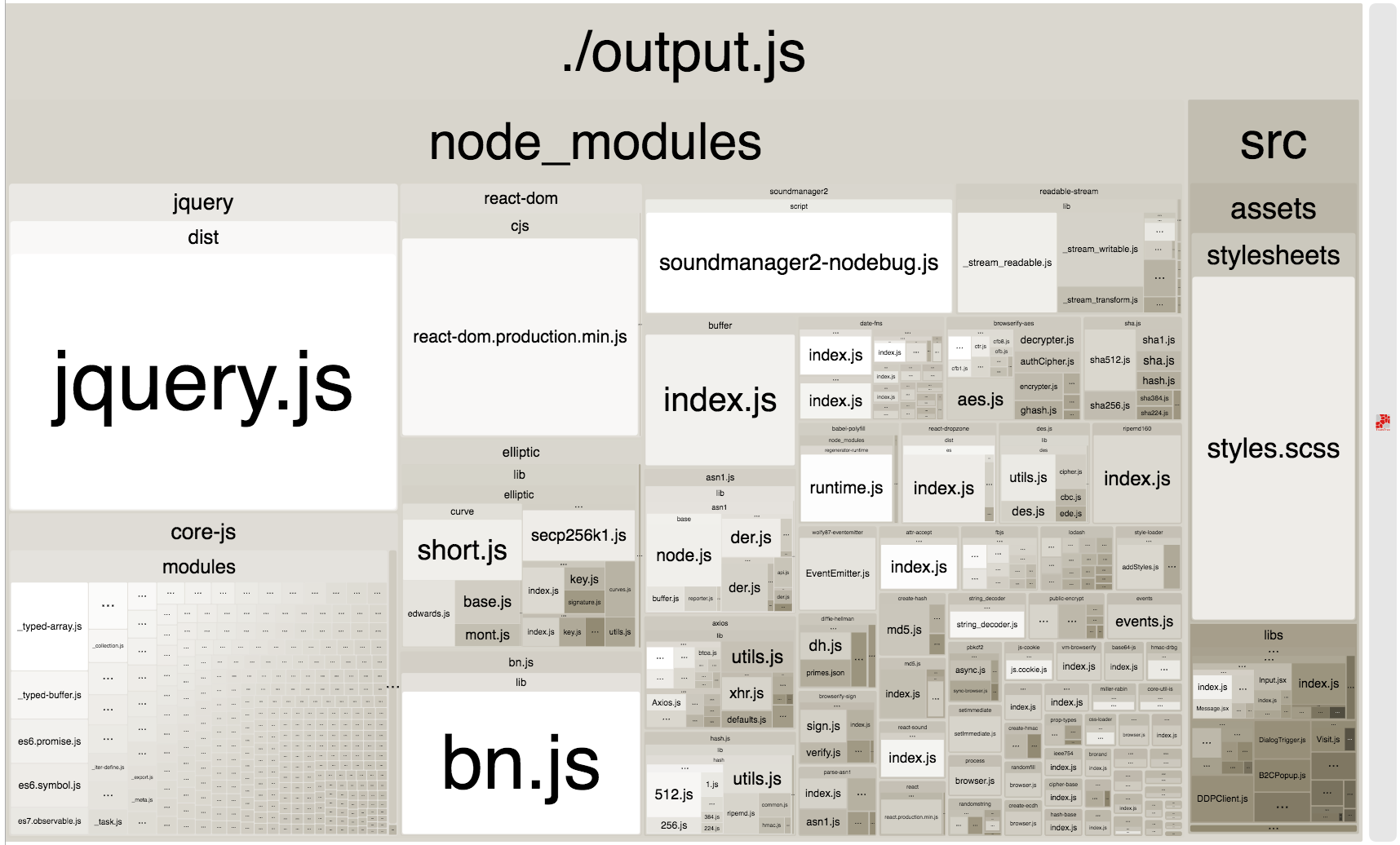
所以你们认为我可以做更多的事情来减少包裹的大小吗?也许可以删除jquery,然后转到普通js?但只有1mb..。我能做些什么来显着地优化尺寸吗?
如果你想要更多的细节
这就是我如何构建NODE_ENV=production webpack的方法
const webpack = require('webpack')
const path = require('path')
const ExtractTextWebpackPlugin = require('extract-text-webpack-plugin')
const UglifyJsPlugin = require('uglifyjs-webpack-plugin')
const OptimizeCSSAssets = require('optimize-css-assets-webpack-plugin')
const BundleAnalyzerPlugin = require('webpack-bundle-analyzer').BundleAnalyzerPlugin
const LodashModuleReplacementPlugin = require('lodash-webpack-plugin')

const config = {
  entry: ['babel-polyfill', './src/index.js'],
  output: {
    path: path.resolve(__dirname, './public'),
    filename: './output.js'
  },
  resolve: {
    extensions: ['.js', '.jsx', '.json', '.scss', '.css', '.jpeg', '.jpg', '.gif', '.png'], // Automatically resolve certain extensions
    alias: { // Create Aliases
      images: path.resolve(__dirname, 'src/assets/images')
    }
  },
  module: {
    rules: [
      {
        test: /\.js$/, // files ending with js
        exclude: /node-modules/,
        loader: 'babel-loader'
      },
      {
        test: /\.scss$/,
        use: ['css-hot-loader', 'style-loader', 'css-loader', 'sass-loader', 'postcss-loader']
      },
      {
        test: /\.jsx$/, // files ending with js
        exclude: /node-modules/,
        loader: 'babel-loader'
      },
      {
        test: /\.(jpe?g|png|gif|svg)$/i,
        loaders: [
          'file-loader?context=src/assets/images/&name=images/[path][name].[ext]',
          {
            loader: 'image-webpack-loader',
            query: {
              mozjpeg: {
                progressive: true
              },
              gifsicle: {
                interlaced: false
              },
              optipng: {
                optimizationLevel: 4
              },
              pngquant: {
                quality: '75-90',
                speed: 3
              }
            }
          }
        ],
        exclude: /node_modules/,
        include: __dirname
      }
    ]
  },
  plugins: [
    new ExtractTextWebpackPlugin('styles.css'),
    new webpack.ProvidePlugin({
      $: 'jquery',
      jQuery: 'jquery'
    }),
    // make sure this one with urls is always the last one
    new webpack.DefinePlugin({
      DDP_URL: getDDPUrl(),
      REST_URL: getRESTUrl()
    }),
    new LodashModuleReplacementPlugin({collections: true})
  ],
  devServer: {
    contentBase: path.resolve(__dirname, './public'), // a directory or URL to serve HTML from
    historyApiFallback: true, // fallback to /index.html for single page applications
    inline: true, // inline mode, (set false to disable including client scripts (like live reload))
    open: true // open default browser while launching
  },
  devtool: 'eval-source-map' // enable devtool for bettet debugging experience
}

module.exports = config

if (process.env.NODE_ENV === 'production') {
  module.exports.plugins.push(
    // https://reactjs.org/docs/optimizing-performance.html#webpack
    new webpack.DefinePlugin({
      'process.env.NODE_ENV': JSON.stringify('production')
    }),
    new webpack.optimize.UglifyJsPlugin(),
    new OptimizeCSSAssets(),
    new BundleAnalyzerPlugin()
  )
}

function getDDPUrl () {
  const local = 'ws://localhost:3000/websocket'
  const prod = 'produrl/websocket'
  let url = local
  if (process.env.NODE_ENV === 'production') url = prod
  // https://webpack.js.org/plugins/define-plugin/
  // Note that because the plugin does a direct text replacement,
  // the value given to it must include actual quotes inside of the string itself.
  // Typically, this is done either with either alternate quotes,
  // such as '"production"', or by using JSON.stringify('production').
  return JSON.stringify(url)
}

function getRESTUrl () {
  const local = 'http://localhost:3000'
  const prod = 'produrl'
  let url = local
  if (process.env.NODE_ENV === 'production') url = prod
  // https://webpack.js.org/plugins/define-plugin/
  // Note that because the plugin does a direct text replacement,
  // the value given to it must include actual quotes inside of the string itself.
  // Typically, this is done either with either alternate quotes,
  // such as '"production"', or by using JSON.stringify('production').
  return JSON.stringify(url)
}
回答 1
Stack Overflow用户
回答已采纳
发布于 2018-03-13 12:58:01
您的问题是,即使在运行webpack生产命令时,您也包含了devtool: 'eval-source-map'。这将包括最后一个包中的源代码映射。因此,要删除它,可以执行以下操作:
var config = {
  //... you config here
  // Remove devtool and devServer server options from here
}

if(process.env.NODE_ENV === 'production') { //Prod
   config.plugins.push(
       new webpack.DefinePlugin({'process.env.NODE_ENV': JSON.stringify('production')}),
       new OptimizeCSSAssets(),
       /* The comments: false will remove the license comments of your libs
       and you will obtain a real single line file as output */
       new webpack.optimize.UglifyJsPlugin({output: {comments: false}}),
   );
} else { //Dev
    config.devServer = {
        contentBase: path.resolve(__dirname, './public'),
        historyApiFallback: true,
        inline: true,
        open: true
    };
    config.devtool = 'eval-source-map';
}

module.exports = config页面原文内容由Stack Overflow提供。腾讯云小微IT领域专用引擎提供翻译支持
原文链接:
https://stackoverflow.com/questions/49235704
复制相关文章
相似问题
腾讯云开发者

Copyright © 2013 - 2026 Tencent Cloud. All Rights Reserved. 腾讯云 版权所有
深圳市腾讯计算机系统有限公司 ICP备案/许可证号:粤B2-20090059  粤公网安备44030502008569号
腾讯云计算(北京)有限责任公司 京ICP证150476号 | 京ICP备11018762号