
如何实现边缘按钮指针事件?
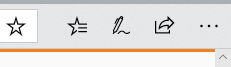
我已经看到这种按钮样式只在边缘按钮,并想知道如何实现它。因此,有两个不同的影响发挥作用(据我所知)。首先,当按下按钮时,其内部的内容会收缩(与Windows提供的默认效果不同),其次,当单击按钮时,会出现一个黑色的、非离散的边框,几乎给人一种深度的感觉。
回答 1
Stack Overflow用户
发布于 2018-03-12 17:51:59
这个问题是个挑战!
我的第一个想法是使用UWP Community Toolkit DropShadowPanel创建一个阴影并将其剪辑到按钮的矩形中。不幸的是,这不是很好,因为我必须在需要可见边框的Rectangle上设置阴影,这对我们拥有一个完美混合的无边界按钮并不是很好。此外,DropShadowPanel阴影只是没有提供足够强的阴影效果,这将足以使按钮看起来像在边缘。
我使用过Visual,并将它的调试器附加到边缘浏览器,以查看浏览器实际使用哪个控件。Live Tree Visualizer揭示了这一点:
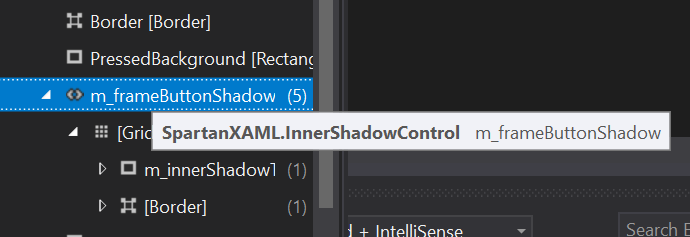
SpartanXAML.InnerShadowControl?好吧,我们没有那个。我们来解决这个问题吧。
我反而点燃了Photoshop。创建了一个64x64平方图像,在表面放置一个透明的矩形层并设置其Inner Glow,如下面的屏幕截图所示:
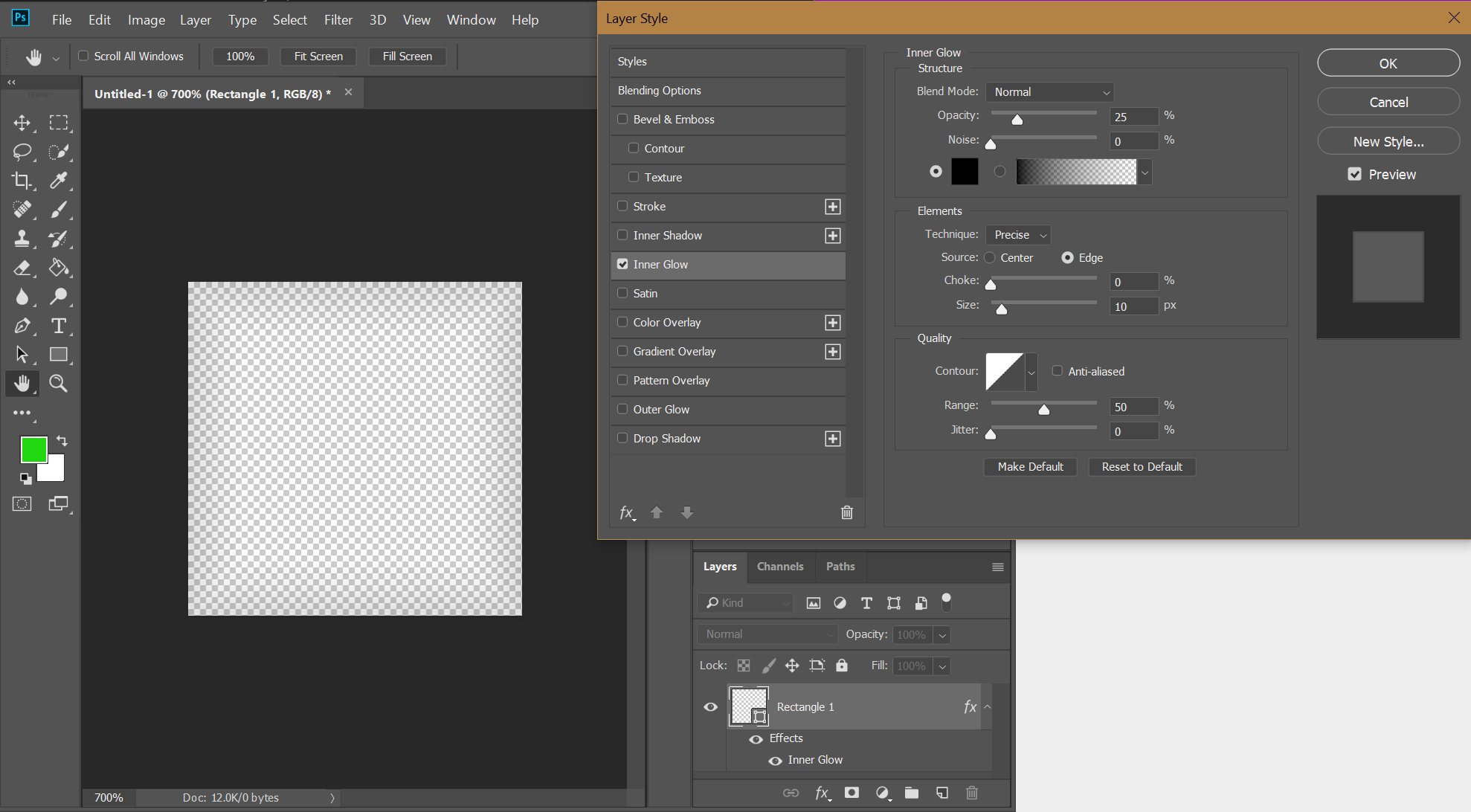
出口后,我得到了以下巴布亚新几内亚:

那看起来很像边缘按钮上的内部阴影!
现在,让我们创建一个使用此图像的自定义按钮样式!
<Style TargetType="Button" x:Key="EdgeButtonStyle">
    <Setter Property="Background" Value="#f5f5f5" />
    <Setter Property="Foreground" Value="{ThemeResource ButtonForeground}" />
    <Setter Property="BorderBrush" Value="{ThemeResource ButtonBorderBrush}" />
    <Setter Property="BorderThickness" Value="{ThemeResource ButtonBorderThemeThickness}" />
    <Setter Property="Padding" Value="8" />
    <Setter Property="HorizontalAlignment" Value="Left" />
    <Setter Property="VerticalAlignment" Value="Center" />
    <Setter Property="FontFamily" Value="{ThemeResource ContentControlThemeFontFamily}" />
    <Setter Property="FontWeight" Value="Normal" />
    <Setter Property="FontSize" Value="{ThemeResource ControlContentThemeFontSize}" />
    <Setter Property="UseSystemFocusVisuals" Value="True" />
    <Setter Property="FocusVisualMargin" Value="-3" />
    <Setter Property="Template">
        <Setter.Value>
            <ControlTemplate TargetType="Button">
                <Grid x:Name="RootGrid" Width="64" Height="64" Background="{TemplateBinding Background}">

                    <VisualStateManager.VisualStateGroups>
                        <VisualStateGroup x:Name="CommonStates">
                            <VisualState x:Name="Normal">

                                <Storyboard>
                                    <PointerUpThemeAnimation Storyboard.TargetName="RootGrid" />
                                </Storyboard>
                            </VisualState>

                            <VisualState x:Name="PointerOver">

                                <Storyboard>
                                    <ObjectAnimationUsingKeyFrames Storyboard.TargetName="RootGrid" Storyboard.TargetProperty="Background">
                                        <DiscreteObjectKeyFrame KeyTime="0" Value="#c1c1c0" />
                                    </ObjectAnimationUsingKeyFrames>
                                    <ObjectAnimationUsingKeyFrames Storyboard.TargetName="ContentPresenter" Storyboard.TargetProperty="Foreground">
                                        <DiscreteObjectKeyFrame KeyTime="0" Value="{ThemeResource ButtonForegroundPointerOver}" />
                                    </ObjectAnimationUsingKeyFrames>
                                </Storyboard>
                            </VisualState>

                            <VisualState x:Name="Pressed">

                                <Storyboard>
                                    <ObjectAnimationUsingKeyFrames Storyboard.TargetName="RootGrid" Storyboard.TargetProperty="Background">
                                        <DiscreteObjectKeyFrame KeyTime="0" Value="#c1c1c0" />
                                    </ObjectAnimationUsingKeyFrames>
                                    <ObjectAnimationUsingKeyFrames Storyboard.TargetName="ContentPresenter" Storyboard.TargetProperty="Foreground">
                                        <DiscreteObjectKeyFrame KeyTime="0" Value="{ThemeResource ButtonForegroundPressed}" />
                                    </ObjectAnimationUsingKeyFrames>
                                    <ObjectAnimationUsingKeyFrames Storyboard.TargetName="Scale" Storyboard.TargetProperty="ScaleX">
                                        <DiscreteObjectKeyFrame KeyTime="0" Value="0.8" />
                                    </ObjectAnimationUsingKeyFrames>
                                    <ObjectAnimationUsingKeyFrames Storyboard.TargetName="Scale" Storyboard.TargetProperty="ScaleY">
                                        <DiscreteObjectKeyFrame KeyTime="0" Value="0.8" />
                                    </ObjectAnimationUsingKeyFrames>
                                    <ObjectAnimationUsingKeyFrames Storyboard.TargetName="InnerShadow" Storyboard.TargetProperty="Visibility">
                                        <DiscreteObjectKeyFrame KeyTime="0" Value="Visible" />
                                    </ObjectAnimationUsingKeyFrames>

                                </Storyboard>
                            </VisualState>

                            <VisualState x:Name="Disabled">

                                <Storyboard>
                                    <ObjectAnimationUsingKeyFrames Storyboard.TargetName="RootGrid" Storyboard.TargetProperty="Background">
                                        <DiscreteObjectKeyFrame KeyTime="0" Value="{ThemeResource ButtonBackgroundDisabled}" />
                                    </ObjectAnimationUsingKeyFrames>
                                    <ObjectAnimationUsingKeyFrames Storyboard.TargetName="ContentPresenter" Storyboard.TargetProperty="Foreground">
                                        <DiscreteObjectKeyFrame KeyTime="0" Value="{ThemeResource ButtonForegroundDisabled}" />
                                    </ObjectAnimationUsingKeyFrames>
                                </Storyboard>
                            </VisualState>
                        </VisualStateGroup>

                    </VisualStateManager.VisualStateGroups>


                    <ContentPresenter x:Name="ContentPresenter"
            BorderBrush="{TemplateBinding BorderBrush}"
            BorderThickness="{TemplateBinding BorderThickness}"
            Content="{TemplateBinding Content}"
            ContentTransitions="{TemplateBinding ContentTransitions}"
            ContentTemplate="{TemplateBinding ContentTemplate}"
            Padding="{TemplateBinding Padding}"
            HorizontalContentAlignment="{TemplateBinding HorizontalContentAlignment}"
            VerticalContentAlignment="{TemplateBinding VerticalContentAlignment}"
            AutomationProperties.AccessibilityView="Raw">
                        <interactivity:Interaction.Behaviors>
                            <behaviors:Scale x:Name="Scale"
                                    ScaleX="1"
                                    ScaleY="1"
                                    CenterX="32"
                                    CenterY="32"
                                    Duration="100"
                                    Delay="0"
                                    EasingType="Default"
                                    AutomaticallyStart="True"/>
                        </interactivity:Interaction.Behaviors>
                    </ContentPresenter>

                    <Image Source="/Assets/InnerShadowGray.png" HorizontalAlignment="Stretch" VerticalAlignment="Stretch" Visibility="Collapsed" x:Name="InnerShadow" />

                </Grid>
            </ControlTemplate>
        </Setter.Value>
    </Setter>
</Style>
这是一个冗长的列表,所以我只想指出最有趣的事情:
- 从按钮中移除所有边框
- 将背景设置为
#f5f5f5,将背景设置为#c1c1c0以匹配边缘 - 将宽度和高度设置为64
- 添加了一个
Image作为RootGrid中的最后一个控件,这是阴影图像,默认情况下是Collapsed,只有当指针被按下时才会出现。 - 使用UWP社区工具包(
Microsoft.Toolkit.Uwp.UI.ControlsNuGet包)的Scale行为创建一个简单、易于控制的动画。这需要将xmlns:interactivity="using:Microsoft.Xaml.Interactivity"和xmlns:behaviors="using:Microsoft.Toolkit.Uwp.UI.Animations.Behaviors"XML命名空间添加到文件的根元素中。 - 将默认的
PointerDownThemeAnimation替换为使用Scale行为的自定义动画,以使动画更加显着且缩放一致,而不会扭曲内容。
现在让我们带着我们的新按钮去试驾吧!
<Button Style="{StaticResource EdgeButtonStyle}" HorizontalAlignment="Center">
    <Image Source="Assets/Windows.png" />
</Button>
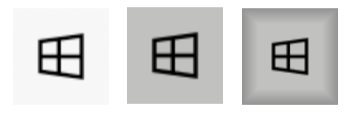
其结果是:
https://stackoverflow.com/questions/49226666
复制相似问题
腾讯云开发者

Copyright © 2013 - 2026 Tencent Cloud. All Rights Reserved. 腾讯云 版权所有
深圳市腾讯计算机系统有限公司 ICP备案/许可证号:粤B2-20090059  粤公网安备44030502008569号
腾讯云计算(北京)有限责任公司 京ICP证150476号 | 京ICP备11018762号