
定时器在后台运行时间不超过3分钟
定时器在后台运行时间不超过3分钟
提问于 2018-03-10 12:12:08
我在做冥想应用程序。在这个应用程序中,我有一些音乐内容和一些静默冥想部分使用计时器。定时器在前台时工作正常,但在后台只运行3分钟(当设备被锁定或用户按主按钮退出应用程序时)。我正在使用swift4。我试过的是:
var timer: Timer!
var timeCounter : Int!
var backgroundTaskIdentifier: UIBackgroundTaskIdentifier?
var backgroundTask = BackgroundTask()

@IBOutlet weak var timeLabel: UILabel!

 override func viewDidLoad() {
    super.viewDidLoad()

     self.backgroundTaskIdentifier = UIApplication.shared.beginBackgroundTask(expirationHandler: {
        UIApplication.shared.endBackgroundTask(self.backgroundTaskIdentifier!)
    })

    backgroundTask.startBackgroundTask()

    DispatchQueue.global(qos: .background).async {
    let currentRunLoop = RunLoop.current
        let timeInterval = 1.0
        self.timer = Timer.scheduledTimer(timeInterval: timeInterval, target: self, selector: #selector(self.updateTimer), userInfo: nil, repeats: true)
        self.timer.tolerance = timeInterval * 0.1
        currentRunLoop.add(self.timer, forMode: .commonModes)
        currentRunLoop.run()
    }
  }
}

 @objc func updateTimer () {
    timeCounter = timeCounter - 1
    let minutes = Int(timeCounter) / 60 % 60
    let seconds = Int(timeCounter) % 60

    print("timeCounter", timeCounter)
    if (timeCounter == 0){
        if self.timer != nil {
            self.timer?.invalidate()
            self.timer = nil
            player.play()
        }
    }

    timeLabel.fadeTransition(0.4)
    timeLabel.text = String(format: "%02i:%02i",minutes,seconds)
}
提前谢谢。
回答 1
Stack Overflow用户
发布于 2018-03-10 12:45:31
一般来说,您从操作系统获得有限的时间运行在后台。您可以使用以下方法检查背景时间并对其作出反应:
UIApplication.shared.backgroundTimeRemaining如果条件良好(设备解锁,电池满.)你通常有160-180秒的时间。
您可以在苹果文献中找到详细信息。
由于您想播放音频,您可以使用“play audio”后台模式来不被OS剪切:
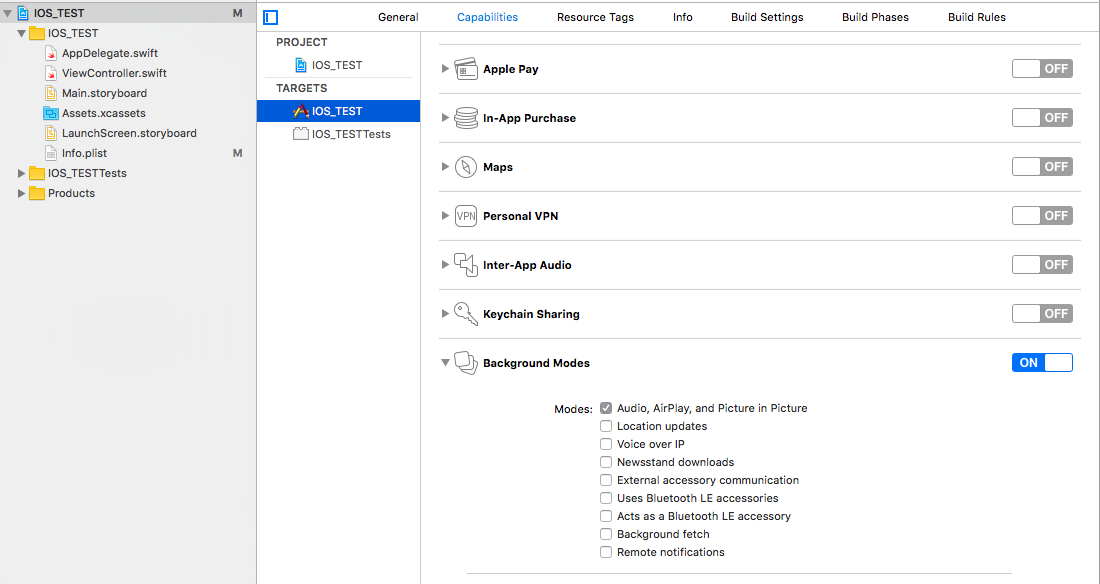
根据您播放音频的方式,配置AudioSession还可以改进一些内容。
编辑:我从你的评论中了解到,你希望你的应用程序每4分钟做一次。我看到的唯一可能就是使用BackgroundFetch特性。不过,这并不能保证固定的间隔。
页面原文内容由Stack Overflow提供。腾讯云小微IT领域专用引擎提供翻译支持
原文链接:
https://stackoverflow.com/questions/49208925
复制相关文章
相似问题
腾讯云开发者

Copyright © 2013 - 2026 Tencent Cloud. All Rights Reserved. 腾讯云 版权所有
深圳市腾讯计算机系统有限公司 ICP备案/许可证号:粤B2-20090059  粤公网安备44030502008569号
腾讯云计算(北京)有限责任公司 京ICP证150476号 | 京ICP备11018762号