
如何设计给定格式的Qt5UI表单设计器
如何设计给定格式的Qt5UI表单设计器
提问于 2018-03-09 05:19:05
我想制作一个对话框,它看起来像这样:
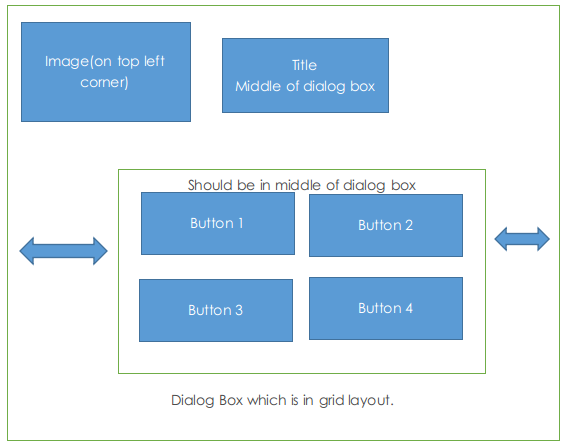
然而,我无法给出适当的间隔组合来实现这一点。
给左水平间隔,使图像也向右移动,我不想。如果我以某种方式将图像移到左上角,那么按钮布局就会向右移动,而不是中间。这是如何做到的呢?
编辑:为.ui文件添加代码:
<?xml version="1.0" encoding="UTF-8"?>
<ui version="4.0">
 <class>TestSelectionDialog</class>
 <widget class="QDialog" name="TestSelectionDialog">
  <property name="geometry">
   <rect>
    <x>0</x>
    <y>0</y>
    <width>1366</width>
    <height>768</height>
   </rect>
  </property>
  <property name="minimumSize">
   <size>
    <width>900</width>
    <height>600</height>
   </size>
  </property>
  <property name="font">
   <font>
    <pointsize>15</pointsize>
   </font>
  </property>
  <property name="windowTitle">
   <string>Settings</string>
  </property>
  <property name="windowIcon">
   <iconset resource="resources.qrc">
    <normaloff>:/images/image.jpg</normaloff>:/images/image.jpg</iconset>
  </property>
  <property name="styleSheet">
   <string notr="true">QGroupBox {
  border: 2px solid white;
  border-radius: 3px;
	margin-top: 10 px

  }
 QGroupBox::title {
     subcontrol-origin: margin;
     left: 10px;
     padding: 0 3px 10 3px;
 }</string>
  </property>
  <layout class="QGridLayout" name="gridLayout">
   <item row="0" column="0">
    <layout class="QHBoxLayout" name="horizontalLayout_4">
     <property name="leftMargin">
      <number>5</number>
     </property>
     <property name="topMargin">
      <number>5</number>
     </property>
     <property name="rightMargin">
      <number>5</number>
     </property>
     <property name="bottomMargin">
      <number>5</number>
     </property>
     <item>
      <widget class="QLabel" name="logolabel">
       <property name="text">
        <string/>
       </property>
       <property name="pixmap">
        <pixmap resource="resources.qrc">:/images/logo2.png</pixmap>
       </property>
       <property name="scaledContents">
        <bool>true</bool>
       </property>
      </widget>
     </item>
    </layout>
   </item>
   <item row="1" column="2">
    <spacer name="verticalSpacer">
     <property name="orientation">
      <enum>Qt::Vertical</enum>
     </property>
     <property name="sizeHint" stdset="0">
      <size>
       <width>20</width>
       <height>40</height>
      </size>
     </property>
    </spacer>
   </item>
   <item row="2" column="4">
    <spacer name="horizontalSpacer_3">
     <property name="orientation">
      <enum>Qt::Horizontal</enum>
     </property>
     <property name="sizeHint" stdset="0">
      <size>
       <width>40</width>
       <height>20</height>
      </size>
     </property>
    </spacer>
   </item>
   <item row="2" column="0">
    <spacer name="horizontalSpacer_4">
     <property name="orientation">
      <enum>Qt::Horizontal</enum>
     </property>
     <property name="sizeType">
      <enum>QSizePolicy::Expanding</enum>
     </property>
     <property name="sizeHint" stdset="0">
      <size>
       <width>40</width>
       <height>20</height>
      </size>
     </property>
    </spacer>
   </item>
   <item row="3" column="1">
    <spacer name="verticalSpacer_2">
     <property name="orientation">
      <enum>Qt::Vertical</enum>
     </property>
     <property name="sizeHint" stdset="0">
      <size>
       <width>20</width>
       <height>40</height>
      </size>
     </property>
    </spacer>
   </item>
   <item row="0" column="2">
    <widget class="QLabel" name="labelMemoryTest">
     <property name="font">
      <font>
       <family>Century Gothic</family>
       <pointsize>28</pointsize>
       <weight>75</weight>
       <bold>true</bold>
      </font>
     </property>
     <property name="styleSheet">
      <string notr="true">color:white;</string>
     </property>
     <property name="text">
      <string>SELECT OPTION</string>
     </property>
    </widget>
   </item>
   <item row="2" column="1" colspan="3">
    <layout class="QVBoxLayout" name="verticalLayout">
     <property name="spacing">
      <number>50</number>
     </property>
     <property name="leftMargin">
      <number>15</number>
     </property>
     <property name="topMargin">
      <number>15</number>
     </property>
     <property name="rightMargin">
      <number>15</number>
     </property>
     <property name="bottomMargin">
      <number>15</number>
     </property>
     <item>
      <layout class="QHBoxLayout" name="horizontalLayout">
       <property name="spacing">
        <number>50</number>
       </property>
       <property name="leftMargin">
        <number>15</number>
       </property>
       <property name="topMargin">
        <number>15</number>
       </property>
       <property name="rightMargin">
        <number>15</number>
       </property>
       <property name="bottomMargin">
        <number>15</number>
       </property>
       <item>
        <widget class="QPushButton" name="loadConfigButton">
         <property name="sizePolicy">
          <sizepolicy hsizetype="Minimum" vsizetype="Preferred">
           <horstretch>0</horstretch>
           <verstretch>0</verstretch>
          </sizepolicy>
         </property>
         <property name="minimumSize">
          <size>
           <width>300</width>
           <height>150</height>
          </size>
         </property>
         <property name="font">
          <font>
           <pointsize>15</pointsize>
           <weight>75</weight>
           <bold>true</bold>
          </font>
         </property>
         <property name="toolTip">
          <string>Load Existing Configurations</string>
         </property>
         <property name="statusTip">
          <string/>
         </property>
         <property name="text">
          <string>Button1</string>
         </property>
        </widget>
       </item>
       <item>
        <widget class="QPushButton" name="loadConfigButton_4">
         <property name="sizePolicy">
          <sizepolicy hsizetype="Minimum" vsizetype="Preferred">
           <horstretch>0</horstretch>
           <verstretch>0</verstretch>
          </sizepolicy>
         </property>
         <property name="minimumSize">
          <size>
           <width>300</width>
           <height>150</height>
          </size>
         </property>
         <property name="font">
          <font>
           <pointsize>15</pointsize>
           <weight>75</weight>
           <bold>true</bold>
          </font>
         </property>
         <property name="toolTip">
          <string>Load Existing Configurations</string>
         </property>
         <property name="statusTip">
          <string/>
         </property>
         <property name="text">
          <string>Button2</string>
         </property>
        </widget>
       </item>
      </layout>
     </item>
     <item>
      <layout class="QHBoxLayout" name="horizontalLayout_2">
       <property name="spacing">
        <number>50</number>
       </property>
       <property name="leftMargin">
        <number>15</number>
       </property>
       <property name="topMargin">
        <number>15</number>
       </property>
       <property name="rightMargin">
        <number>15</number>
       </property>
       <property name="bottomMargin">
        <number>15</number>
       </property>
       <item>
        <widget class="QPushButton" name="loadConfigButton_3">
         <property name="sizePolicy">
          <sizepolicy hsizetype="Minimum" vsizetype="Preferred">
           <horstretch>0</horstretch>
           <verstretch>0</verstretch>
          </sizepolicy>
         </property>
         <property name="minimumSize">
          <size>
           <width>300</width>
           <height>150</height>
          </size>
         </property>
         <property name="font">
          <font>
           <pointsize>15</pointsize>
           <weight>75</weight>
           <bold>true</bold>
          </font>
         </property>
         <property name="toolTip">
          <string>Load Existing Configurations</string>
         </property>
         <property name="statusTip">
          <string/>
         </property>
         <property name="text">
          <string>Button3</string>
         </property>
        </widget>
       </item>
       <item>
        <widget class="QPushButton" name="loadConfigButton_2">
         <property name="sizePolicy">
          <sizepolicy hsizetype="Minimum" vsizetype="Preferred">
           <horstretch>0</horstretch>
           <verstretch>0</verstretch>
          </sizepolicy>
         </property>
         <property name="minimumSize">
          <size>
           <width>300</width>
           <height>150</height>
          </size>
         </property>
         <property name="font">
          <font>
           <pointsize>15</pointsize>
           <weight>75</weight>
           <bold>true</bold>
          </font>
         </property>
         <property name="toolTip">
          <string>Load Existing Configurations</string>
         </property>
         <property name="statusTip">
          <string/>
         </property>
         <property name="text">
          <string>Button4</string>
         </property>
        </widget>
       </item>
      </layout>
     </item>
    </layout>
   </item>
  </layout>
 </widget>
 <resources>
  <include location="resources.qrc"/>
 </resources>
 <connections/>
</ui>
回答 1
Stack Overflow用户
回答已采纳
发布于 2018-03-09 11:06:17
QGridLayout看起来还不够成熟。
尝试使用几个嵌套的具有更简单布局的小部件:
test.ui
<?xml version="1.0" encoding="UTF-8"?>
<ui version="4.0">
 <class>Form</class>
 <widget class="QWidget" name="Form">
  <property name="geometry">
   <rect>
    <x>0</x>
    <y>0</y>
    <width>448</width>
    <height>300</height>
   </rect>
  </property>
  <property name="windowTitle">
   <string>Form</string>
  </property>
  <layout class="QVBoxLayout" name="verticalLayout">
   <item>
    <widget class="QWidget" name="widget" native="true">
     <layout class="QHBoxLayout" name="horizontalLayout" stretch="1,0,1">
      <item>
       <widget class="QWidget" name="widget_3" native="true">
        <layout class="QHBoxLayout" name="horizontalLayout_2">
         <item>
          <spacer name="horizontalSpacer_6">
           <property name="orientation">
            <enum>Qt::Horizontal</enum>
           </property>
           <property name="sizeHint" stdset="0">
            <size>
             <width>157</width>
             <height>27</height>
            </size>
           </property>
          </spacer>
         </item>
         <item>
          <widget class="QFrame" name="frame">
           <property name="minimumSize">
            <size>
             <width>100</width>
             <height>100</height>
            </size>
           </property>
           <property name="maximumSize">
            <size>
             <width>100</width>
             <height>100</height>
            </size>
           </property>
           <property name="frameShape">
            <enum>QFrame::Box</enum>
           </property>
           <property name="frameShadow">
            <enum>QFrame::Raised</enum>
           </property>
          </widget>
         </item>
         <item>
          <spacer name="horizontalSpacer_7">
           <property name="orientation">
            <enum>Qt::Horizontal</enum>
           </property>
           <property name="sizeHint" stdset="0">
            <size>
             <width>157</width>
             <height>27</height>
            </size>
           </property>
          </spacer>
         </item>
        </layout>
       </widget>
      </item>
      <item>
       <widget class="QGroupBox" name="groupBox">
        <property name="minimumSize">
         <size>
          <width>100</width>
          <height>30</height>
         </size>
        </property>
        <property name="maximumSize">
         <size>
          <width>100</width>
          <height>30</height>
         </size>
        </property>
        <property name="title">
         <string>Title</string>
        </property>
       </widget>
      </item>
      <item>
       <spacer name="horizontalSpacer_5">
        <property name="orientation">
         <enum>Qt::Horizontal</enum>
        </property>
        <property name="sizeHint" stdset="0">
         <size>
          <width>147</width>
          <height>27</height>
         </size>
        </property>
       </spacer>
      </item>
     </layout>
    </widget>
   </item>
   <item>
    <widget class="QWidget" name="widget_2" native="true">
     <layout class="QHBoxLayout" name="horizontalLayout_3">
      <item>
       <spacer name="horizontalSpacer">
        <property name="orientation">
         <enum>Qt::Horizontal</enum>
        </property>
        <property name="sizeType">
         <enum>QSizePolicy::Preferred</enum>
        </property>
        <property name="sizeHint" stdset="0">
         <size>
          <width>97</width>
          <height>108</height>
         </size>
        </property>
       </spacer>
      </item>
      <item>
       <widget class="QGroupBox" name="groupBox_2">
        <property name="minimumSize">
         <size>
          <width>200</width>
          <height>100</height>
         </size>
        </property>
        <property name="title">
         <string>GroupBox</string>
        </property>
       </widget>
      </item>
      <item>
       <spacer name="horizontalSpacer_2">
        <property name="orientation">
         <enum>Qt::Horizontal</enum>
        </property>
        <property name="sizeType">
         <enum>QSizePolicy::Preferred</enum>
        </property>
        <property name="sizeHint" stdset="0">
         <size>
          <width>97</width>
          <height>108</height>
         </size>
        </property>
       </spacer>
      </item>
     </layout>
    </widget>
   </item>
  </layout>
 </widget>
 <resources/>
 <connections/>
</ui>页面原文内容由Stack Overflow提供。腾讯云小微IT领域专用引擎提供翻译支持
原文链接:
https://stackoverflow.com/questions/49187053
复制相关文章
相似问题
腾讯云开发者

Copyright © 2013 - 2026 Tencent Cloud. All Rights Reserved. 腾讯云 版权所有
深圳市腾讯计算机系统有限公司 ICP备案/许可证号:粤B2-20090059  粤公网安备44030502008569号
腾讯云计算(北京)有限责任公司 京ICP证150476号 | 京ICP备11018762号