
用JavaFx制作暗模式
用JavaFx制作暗模式
提问于 2018-03-07 18:53:57
我想知道是否有一种使用JavaFx和CSS制作黑暗模式的简单方法。我有一个名为“黑暗模式”( dark Mode)的MenuBar,当我点击它时,我希望场景变得黑暗,文本变成白色。
回答 4
Stack Overflow用户
回答已采纳
发布于 2018-03-07 19:14:04
我已经有一段时间没有使用“主题化”JavaFX应用程序了,但从不久前开始,我有一个CSS文件:
.root {
    -fx-base: #3f474f;
    -fx-accent: #e7eff7 ;
    -fx-default-button: #7f878f ;
    -fx-focus-color: #efefef;
    -fx-faint-focus-color: #efefef22;
    -fx-focused-text-base-color : ladder(
            -fx-selection-bar,
            -fx-light-text-color 45%,
            -fx-dark-text-color 46%,
            -fx-dark-text-color 59%,
            -fx-mid-text-color 60%
        );
    -fx-focused-mark-color : -fx-focused-text-base-color ;

}

.text-input:focused {
    -fx-highlight-text-fill: ladder(
        -fx-highlight-fill,
        -fx-light-text-color 45%,
        -fx-dark-text-color  46%,
        -fx-dark-text-color  59%,
        -fx-mid-text-color   60%
    );
}如果您将其放入一个文件中,比如dark-theme.css,您可以这样做
checkMenuItem.selectedProperty().addListener((obs, wasSelected, isSelected) -> {
    if (isSelected) {
        scene.getStyleSheets().add("dark-theme.css");
    } else {
        scene.getStyleSheets().remove("dark-theme.css");
    }
});Stack Overflow用户
发布于 2019-10-17 23:00:25
这是我的。
(更新)上一个版本太不透明了。
.root {
    -fx-accent: #1e74c6;
    -fx-focus-color: -fx-accent;
    -fx-base: #373e43;
    -fx-control-inner-background: derive(-fx-base, 35%);
    -fx-control-inner-background-alt: -fx-control-inner-background ;
}

.label{
    -fx-text-fill: lightgray;
}

.text-field {
    -fx-prompt-text-fill: gray;
}

.titulo{
    -fx-font-weight: bold;
    -fx-font-size: 18px;
}

.button{
    -fx-focus-traversable: false;
}

.button:hover{
    -fx-text-fill: white;
}

.separator *.line {
    -fx-background-color: #3C3C3C;
    -fx-border-style: solid;
    -fx-border-width: 1px;
}

.scroll-bar{
    -fx-background-color: derive(-fx-base,45%)
}

.button:default {
    -fx-base: -fx-accent ;
}

.table-view{
    /*-fx-background-color: derive(-fx-base, 10%);*/
    -fx-selection-bar-non-focused: derive(-fx-base, 50%);
}

.table-view .column-header .label{
    -fx-alignment: CENTER_LEFT;
    -fx-font-weight: none;
}

.list-cell:even,
.list-cell:odd,
.table-row-cell:even,
.table-row-cell:odd{
    -fx-control-inner-background: derive(-fx-base, 15%);
}

.list-cell:empty,
.table-row-cell:empty {
    -fx-background-color: transparent;
}

.list-cell,
.table-row-cell{
    -fx-border-color: transparent;
    -fx-table-cell-border-color:transparent;
}
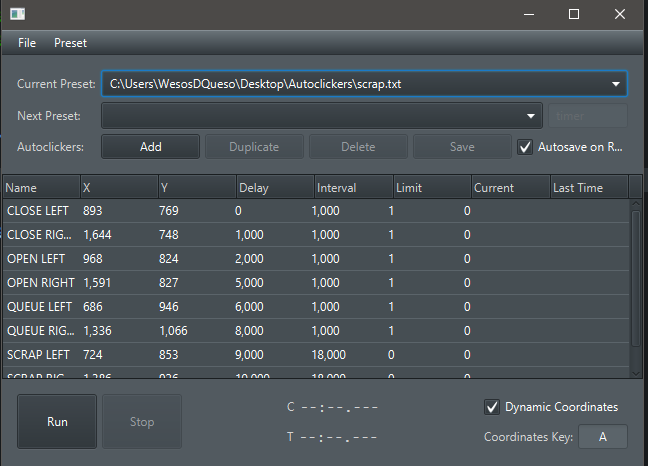
Stack Overflow用户
发布于 2018-03-08 01:06:46
属性基可以应用于每种JavaFX类型,这使得可以使用JavaFx节点或布局的单个基色指定颜色主题.并根据该基色计算各种颜色(用于其子颜色)!
在这种情况下,您正在尝试设置整个场景的主题,因此您应该将基色应用到层次结构中的最高部分,您可以通过获取场景的根节点来获得该颜色!
checkMenuItem.selectedProperty().addListener((obs, wasSelected, isSelected) -> {
    if (isSelected) {
        scene.getRoot().setStyle("-fx-base:black");
    } else {
        scene.getRoot().setStyle("");
    }
});页面原文内容由Stack Overflow提供。腾讯云小微IT领域专用引擎提供翻译支持
原文链接:
https://stackoverflow.com/questions/49159286
复制相关文章
相似问题
腾讯云开发者

Copyright © 2013 - 2026 Tencent Cloud. All Rights Reserved. 腾讯云 版权所有
深圳市腾讯计算机系统有限公司 ICP备案/许可证号:粤B2-20090059  粤公网安备44030502008569号
腾讯云计算(北京)有限责任公司 京ICP证150476号 | 京ICP备11018762号