
用Haskell Opengl实现闪烁
我用Haskell OpenGL做了很多图形。他们在我的回购这里:opengl-示例 (画廊并非详尽无遗)。然而,我有一个问题:当我使用materialShininess时,什么都不会发生。有什么东西可以让它有光泽吗?
下面是我的一个例子。它不完整,但我希望它足以确定问题。
module CompoundFiveTetrahedra2
  where
import           CompoundFiveTetrahedra.Data
import           Control.Monad                     (when)
import qualified Data.ByteString                   as B
import           Data.IORef
import           Graphics.Rendering.OpenGL.Capture (capturePPM)
import           Graphics.Rendering.OpenGL.GL
import           Graphics.UI.GLUT
import           Text.Printf
import           Utils.ConvertPPM
import           Utils.OpenGL                      (negateNormal)
import           Utils.Prism

blue,red,green,yellow,purple,white,black :: Color4 GLfloat
blue   = Color4 0   0   1   1
red    = Color4 1   0   0   1
green  = Color4 0   1   0   1
yellow = Color4 1   1   0   1
white  = Color4 1   1   1   1
black  = Color4 0   0   0   1
purple = Color4 0.5 0   0.5 1

display :: IORef GLfloat -> IORef GLfloat -> IORef GLfloat -> IORef GLdouble
        -> IORef GLint -> IORef GLfloat -> DisplayCallback
display rot1 rot2 rot3 zoom capture angle = do
  clear [ColorBuffer, DepthBuffer]
  r1 <- get rot1
  r2 <- get rot2
  r3 <- get rot3
  z <- get zoom
  a <- get angle
  i <- get capture
  loadIdentity
  (_, size) <- get viewport
  resize z size
  rotate a $ Vector3 1 1 1
  rotate r1 $ Vector3 1 0 0
  rotate r2 $ Vector3 0 1 0
  rotate r3 $ Vector3 0 0 1
  mapM_ (drawEdge blue)   (edges!!0)
  mapM_ (drawEdge red)    (edges!!1)
  mapM_ (drawEdge green)  (edges!!2)
  mapM_ (drawEdge yellow) (edges!!3)
  mapM_ (drawEdge purple) (edges!!4)
  mapM_ (drawVertex blue)   vertices1
  mapM_ (drawVertex red)    vertices2
  mapM_ (drawVertex green)  vertices3
  mapM_ (drawVertex yellow) vertices4
  mapM_ (drawVertex purple) vertices5
  when (i > 0) $ do
    let ppm = printf "tetrahedra%04d.ppm" i
        png = printf "tetrahedra%04d.png" i
    (>>=) capturePPM (B.writeFile ppm)
    convert ppm png True
    capture $~! (+1)
  swapBuffers

drawVertex :: Color4 GLfloat -> Vertex3 GLfloat -> IO ()
drawVertex col v =
  preservingMatrix $ do
    translate $ toVector v
    materialDiffuse Front $= col
    renderObject Solid $ Sphere' 0.03 30 30
  where
    toVector (Vertex3 x y z) = Vector3 x y z

drawEdge :: Color4 GLfloat -> (Vertex3 GLfloat, Vertex3 GLfloat) -> IO ()
drawEdge col (v1,v2) = do
  let cylinder = prism v1 v2 30 0.03
  renderPrimitive Quads $ do
    materialDiffuse Front $= col
    mapM_ drawQuad cylinder
  where
    drawQuad ((w1,w2,w3,w4),n) = do
      normal $ negateNormal n
      vertex w1
      vertex w2
      vertex w3
      vertex w4

resize :: Double -> Size -> IO ()
resize zoom s@(Size w h) = do
  viewport $= (Position 0 0, s)
  matrixMode $= Projection
  loadIdentity
  perspective 45.0 (w'/h') 1.0 100.0
  lookAt (Vertex3 0 0 (-3 + zoom)) (Vertex3 0 0 0) (Vector3 0 1 0)
  matrixMode $= Modelview 0
  where
    w' = realToFrac w
    h' = realToFrac h

keyboard :: IORef GLfloat -> IORef GLfloat -> IORef GLfloat -> IORef GLint
         -> KeyboardCallback
keyboard rot1 rot2 rot3 capture c _ =
  case c of
    'r' -> rot1 $~! subtract 1
    't' -> rot1 $~! (+1)
    'f' -> rot2 $~! subtract 1
    'g' -> rot2 $~! (+1)
    'v' -> rot3 $~! subtract 1
    'b' -> rot3 $~! (+1)
    'c' -> capture $~! (+1)
    'q' -> leaveMainLoop
    _   -> return ()

mouse :: IORef GLdouble -> MouseCallback
mouse zoom button keyState _ =
  case (button, keyState) of
    (LeftButton, Down)  -> zoom $~! (+0.1)
    (RightButton, Down) -> zoom $~! subtract 0.1
    _                   -> return ()

idle :: IORef GLfloat -> IdleCallback
idle angle = do
  angle $~! (+ 2)
  postRedisplay Nothing

main :: IO ()
main = do
  _ <- getArgsAndInitialize
  _ <- createWindow "Five tetrahedra"
  initialDisplayMode $= [RGBAMode, DoubleBuffered, WithDepthBuffer]
  clearColor $= black
  materialAmbient Front $= black
  materialShininess Front $= 80 -- THIS DOES NOT WORK
  lighting $= Enabled
  light (Light 0) $= Enabled
  position (Light 0) $= Vertex4 0 0 (-100) 1
  ambient (Light 0) $= white
  diffuse (Light 0) $= white
  specular (Light 0) $= white
  depthFunc $= Just Lequal
  depthMask $= Enabled
  shadeModel $= Smooth
  rot1 <- newIORef 0.0
  rot2 <- newIORef 0.0
  rot3 <- newIORef 0.0
  zoom <- newIORef 0.0
  capture <- newIORef 0
  angle <- newIORef 0.0
  displayCallback $= display rot1 rot2 rot3 zoom capture angle
  reshapeCallback $= Just (resize 0)
  keyboardCallback $= Just (keyboard rot1 rot2 rot3 capture)
  mouseCallback $= Just (mouse zoom)
  idleCallback $= Just (idle angle)
  mainLoop
我是不是错过了什么东西,让它更亮丽?
编辑
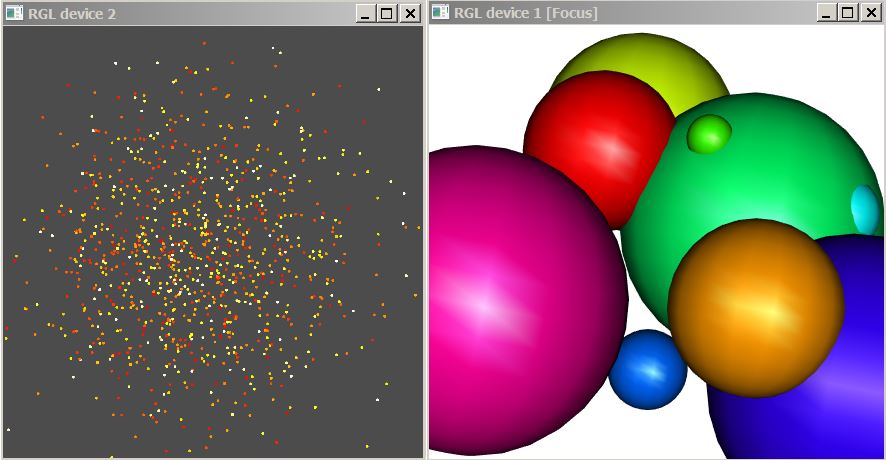
下面是R包rgl的一个示例,它也是OpenGL的包装器。看看球体上的白色部分。我不能用Haskell做到这一点。
回答 1
Stack Overflow用户
发布于 2018-03-07 23:42:09
Update:尝试1.0的亮点,以便在低分辨率时更清楚地看到这种差异。
亮度参数会影响镜面照明的清晰度,所以你需要为你的材料打开这种类型的照明,给它们一个镜面颜色。(默认情况下,镜面颜色为黑色,因此亮度参数的效果将不可见。)你也会想要降低这个场景的亮度值,因为它太高了,看不出来。
尝试:
materialSpecular Front $= white
materialShininess Front $= 1.0
你会开始看到白色的高光,特别是沿着弯曲的边缘你的形状。平面镜也会反射一些白光,但只有当它们几乎垂直于观众和光源之间的夹角时,这就有点复杂了。
请注意,大多数材料的镜面颜色被认为是某种白色的“多重”(即,对于场景中最光亮的材料,在黑色和白色之间)。唯一有颜色镜面颜色的材料是有色金属,如金或青铜。
一些补充说明:
- 您使用的是老式的OpenGL 2.1阴影,而不是“现代OpenGL",所以您不必太担心@ using 2297560所谈论的”着色器“。OpenGL 2.1附带内置着色器来进行基本的阴影处理;使用现代OpenGL,您必须从头开始构建所有的东西。
- 正如@luqui所提到的,如果你在寻找能真实反映场景其他部分的材料,这种亮丽不会对你有帮助。
这就是区别所在。你的原始代码在左边,设置在右边,在你的“复合五四面体”例子。如果你增加窗户的尺寸,它会看起来更好。
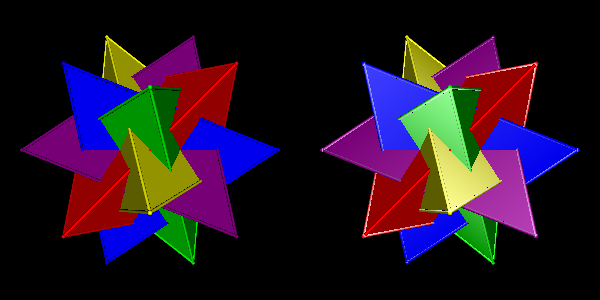
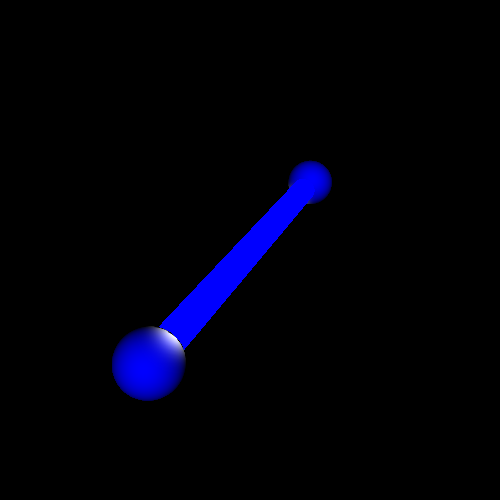
注意,它在曲面上工作得更好。下面是您的圆柱体示例,使用:
materialShininess Front $= 5
materialSpecular Front $= white
你可以看到近距离球体上的亮光。
https://stackoverflow.com/questions/49159030
复制相似问题
腾讯云开发者

Copyright © 2013 - 2026 Tencent Cloud. All Rights Reserved. 腾讯云 版权所有
深圳市腾讯计算机系统有限公司 ICP备案/许可证号:粤B2-20090059  粤公网安备44030502008569号
腾讯云计算(北京)有限责任公司 京ICP证150476号 | 京ICP备11018762号