
从Azure函数.csx查询.csx
从Azure函数.csx查询.csx
提问于 2018-03-07 09:13:07
我想查询一个CosmosDB集合,看看一个文档是否已经存在于使用csx的Azure函数中。
除了下面的代码之外,我还有一个与cosmosDB集合的隐式绑定,以便能够创建新文档。这是用
binder.BindAsync<IAsyncCollector<string>>(new CosmosDBAttribute("test", "collection")这是我的函数的一个简单版本。
#r "System"
#r "Microsoft.Azure.WebJobs.Extensions.CosmosDB"

using System;
using Microsoft.Azure.Documents;
using Microsoft.Azure.Documents.Client;

public static async Task<string> Run(string localityId, Binder binder, TraceWriter log)
{
    ...

    string EndpointUrl = "<your endpoint URL>";
    string PrimaryKey = "<your primary key>";
    DocumentClient client = new DocumentClient(new Uri(EndpointUrl), PrimaryKey);

    ...
}
这将导致以下错误消息:
错误CS0246:无法找到类型或命名空间名称'DocumentClient‘(您是缺少使用指令还是程序集引用?)
我已经安装了扩展程序Microsoft.Azure.WebJobs.Extensions.CosmosDB
我正在MacOS上运行,使用func host start命令进行本地测试。
回答 1
Stack Overflow用户
发布于 2018-03-07 09:33:33
错误CS0246:无法找到类型或命名空间名称'DocumentClient‘(您是缺少使用指令还是程序集引用?)
似乎您需要引用"Microsoft.Azure.Documents.Client". ##您还可以从Azure Cosmos DB绑定用于Azure函数获得演示代码。
 #r "Microsoft.Azure.Documents.Client"

    using System;
    using Microsoft.Azure.Documents;
    using System.Collections.Generic;


    public static void Run(IReadOnlyList<Document> documents, TraceWriter log)
    {
      log.Verbose("Documents modified " + documents.Count);
      log.Verbose("First document Id " + documents[0].Id);
    }
更新:
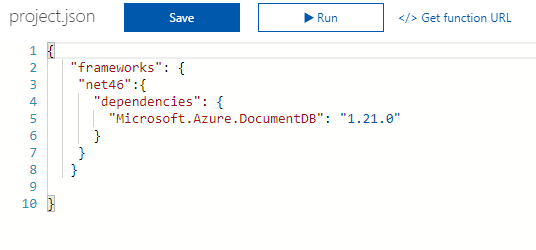
若要在NuGet函数中使用C#包,请将project.json文件上载到函数应用程序文件系统中的函数文件夹中。下面是添加引用的示例project.json文件
页面原文内容由Stack Overflow提供。腾讯云小微IT领域专用引擎提供翻译支持
原文链接:
https://stackoverflow.com/questions/49148030
复制相关文章
相似问题
腾讯云开发者

Copyright © 2013 - 2026 Tencent Cloud. All Rights Reserved. 腾讯云 版权所有
深圳市腾讯计算机系统有限公司 ICP备案/许可证号:粤B2-20090059  粤公网安备44030502008569号
腾讯云计算(北京)有限责任公司 京ICP证150476号 | 京ICP备11018762号