
在InSpec中处理属性
我试图创建一些基本的inspec测试来验证一组HTTP。我开始的方式是这样的-
control 'http-url-checks' do
  impact 1.0
  title 'http-url-checks'
  desc '
   Specify the URLs which need to be up and working.
  '
  tag 'http-url-checks'

  describe http('http://example.com') do
    its('status') { should eq 200 }
    its('body') { should match /abc/ }
    its('headers.name') { should eq 'header' }
  end

  describe http('http://example.net') do
    its('status') { should eq 200 }
    its('body') { should match /abc/ }
    its('headers.name') { should eq 'header' }
  end
end
我们注意到URL在控件中是硬编码的,并不是很有趣。我想将它们移动到某种类型的“属性”文件中,并在控制文件中循环它们。
我的尝试是在配置文件中使用‘file’文件夹结构。我创建了一个文件- httpurls.yml,其中包含了以下内容-
- url: http://example.com
- url: http://example.net
..and在我的控制文件中,我有一个构造-
  my_urls = yaml(content: inspec.profile.file('httpurls.yml')).params

  my_urls.each do |s|
    describe http(s['url']) do
      its('status') { should eq 200 }
    end
  end
但是,当我执行遵从性配置文件时,我会得到一个错误--“httpurls.yml not”(虽然不确定确切的错误消息)。下面是我的遵从性配置文件的文件夹结构。
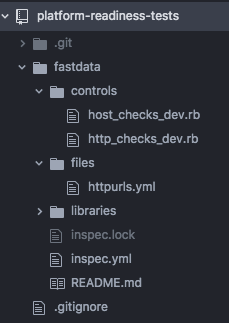
我做错什么了?
是否有更好的方法来实现我正在努力做的事情?
回答 2
Stack Overflow用户
发布于 2018-08-03 13:47:48
秘诀是使用配置文件属性,就像在本页面底部附近定义的那样:
https://www.inspec.io/docs/reference/profiles/
首先,创建一个配置文件属性YML文件。我叫我的profile-attribute.yml。
其次,将数组的值放在YML文件中,如下所示:
urls:
  - http://example.com
  - http://example.net
第三,在InSpec测试的顶部创建一个属性:
my_urls = attribute('urls', description: 'The URLs that I am validating.')第四,在InSpec测试中使用属性:
my_urls.each do |s|
  describe http(s['url']) do
    its('status') { should eq 200 }
  end
end最后,当您调用InSpec测试时,使用--attrs指向您的YML文件
inspec exec mytest.rb --reporter=cli --attrs profile-attribute.ymlStack Overflow用户
发布于 2019-01-29 15:11:59
还有一种方法可以使用文件(而不是配置文件属性和--attrs标志)来做到这一点。您可以使用JSON或YAML。
首先,创建JSON和/或YAML文件,并将它们放在files目录中。JSON文件的一个简单示例可能如下所示:
{
    "urls": ["https://www.google.com", "https://www.apple.com"]
}
一个简单的YAML文件示例可能如下所示:
urls:
- https://www.google.com
- https://www.apple.com
其次,将代码包含在InSpec文件的顶部,以读取和解析JSON和/或YAML,如下所示:
jsoncontent = inspec.profile.file("tmp.json")
jsonparams = JSON.parse(jsoncontent)
jsonurls = jsonparams['urls']

yamlcontent = inspec.profile.file("tmp.yaml")
yamlparams = YAML.load(yamlcontent)
yamlurls = yamlparams['urls']
第三,在InSpec测试中使用变量,如下所示:
jsonurls.each do |jsonurl|
  describe http(jsonurl) do
    puts "json url is " + jsonurl
    its('status') { should eq 200 }
  end
end

yamlurls.each do |yamlurl|
  describe http(yamlurl) do
    puts "yaml url is " + yamlurl
    its('status') { should eq 200 }
  end
end(注意:puts行用于调试。)
其结果就是你所期望的:
json url is https://www.google.com
json url is https://www.apple.com
yaml url is https://www.google.com
yaml url is https://www.apple.com

Profile: InSpec Profile (inspec-file-test)
Version: 0.1.0
Target:  local://

  http GET on https://www.google.com
     ✔  status should eq 200
  http GET on https://www.apple.com
     ✔  status should eq 200
  http GET on https://www.google.com
     ✔  status should eq 200
  http GET on https://www.apple.com
✔ status should eq 200https://stackoverflow.com/questions/49042560
复制相似问题
腾讯云开发者

Copyright © 2013 - 2026 Tencent Cloud. All Rights Reserved. 腾讯云 版权所有
深圳市腾讯计算机系统有限公司 ICP备案/许可证号:粤B2-20090059  粤公网安备44030502008569号
腾讯云计算(北京)有限责任公司 京ICP证150476号 | 京ICP备11018762号