
将图像添加到windows工作流自定义活动设计器中。
将图像添加到windows工作流自定义活动设计器中。
提问于 2018-02-26 14:39:30
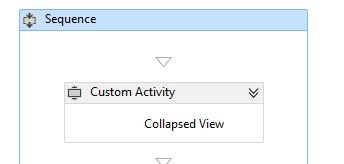
我正在Windows工作流中开发一些自定义活动,使用设计器为用户添加一些漂亮的自定义外观。虽然在实际的工作流视图中加载图像存在问题,但我仍然能够在WPF中完成所有类似的工作。这就是它在设计师中的样子

<sap:ActivityDesigner.Resources>
    <DataTemplate x:Key="Collapsed">
        <Grid>
            <Grid.ColumnDefinitions>
                <ColumnDefinition MaxWidth="40"/>
                <ColumnDefinition/>
            </Grid.ColumnDefinitions>
            <Image MaxWidth="40" MaxHeight="20" Grid.Column="0" HorizontalAlignment="Left" Source="pack://application:,,,/Images/Web.ico"></Image>
            <Label VerticalContentAlignment="Center" HorizontalContentAlignment="Center" Grid.Column="1">Collapsed View</Label>
        </Grid>
    </DataTemplate>
    <DataTemplate x:Key="Expanded">
     <Grid>
    <Label>hi</Label>
    </Grid>

    </DataTemplate>

    <Style x:Key="ExpandOrCollapsedStyle" TargetType="{x:Type ContentPresenter}">
        <Setter Property="ContentTemplate" Value="{DynamicResource Collapsed}"/>
        <Style.Triggers>
            <DataTrigger Binding="{Binding Path=ShowExpanded}" Value="true">
                <Setter Property="ContentTemplate" Value="{DynamicResource Expanded}"/>
            </DataTrigger>
        </Style.Triggers>
    </Style>
</sap:ActivityDesigner.Resources>
 <Grid>
    <ContentPresenter Style="{DynamicResource ExpandOrCollapsedStyle}" Content="{Binding}" />
</Grid>
</sap:ActivityDesigner>
但是在Visual 2015中创建工作流时,如下所示:
回答 1
Stack Overflow用户
回答已采纳
发布于 2018-03-09 13:58:38
我发现图像需要包含名称空间。图像标记应该类似于以下内容:
<Image MaxWidth="40" MaxHeight="20" Grid.Column="0" HorizontalAlignment="Left"
       Source="pack://application:,,,/MyNamespace;component/Lookup.png"></Image>
Lookup.png的构建操作应该是“资源”。
页面原文内容由Stack Overflow提供。腾讯云小微IT领域专用引擎提供翻译支持
原文链接:
https://stackoverflow.com/questions/48990986
复制相关文章
相似问题
腾讯云开发者

Copyright © 2013 - 2026 Tencent Cloud. All Rights Reserved. 腾讯云 版权所有
深圳市腾讯计算机系统有限公司 ICP备案/许可证号:粤B2-20090059  粤公网安备44030502008569号
腾讯云计算(北京)有限责任公司 京ICP证150476号 | 京ICP备11018762号