
PHP websocket断开连接问题
PHP websocket断开连接问题
提问于 2018-02-22 16:15:59
我已经测试了几个库(工人和PHP-Websockets),但在所有情况下我都有相同的问题--当我打开客户端页面时,一切正常,我与服务器有websocket连接,但稍后它会在几分钟或更短的时间内自动断开连接。它是已知的问题,还是有任何方法来处理它?或者,如果websocket失败了,我应该简单地实现一些函数来强制恢复吗?
这是workerman的代码示例
服务器test_ws.php
<?php
require_once '/home/ubuntu/workspace/workerman/vendor/autoload.php';
use Workerman\Worker;

// Create a Websocket server
$ws_worker = new Worker("websocket://0.0.0.0:8082");

// 6 processes
$ws_worker->count = 6;

// Emitted when new connection come
$ws_worker->onConnect = function($connection)
{
    echo "New connection\n";
    $connection->send('Hello from server');
};

// Emitted when data received
$ws_worker->onMessage = function($connection, $data)
{
    // Send hello $data
    $connection->send('Data from server: ' . $data);
};

// Emitted when connection closed
$ws_worker->onClose = function($connection)
{
    echo "Connection closed\n";
};

// Run worker
Worker::runAll();和客户端client.html
var socket = new WebSocket("wss://example.com:8082");

socket.onopen = function() {
   console.log("Connected.");
};

socket.onclose = function(event) {
   if (event.wasClean) {
      console.log('Connection closed');
   } else {
      console.log('Connection failure');
   }
   console.log('Code: ' + event.code + ' Reason: ' + event.reason);
};

socket.onmessage = function(event) {
   console.log("Data received: " + event.data);
};

socket.onerror = function(error) {
   console.log("Error: " + error.message);
};

function send() {
   socket.send("Hello!");
}<!DOCTYPE html>
<html lang="en">
<head>
<meta charset="UTF-8">
<meta name="viewport" content="width=device-width, initial-scale=1.0">
<meta http-equiv="X-UA-Compatible" content="ie=edge">
<title>Workerman Sockets Test</title>
</head>
<body>
<h3>Hello</h3>
<button onclick="send()">Send Message</button>
</body>
</html>
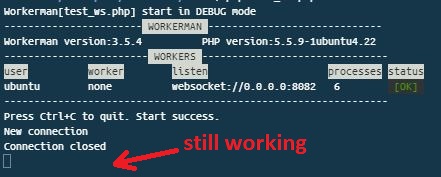
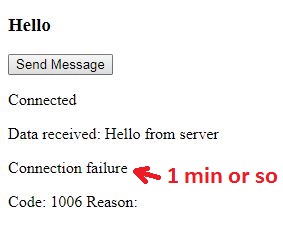
所以,首先我启动apache服务器,然后通过控制台运行我的websocket脚本,websocket服务器可以正常启动。然后我打开我的客户网页和websocket连接也建立了良好的,但如果我等待大约1分钟或更短的时间,它没有理由失败。如何建立永久的websocket连接?如有任何建议,将不胜感激。谢谢!
服务器
客户端
回答 1
Stack Overflow用户
回答已采纳
发布于 2018-02-24 04:52:04
正如这篇文章中所写的:“在建立了websocket连接的情况下,服务器或防火墙可以在一段时间不活动之后超时并终止连接。”
这就是解决办法!
修改后的客户页面:
<!DOCTYPE html>
<html lang="en">
<head>
    <meta charset="UTF-8">
    <meta name="viewport" content="width=device-width, initial-scale=1.0">
    <meta http-equiv="X-UA-Compatible" content="ie=edge">
    <title>Workerman Sockets Test</title>
</head>
<body>
    <h3>Hello</h3>
    <button onclick="send()">Send Message</button>
    <script type="text/javascript">
        var socket = new WebSocket("wss://example.com:8082");

        var timerID = 0;
        function keepAlive() {
            var timeout = 20000;
            if (socket.readyState == socket.OPEN) {
                socket.send('');
            }
            timerId = setTimeout(keepAlive, timeout);
        }
        function cancelKeepAlive() {
            if (timerId) {
                clearTimeout(timerId);
            }
        }

        socket.onopen = function() {
          console.log("Connected.");
          document.body.innerHTML += "<p>Connected.</p>";

          keepAlive();
        };

        socket.onclose = function(event) {
          if (event.wasClean) {
            console.log('Connection closed');
            document.body.innerHTML += "<p>Connection closed</p>";
          } else {
            console.log('Connection failure');
            document.body.innerHTML += "<p>Connection failure</p>";
          }
          console.log('Code: ' + event.code + ' Reason: ' + event.reason);
          document.body.innerHTML += "<p>Code: " + event.code + " Reason: " + event.reason + "</p>";

          cancelKeepAlive();
        };

        socket.onmessage = function(event) {
          console.log("Data received: " + event.data);
          document.body.innerHTML += "<p>Data received: " + event.data + "</p>";
        };

        socket.onerror = function(error) {
          console.log("Error: " + error.message);
          document.body.innerHTML += "<p>Error: " + event.message + "</p>";

          cancelKeepAlive();
        };

        function send() {
            socket.send("Hello");
        }
    </script>
</body>
</html>
希望它能对某人有所帮助。
页面原文内容由Stack Overflow提供。腾讯云小微IT领域专用引擎提供翻译支持
原文链接:
https://stackoverflow.com/questions/48932232
复制相关文章
相似问题
腾讯云开发者

Copyright © 2013 - 2026 Tencent Cloud. All Rights Reserved. 腾讯云 版权所有
深圳市腾讯计算机系统有限公司 ICP备案/许可证号:粤B2-20090059  粤公网安备44030502008569号
腾讯云计算(北京)有限责任公司 京ICP证150476号 | 京ICP备11018762号