
编辑-如何从第三党派库导入CSS
当我试图从第三方库导入CSS时,我陷入了困境。除了之外,有些LIB还需要导入css。
安装lib之后,我在组件中导入css,如下所示
import Cards from 'react-credit-cards'
import 'react-credit-cards/lib/styles.scss'
然后使用组件
<Cards
  number='XXXX XXXX XXXX XXXX'
  name='CARD HOLDER NAME'
  expiry='MONTH/YEAR'
  cvc='CVV/CVC'/>
第一次运行时,导入行中会出现错误(模块未找到)。
然后我将webpack更改为在节点模块上加载此文件,如下所示:
{
        test: /.css$/,
        loader: ExtractTextPlugin.extract('style', 'css?modules&importLoaders=1'),
        include: [
    >>>      /node_modules/, <<<
          /flexboxgrid/
        ]
      },
...
}
现在,它不会弹出错误,但是当我运行代码时,CSS不会被加载。我还尝试将css复制和粘贴添加到我的全局css文件中,但仍然无法工作。
最后,我的问题=D。要加载第三方lib,我需要在webpack.config上设置更多内容吗?
编辑。
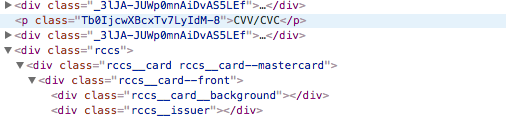
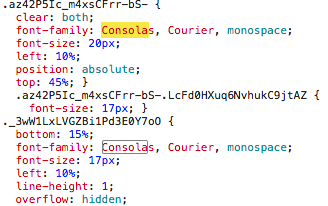
更改我的webpack文件后,CSS现在正在加载。但是,--看看下面的图片-- CSS在传递时认为webpack生成了一些哈希来识别类。卡片组件仍然带有原始名称,生成的CSS也带有此散列。
卡片组件
反应CSS -信用卡
这是我的webpack.config.json的装载机部分
const ExtractTextPlugin = require('extract-text-webpack-plugin')

const PATHS = {
  app: path.join(__dirname, 'src'),
  build: path.join(__dirname, 'build'),
  assets: path.join(__dirname, 'assets')
}

const common = {
  entry: [
    PATHS.app
  ],
  module: {
    loaders: [
      {
        test: /\.jsx?$/,
        exclude: /node_modules/,
        include: PATHS.app,
        loaders: ['babel']
      },
      {
        test: /.css$/,
        loader: ExtractTextPlugin.extract('style', 'css?modules&importLoaders=1'),
        include: /flexboxgrid/
      },
      {
        test: /\.scss$/,
        loader: ExtractTextPlugin.extract('style', 'css?modules&importLoaders=1!sass?sourceMap'),
        exclude: /flexboxgrid/
      },
      {
        test: /\.jpe?g$|\.gif$|\.png$/i,
        loader: 'url?name=/imgs/[name].[ext]'
      },
      {
        test: /\.(eot|svg|ttf|woff|woff2)$/,
        loader: 'url?name=/fonts/[name].[ext]'
      }
    ]
  },
  resolve: {
    extensions: ['', '.js', '.jsx'],
    modulesDirectories: [
      'node_modules',
      path.resolve(__dirname, './node_modules')
    ],
    packageMains: ['browser', 'web', 'browserify', 'main', 'style']
  }
}
...回答 2
Stack Overflow用户
发布于 2018-02-16 13:25:19
我假设您正在尝试加载SCSS文件,而不是CSS文件。
您的webpack.config.js的相应部分可以如下所示:
const ExtractTextPlugin = require('extract-text-webpack-plugin')

module.exports = {
  resolve: {
    modules: [
      path.join(__dirname, 'src'), // to load from your src folder
      path.join(__dirname, 'node_modules') // to load from node_modules
]
  },
  plugins: [
    new ExtractTextPlugin('app.css') // extract css and sass files into server.css bundle
  ],
  module: {
    rules: [
      ...
      {
        test: /\.(s?css|sass)$/, // css, scss and sass will be passed to sass-loader, then css-loader and then to ExtractTextPlugin and css will be extracted to app.css
        use: ExtractTextPlugin.extract({
          fallback: 'style-loader', // if can't extract css, inline it into JS bundle
          use: [
            { loader: 'css-loader', options: {sourceMap: true} },
            { loader: 'sass-loader', options: {sourceMap: true} }
          ]
        })
      },
这个配置是针对Webpack2的,我假设与Webpack3的差异是最小的。
Stack Overflow用户
发布于 2018-02-16 14:34:10
您正在尝试导入scss而不是css。你需要一个sass装载机。
做,
npm install sass-loader node-sass webpack --save-dev
然后,
将以下加载程序添加到webpack配置中。
{ test: /\.scss$/, include: paths.appSrc, loaders: ["style", "css", "sass"] }
https://stackoverflow.com/questions/48827077
复制相似问题
腾讯云开发者

Copyright © 2013 - 2026 Tencent Cloud. All Rights Reserved. 腾讯云 版权所有
深圳市腾讯计算机系统有限公司 ICP备案/许可证号:粤B2-20090059  粤公网安备44030502008569号
腾讯云计算(北京)有限责任公司 京ICP证150476号 | 京ICP备11018762号