
Qt5.10文档中关于QtQuick中键盘焦点的错误?
我正在阅读Qt来学习QtQuick中的键盘焦点!我运行文档中的代码。但是,结果与文档不同!代码如下。
main.qml
//Window code that imports MyWidget
Rectangle {
id: window
color: "white"; width: 240; height: 150

Column {
    anchors.centerIn: parent; spacing: 15

    MyWidget {
        focus: true             //set this MyWidget to receive the focus
        color: "lightblue"
    }
    MyWidget {
        color: "palegreen"
    }
}
MyWidget.qml
Rectangle {
  id: widget
  color: "lightsteelblue"; width: 175; height: 25; radius: 10; antialiasing:
  true
  Text { id: label; anchors.centerIn: parent}
  focus: true
  Keys.onPressed: {
      if (event.key == Qt.Key_A)
          label.text = 'Key A was pressed'
      else if (event.key == Qt.Key_B)
          label.text = 'Key B was pressed'
      else if (event.key == Qt.Key_C)
          label.text = 'Key C was pressed'
   }
}
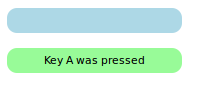
pic1是文档的结果。pic2是我运行的结果,我只是从doc复制代码并运行它。
pic1
pic2
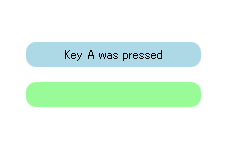
是虫子吗?为什么结果不同?
医生说
我们希望第一个MyWidget对象具有焦点,因此我们将其focus属性设置为true。但是,通过运行代码,我们可以确认第二个小部件接收到焦点。
查看MyWidget和窗口代码,问题很明显--有三种类型将focus属性设置为true。两个MyWidgets将焦点设置为true,而window组件也设置焦点。最终,只有一种类型可以有键盘焦点,系统必须决定哪种类型接收焦点。创建第二个MyWidget时,它接收焦点,因为它是将其focus属性设置为true的最后一个类型。
我的问题
1.为什么结果是不同的?在我的结果中,第一个小部件接收焦点。
2.此外,在doc中,“因为它是最后一次将其focus属性设置为true”的含义是什么?
你可以从这里得到的医生! Qt医生
回答 2
Stack Overflow用户
发布于 2018-03-05 23:44:16
我测试过很多次了。结果是一样的。也许医生已经过时了!
Stack Overflow用户
发布于 2018-03-15 10:57:50
当我运行代码时,我得到了与您相同的结果,但这并不重要。这里的要点是,如果没有FocusScope,您就无法控制哪个对象接收来自系统的焦点(您无法保证按照创建QML对象的顺序)。
您是否尝试将focus: true设置为第二个MyWidget?如果尝试,键盘事件仍将由第一个小部件接收,除非使用FocusScope。
请注意,您还可以从focus: true中删除MyWidget.qml,甚至不需要手动添加FocusScope (它将由应用程序窗口自动管理)。
https://stackoverflow.com/questions/48818049
复制相似问题
腾讯云开发者

Copyright © 2013 - 2026 Tencent Cloud. All Rights Reserved. 腾讯云 版权所有
深圳市腾讯计算机系统有限公司 ICP备案/许可证号:粤B2-20090059  粤公网安备44030502008569号
腾讯云计算(北京)有限责任公司 京ICP证150476号 | 京ICP备11018762号