
拆分一个单元格并将其内容插入一个单元格之上另一个单元格。
拆分一个单元格并将其内容插入一个单元格之上另一个单元格。
提问于 2018-02-15 11:31:21
我试图编写一个VBA命令,以便拆分一个单元格内容并插入它包含的所有内容,其中一个单元格高于另一个单元格。
Sub SplitInsert()

Dim Cell As Variant
Dim Cell1 As Variant
Dim i As Integer

'Input column is on column A that I manually select'
'Then I press plau'

For Each Cell In Selection
    'I split the current selected cell into a variant tab'
    Cell1 = Split(Cell.Value)

    'Then I do a second loop to insert every Cell1 values'
    'one after the other in column B'
    For i = 0 To UBound(Cell1)
        'I don't know how to insert and shift down just a cell,'
        'and not a row or a column'
        Cells(2, 1).Insert '....' shift:=xlShiftDown
    Next
Next Cell
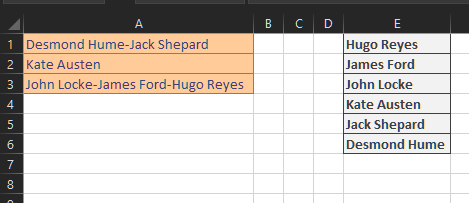
End Sub- 输入:
- 德斯蒙德休谟-杰克谢泼德
- 凯特·奥斯汀
- 约翰·洛克-詹姆斯·福特-雨果·雷耶斯
会变成
- 输出:
- 雨果·雷耶斯
- 詹姆斯·福特
- 骆家辉
- 凯特·奥斯汀
- 杰克·谢泼德
- 德斯蒙德休谟
(谢谢你的帮助:)
回答 3
Stack Overflow用户
发布于 2018-02-15 11:44:16
Sub Macro2()
Dim Cell As Range
Dim Cell1 As Variant
Dim i As Integer

'Input column is on column A that I manually select'
'Then I press plau'

For Each Cell In Selection

    'I split the current selected cell into a variant tab'
    Cell1 = Split(Cell.Value, "-")

    'Then I do a second loop to insert every Cell1 values'
    'one after the other in column B'
    For i = 0 To UBound(Cell1)
        'I don't know how to insert and shift down just a cell,'
        'and not a row or a column'

        Cells(1, 2).Insert Shift:=xlDown, CopyOrigin:=xlFormatFromLeftOrAbove
        Cells(1, 2).Value = Cell1(i)
    Next i

Next Cell
End Sub
试一试,让它适合你的需要。我对你的代码做了一些修改,但你走的路是对的。
- 将单元格从变体更改为范围
- 在
Cell1 = Split(Cell.Value)行中,您忘记了该方法的第二个参数。我加入它就像Cell1 = Split(Cell.Value, "-")一样 - 最后使用
Cells(1, 2).Value = Cell1(i)调用数组值。
Stack Overflow用户
发布于 2018-02-15 11:57:49
我不明白你所说的“一个细胞高于另一个细胞”是什么意思。所以也许Foxfire,Burns和Burns回答了你想要的结果。我的代码将在B中插入结果,并在输出中插入一行以具有结构化视图。我还更改了代码中的一些内容,并试图在代码后面进行注释,以更好地理解代码的功能。
Sub SplitInsert()
Dim Cell As Variant
Dim Cell1 As Variant
Dim i As Integer, j As Integer
Dim rng As Range
    Set rng = Selection                   ' get selection range
    j = Selection.Row                     ' get first selected row
    For Each Cell In rng                  ' perform for each on every cell in range
    Cell1 = Split(Cell.Value, "-")        ' added separator (I assume it's what you'd want to split?)

        For i = 0 To UBound(Cell1)
            If i > 0 Then Rows(j).Insert  ' only insert line if it's not the first value
            Cells(j, 2).Value = Cell1(i)  ' insert value in B
            j = j + 1                     ' increase row counter
        Next i
    Next Cell
End SubStack Overflow用户
发布于 2018-02-15 13:09:27
从工作表上读/写要花很多时间。对于小列表来说不是问题,而是大列表的问题。
下面的代码避免了
- 将源数据读入变体数组中。
- 将每个项拆分,然后依次输入一个集合对象。
- 创建结果数组并按反向顺序从集合中填充
- 将结果数组写回工作表
Option Explicit
Sub SplitNames()
    Dim wsSrc As Worksheet, wsRes As Worksheet, rRes As Range
    Dim vSrc As Variant, vRes() As Variant
    Dim cNames As Collection
    Dim V As Variant
    Dim I As Long, J As Long

'Set results and source worksheets and ranges
Set wsSrc = Worksheets("sheet1")
Set wsRes = Worksheets("sheet1")
    Set rRes = wsRes.Cells(1, 5)

'read source data into array
'you could use  vSrc=Selection  instead of determining the range as below
'the code below assumes the data is in column A starting at A1
With wsSrc
    vSrc = .Range(.Cells(1, 1), .Cells(.Rows.Count, 1).End(xlUp))
End With

'split the names and read them into collection
Set cNames = New Collection
For I = 1 To UBound(vSrc, 1)
    V = Split(vSrc(I, 1), "-")
    For J = 0 To UBound(V)
        cNames.Add V(J)
    Next J
Next I

'create results array in reverse order
ReDim vRes(1 To cNames.Count, 1 To 1)
For I = 1 To cNames.Count
    vRes(cNames.Count + 1 - I, 1) = cNames(I)
Next I

'write the results
Set rRes = rRes.Resize(rowsize:=UBound(vRes, 1))
With rRes
    .EntireColumn.Clear
    .Value = vRes
    .EntireColumn.AutoFit
End With

End Sub
页面原文内容由Stack Overflow提供。腾讯云小微IT领域专用引擎提供翻译支持
原文链接:
https://stackoverflow.com/questions/48806206
复制相关文章
相似问题
腾讯云开发者

Copyright © 2013 - 2026 Tencent Cloud. All Rights Reserved. 腾讯云 版权所有
深圳市腾讯计算机系统有限公司 ICP备案/许可证号:粤B2-20090059  粤公网安备44030502008569号
腾讯云计算(北京)有限责任公司 京ICP证150476号 | 京ICP备11018762号