
如何在collectionView自定义布局中将标题辅助单元格添加到其他补充标头单元格之上
如何在collectionView自定义布局中将标题辅助单元格添加到其他补充标头单元格之上
提问于 2018-02-14 10:44:22
所以我有一个custom layout collectionView,它看起来像这样:

在@McDonal_11的帮助下,我这样做了,使用的是自定义布局,而不是允许我的collectionView在单独的列中显示每个section及其项的flowLayout。
问题是,我想在supplementary header 之上添加一个,所有这些supplementary headers都不是sections的一部分。
就像这样:
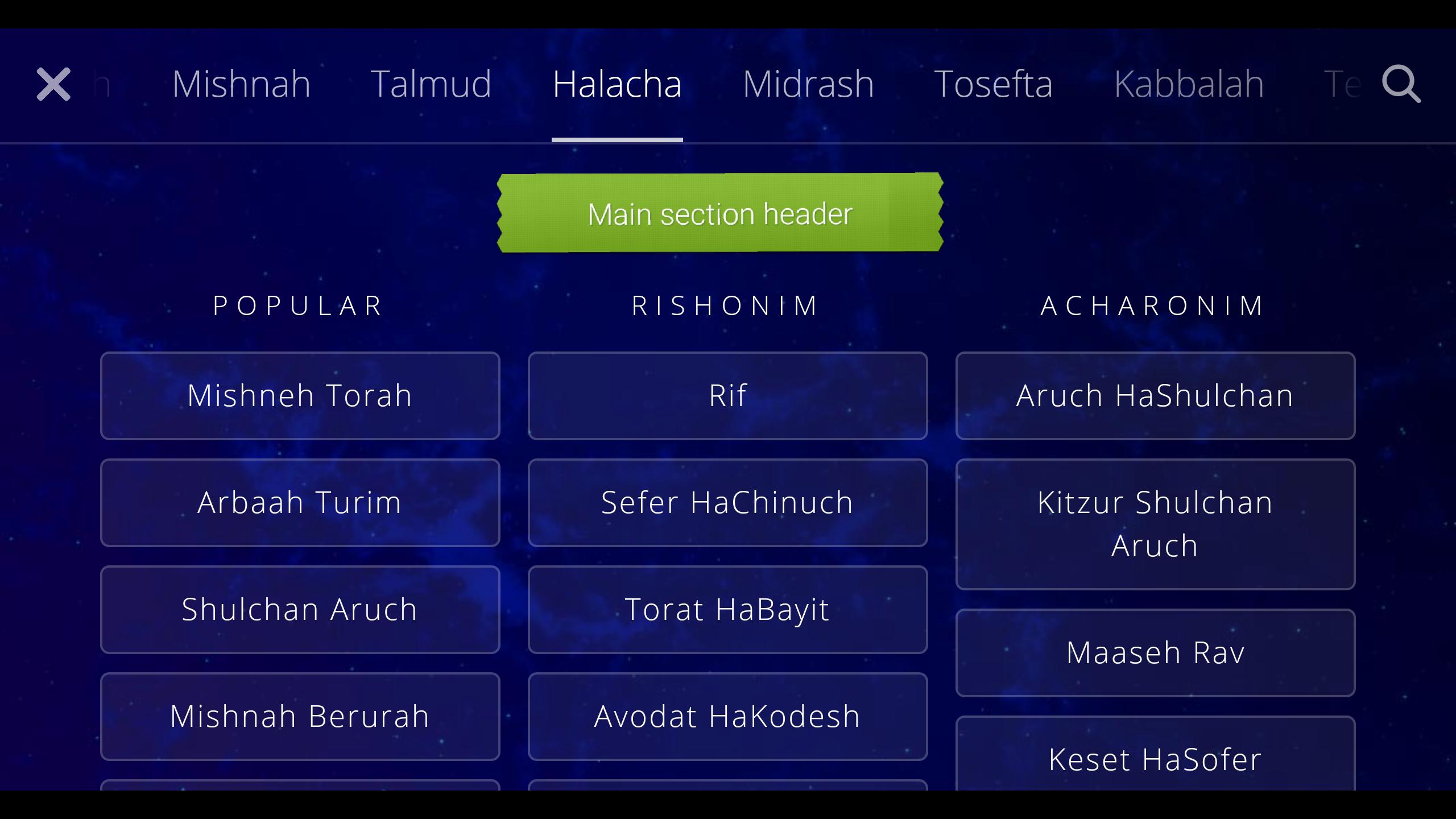
我该如何做呢?
回答 1
Stack Overflow用户
发布于 2018-02-16 06:41:37
在下面的更改中,您将接近该结果。
对于肖像,我为0节和0项更改了xPosition和Cell width
对于景观,我已经更改了xPosition,yPosition和Cell width的0节和0项。
我为Cell做了一些逻辑,应该是SuperView的中心。
override func prepare() {

    dataSourceDidUpdate = false

    if UIDevice.current.orientation == .landscapeLeft || UIDevice.current.orientation == .landscapeRight
    {
        if let sectionCount = collectionView?.numberOfSections, sectionCount > 0 {
            for section in 0...sectionCount-1 {

                let maxNum = max(section, sectionCount + 1)
                let minNum = min(section, sectionCount + 1)

                let difference = maxNum - minNum

                var xPos = (Double(UIScreen.main.bounds.width) - (Double(difference) * CELL_WIDTH) - (Double(difference) * horizontalSpacing))

                var yPos : Double = 35.0

                if let rowCount = collectionView?.numberOfItems(inSection: section), rowCount > 0 {

                    for item in 0...rowCount-1 {


                        xPos = (Double(UIScreen.main.bounds.width) - (Double(difference) * CELL_WIDTH) - (Double(difference) * horizontalSpacing))

                        CELL_WIDTH = 100.0

                        let cellIndex = IndexPath(item: item, section: section)

                        if item == 0
                        {
                            portrait_Ypos = headerSpacing + 30
                        }
                        else
                        {
                            portrait_Ypos = portrait_Ypos + CELL_HEIGHT + verticalSpaing
                        }
                        yPos = portrait_Ypos

                        if section == 0 && item == 0
                        {
                            xPos = 20
                            yPos = 0.0
                            CELL_WIDTH = (Double(UIScreen.main.bounds.width)) - 40
                        }


                        let cellAttributes = UICollectionViewLayoutAttributes(forCellWith: cellIndex)
                        cellAttributes.frame = CGRect(x: xPos, y: yPos, width: CELL_WIDTH, height: CELL_HEIGHT)


                        xPos = (Double(UIScreen.main.bounds.width) - (Double(difference) * CELL_WIDTH) - (Double(difference) * horizontalSpacing))

                        CELL_WIDTH = 100.0
                        yPos = 35.0

                        // Determine zIndex based on cell type.
                        if section == 0 && item == 0 {
                            cellAttributes.zIndex = 4
                        } else if section == 0 {
                            cellAttributes.zIndex = 3
                        } else if item == 0 {
                            cellAttributes.zIndex = 2
                        } else {
                            cellAttributes.zIndex = 1
                        }
                        cellAttrsDictionary[cellIndex] = cellAttributes

                    }

                }

            }
        }

        let contentWidth = Double(collectionView!.numberOfSections) * CELL_WIDTH + (Double(collectionView!.numberOfSections - 1) * horizontalSpacing)
        let contentHeight = Double(collectionView!.numberOfSections) * CELL_HEIGHT
        self.contentSize = CGSize(width: contentWidth, height: contentHeight)

        print("self.contentSizeself.contentSize     ", self.contentSize)
    }
    else
    {
        if let sectionCount = collectionView?.numberOfSections, sectionCount > 0 {

            for section in 0...sectionCount-1 {

                var xPos = (Double(UIScreen.main.bounds.width) - CELL_WIDTH) / 2.0

                if let rowCount = collectionView?.numberOfItems(inSection: section), rowCount > 0 {
                    for item in 0...rowCount-1 {

                        xPos = (Double(UIScreen.main.bounds.width) - CELL_WIDTH) / 2.0
                        CELL_WIDTH = 100.0

                        let cellIndex = IndexPath(item: item, section: section)

                        if section != 0
                        {
                            if item == 0
                            {
                                portrait_Ypos = portrait_Ypos + CELL_HEIGHT + headerSpacing
                            }
                            else
                            {

                                portrait_Ypos = portrait_Ypos + CELL_HEIGHT + verticalSpaing
                            }
                        }
                        else
                        {
                            if item == 0
                            {
                                portrait_Ypos = headerSpacing

                                xPos = 20
                                CELL_WIDTH = (Double(UIScreen.main.bounds.width)) - 40

                            }
                            else
                            {
                                portrait_Ypos = portrait_Ypos + CELL_HEIGHT + verticalSpaing
                            }
                        }

                        let cellAttributes = UICollectionViewLayoutAttributes(forCellWith: cellIndex)
                        cellAttributes.frame = CGRect(x: xPos, y: portrait_Ypos, width: CELL_WIDTH, height: CELL_HEIGHT)

                        xPos = (Double(UIScreen.main.bounds.width) - CELL_WIDTH) / 2.0
                        CELL_WIDTH = 100.0

                        if section == 0 && item == 0 {
                            cellAttributes.zIndex = 4
                        } else if section == 0 {
                            cellAttributes.zIndex = 3
                        } else if item == 0 {
                            cellAttributes.zIndex = 2
                        } else {
                            cellAttributes.zIndex = 1
                        }
                        cellAttrsDictionary[cellIndex] = cellAttributes

                    }

                }

            }
        }

        let contentWidth = UIScreen.main.bounds.width
        let contentHeight = CGFloat(portrait_Ypos) + CGFloat(CELL_HEIGHT)
        self.contentSize = CGSize(width: contentWidth, height: contentHeight)

        print("sPort.contentSize     ", self.contentSize)
    }


}不添加0节的标题
override func layoutAttributesForElements(in rect: CGRect) -> [UICollectionViewLayoutAttributes]? {

    var attributesInRect = [UICollectionViewLayoutAttributes]()

    for cellAttributes in cellAttrsDictionary.values {
        if rect.intersects(cellAttributes.frame) {

            attributesInRect.append(cellAttributes)

            let celIndPth = cellAttributes.indexPath

            if celIndPth.section != 0
            {
                if celIndPth.item == 0
                {
                    if let supplementaryAttributes = layoutAttributesForSupplementaryView(ofKind: UICollectionElementKindSectionHeader, at: cellAttributes.indexPath) {
                        attributesInRect.append(supplementaryAttributes)
                    }

                }
            }

        }
    }

    return attributesInRect
}

override func layoutAttributesForItem(at indexPath: IndexPath) -> UICollectionViewLayoutAttributes? {

    return cellAttrsDictionary[indexPath]!

}用于项目的单元
 override func collectionView(_ collectionView: UICollectionView, cellForItemAt indexPath: IndexPath) -> UICollectionViewCell {
    let cell = collectionView.dequeueReusableCell(withReuseIdentifier:  "Cell", for: indexPath) as! RulesCollectionViewCell
    cell.backgroundColor = UIColor.clear

    cell.layer.borderColor = UIColor(red: 83/255, green: 50/255, blue: 129/255, alpha: 1.0).cgColor
    cell.layer.borderWidth = 1.0
    cell.txtLbl.text = values[indexPath.section][indexPath.row]
    cell.txtLbl.textAlignment = .center
    cell.txtLbl.textColor = UIColor.white


    if indexPath.section == 0 && indexPath.row == 0
    {
        cell.backgroundColor = UIColor.white
        cell.txtLbl.textColor = UIColor.red
    }


    cell.layer.cornerRadius = 5

    cell.alpha = 1.0
    return cell
}
阵列声明
let values = [["Main Header"],["a","b","c","d","e","f"], ["a","b","c"], ["a","b","c","d"], ["a","b","c","d","e","f"]]输出
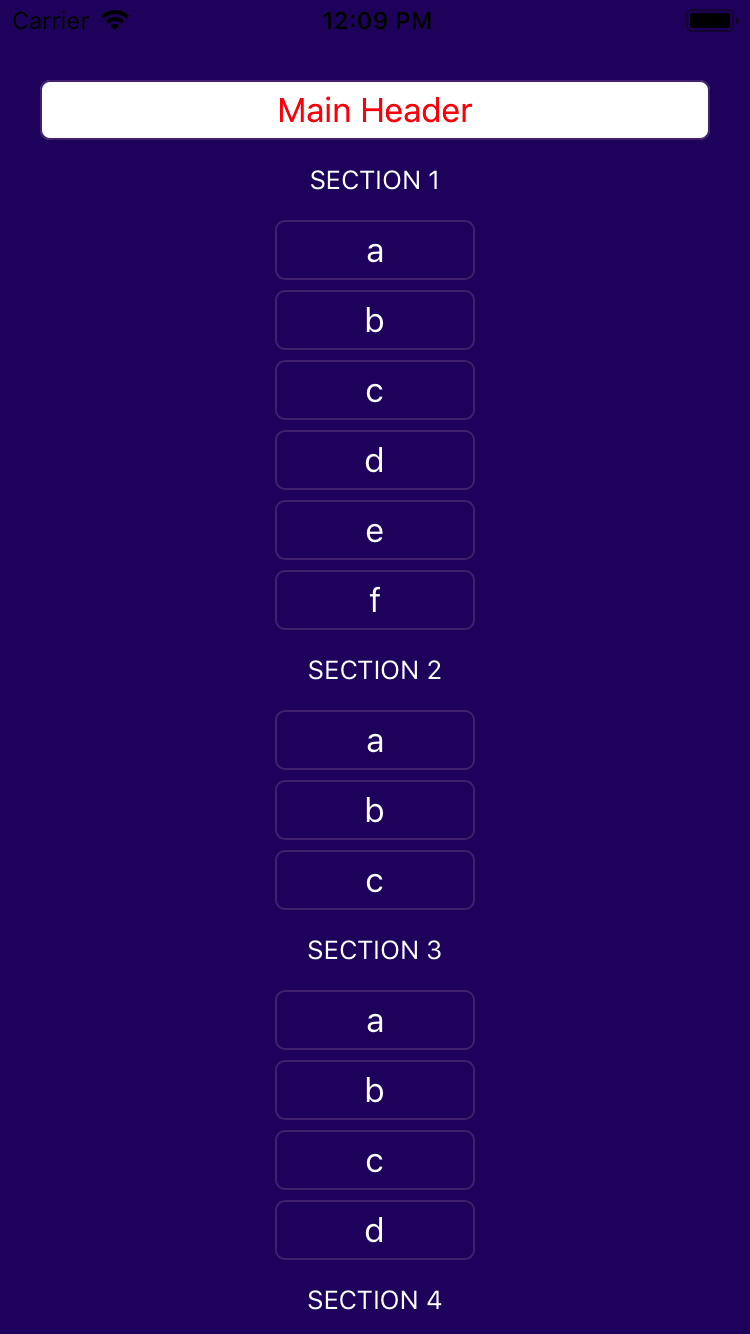
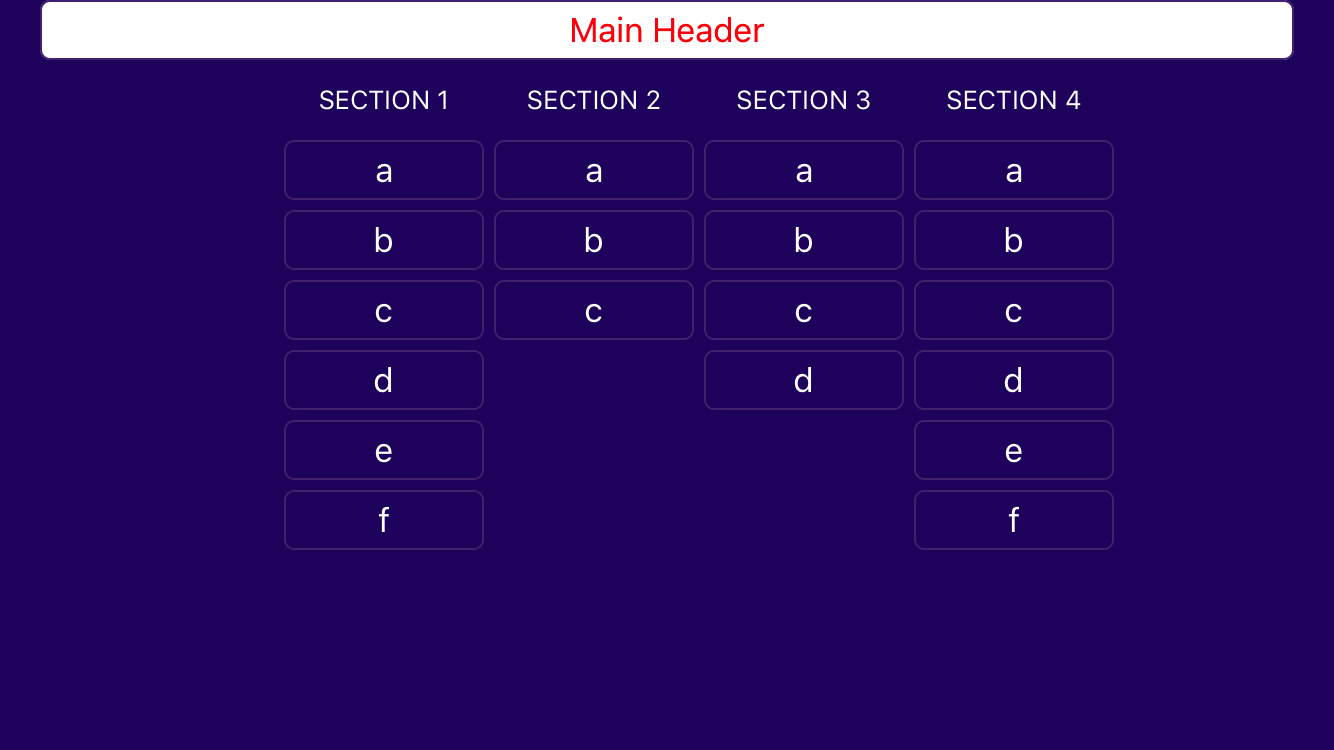
页面原文内容由Stack Overflow提供。腾讯云小微IT领域专用引擎提供翻译支持
原文链接:
https://stackoverflow.com/questions/48785192
复制相关文章
相似问题
腾讯云开发者

Copyright © 2013 - 2026 Tencent Cloud. All Rights Reserved. 腾讯云 版权所有
深圳市腾讯计算机系统有限公司 ICP备案/许可证号:粤B2-20090059  粤公网安备44030502008569号
腾讯云计算(北京)有限责任公司 京ICP证150476号 | 京ICP备11018762号