
UIPresentationController崩溃只是指向AppDelegate
截图:

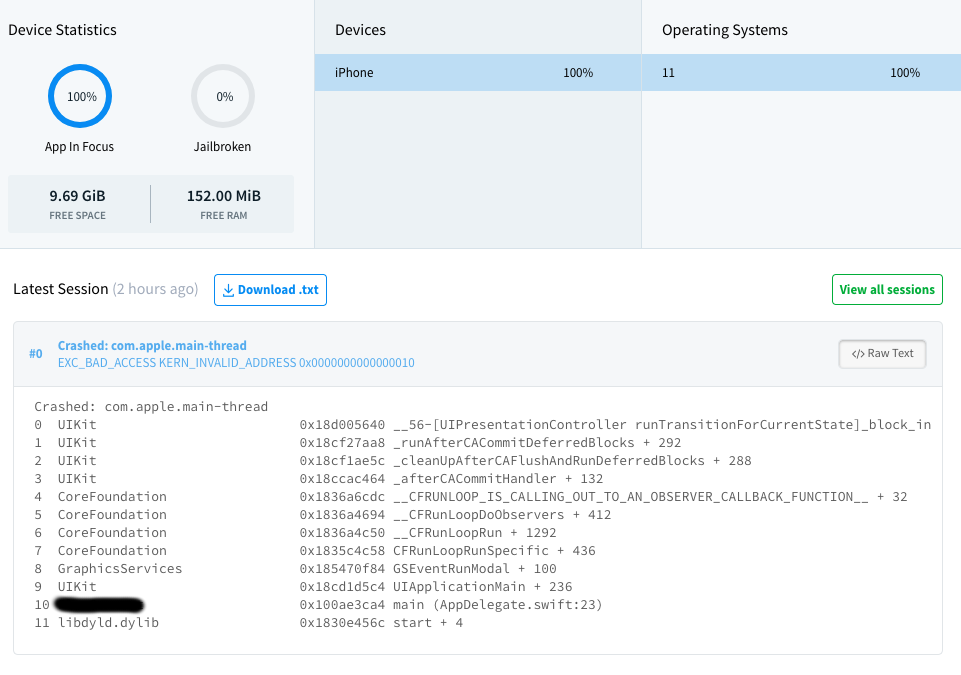
我得到了很多这样的崩溃,但问题是,我只是被指到我的appDelegate第一线。我不知道在哪里找这个问题。有什么想法可以让我从下面的坠机报告开始调查吗?
Crashed: com.apple.main-thread
0  UIKit                          0x18d005640 __56-

[UIPresentationController runTransitionForCurrentState]_block_invoke + 460
1  UIKit                          0x18cf27aa8 _runAfterCACommitDeferredBlocks + 292
2  UIKit                          0x18cf1ae5c _cleanUpAfterCAFlushAndRunDeferredBlocks + 288
3  UIKit                          0x18ccac464 _afterCACommitHandler + 132
4  CoreFoundation                 0x1836a6cdc __CFRUNLOOP_IS_CALLING_OUT_TO_AN_OBSERVER_CALLBACK_FUNCTION__ + 32
5  CoreFoundation                 0x1836a4694 __CFRunLoopDoObservers + 412
6  CoreFoundation                 0x1836a4c50 __CFRunLoopRun + 1292
7  CoreFoundation                 0x1835c4c58 CFRunLoopRunSpecific + 436
8  GraphicsServices               0x185470f84 GSEventRunModal + 100
9  UIKit                          0x18cd1d5c4 UIApplicationMain + 236
10 AppName                        0x100ae3ca4 main (AppDelegate.swift:23)
11 libdyld.dylib                  0x1830e456c start + 4
更新:
依据如下:
App crashing on runTransitionForCurrentState but no clue as to why
我正在寻找潜在的原因,并对下面的代码感到好奇。
在进行同步过程时,我有以下功能,用于显示带有活动指示符的视图。
public func displayActivityAlertWithCompletion(_ title: String, ViewController: UIViewController, completionHandler: @escaping ()->())
{
    let pending = UIAlertController(title: "\n\n\n"+title, message: nil, preferredStyle: .alert)
    //create an activity indicator
    let indicator = UIActivityIndicatorView(frame: pending.view.bounds)
    indicator.autoresizingMask = [.flexibleWidth, .flexibleHeight]
    indicator.color = UIColor(rgba: Palette.loadingColour)
    //add the activity indicator as a subview of the alert controller's view
    pending.view.addSubview(indicator)
    indicator.isUserInteractionEnabled = false
    // required otherwise if there buttons in the UIAlertController you will not be able to press them
    indicator.startAnimating()


    ViewController.present(pending, animated: true, completion: completionHandler)
}
然后,我像这样使用这个功能:
displayActivityAlertWithCompletion("Pushing Data", ViewController: self){_ in
    Helper_class.doSync(_cleanSync: false){
        //sync is complete
        Prefs.is_Syncing = false
        DispatchQueue.main.async {
            //dismiss my view with activity alert
            self.dismiss(animated: true){
                //dismiss my viewcontroller
                Toast(text: "Upload sync completed").show()
                self.dismiss(animated: true, completion: nil)
            }
        }
    }
}
这会不会成为UIKit问题的潜在原因?
回答 4
Stack Overflow用户
发布于 2018-02-13 10:57:58
按照以下步骤,您可以完成以下操作: 1.打开导航器;2.切换到BreakPoint导航器;3.单击左下角的"+“按钮;4.弹出时,单击"Exception BreakPoint”。
然后再运行您的项目,它将在确切的点崩溃。
Stack Overflow用户
发布于 2018-02-13 11:08:34
以下是我的建议:
- 试着自己复制这个问题。因为您知道哪个屏幕有崩溃,所以您可以很容易地识别导致崩溃的视图控制器/类。这将是一个很好的开始。一旦你确定了类,检查
- 如果在屏幕加载或离开屏幕时发生崩溃。在
UIViewController函数上放置断点--viewDidLoad、viewWillAppear、viewWillDisappear等。 - 如果发生崩溃的事件,如按钮点击,段更改或表重新加载。
- 如果在屏幕加载或离开屏幕时发生崩溃。在
- 从Crashlytics report获得更多信息。它总是伴随着发生崩溃的文件名。我已经附加了一个Crashlytics屏幕截图,它显示了崩溃列表和文件名。
- 在进行上述操作后,请使用更多信息更新您的问题。

根据您的代码,您要删除同一viewController两次。将pending作为全局变量。并将其视为:
pending.dismiss(animated: true, completion: nil)
DispatchQueue.main.asyncAfter(deadline: .now() + .seconds(0.1)) {
    self.dismiss(animated: true, completion: nil)  // This will be called after above time gap.
}Stack Overflow用户
发布于 2018-02-13 11:50:28
在某一年进行某些迁移时,UIPresentationController构造函数中的崩溃引起了问题。
对我来说,这个问题是通过将presenting改为UIViewControllerTransitioningDelegate中的source来解决的。
比如:
public func presentationController(forPresented presented: UIViewController, presenting: UIViewController?, source: UIViewController) -> UIPresentationController? {
    return PresentationController(presentedViewController: presented, presenting: source)
}
虽然它一直都是可以复制的,所以也许不是同一个问题。
https://stackoverflow.com/questions/48764872
复制相似问题
腾讯云开发者

Copyright © 2013 - 2026 Tencent Cloud. All Rights Reserved. 腾讯云 版权所有
深圳市腾讯计算机系统有限公司 ICP备案/许可证号:粤B2-20090059  粤公网安备44030502008569号
腾讯云计算(北京)有限责任公司 京ICP证150476号 | 京ICP备11018762号