
在将行插入蔚蓝表时获取错误
在将行插入蔚蓝表时获取错误
提问于 2018-02-12 16:58:51
我正试图使用PowerShell上传蔚蓝表行,并收到以下错误。这可能是因为Azure存储powershell模块错误吗?我正在使用Azure.Storage 4.0.2模块。
“守则”如下:
# Getting all the resource group
$resource_group_list = Get-AzureRmResourceGroup

# Iterating through the resource group
foreach($resource_group_list_iterator in $resource_group_list){

    # Since the solution applies for virtual machines,
    # obtain the list of virtual machines for the resource group
    $virtual_machine_list = get-azurermvm -ResourceGroupName $resource_group_list_iterator.ResourceGroupName

    # Proceed only when resource group contains virtual machines
    if(!($virtual_machine_list -eq $null)){

        # Iterate through the virtual machine list
        foreach($virtual_machine_list_iterator in $virtual_machine_list){

            # Creat an unique ID by concatinating 'Resource Group name' and 'Virtual Machine name'
            $unique_id = $resource_group_list_iterator.ResourceGroupName + $virtual_machine_list_iterator.name
            #Write-Host $unique_id
            $tag_list = $virtual_machine_list_iterator.Tags

            $tag_list.GetEnumerator() | foreach {
            #write-host $_.key
            #Write-Host $_.value
            #write-host ""

            $partitionKey1 = $unique_id

            if($_.key -eq 'owner' -and $_.value -eq 'ibm') {
                #write-host "true"
                $virtual_machine_name = $virtual_machine_list_iterator.Name.ToString()
                $virtual_machine_resource_group_name = $resource_group_list_iterator.ResourceGroupName.ToString()
                $virtual_machine_location = $virtual_machine_list_iterator.Location.ToString()
                $virtual_machine_size = $virtual_machine_list_iterator.HardwareProfile.VmSize.ToString()
                $virtual_machine_operating_system = $virtual_machine_list_iterator.StorageProfile.ImageReference.Offer.ToString()


                $hash = @{}
                #$hash.add('currentDate', $current_date)
                $hash.Add('VM Name','VM')
                $hash.Add('Resource Group',$virtual_machine_resource_group_name)
                $hash.add('Location',$virtual_machine_location)
                $hash.add('VM Size',$virtual_machine_size)
                $hash.add('Operating System',$virtual_machine_operating_system)

                Add-StorageTableRow -table $azure_table_object -partitionKey ("CA") -rowKey $unique_id -property $hash

            }
           }

        }

    }

}
以下是我收到的例外情况:
Exception calling "Execute" with "1" argument(s): "The remote server returned an error: (400)
Bad Request."
At C:\Program Files\WindowsPowerShell\Modules\AzureRmStorageTable\1.0.0.21\AzureRmStorageTableCor
eHelper.psm1:267 char:16
+ ...      return ($table.CloudTable.Execute((invoke-expression "[Microsoft ...
+                 ~~~~~~~~~~~~~~~~~~~~~~~~~~~~~~~~~~~~~~~~~~~~~~~~~~~~~~~~~
    + CategoryInfo          : NotSpecified: (:) [], MethodInvocationException
    + FullyQualifiedErrorId : StorageException
关于如何排除故障,我已经浏览了很少的在线资源,但是我没有得到任何解决方案。
回答 1
Stack Overflow用户
回答已采纳
发布于 2018-02-13 07:02:36
我使用提示器捕捉到在我这一边用代码添加实体请求。然后我就可以得到属性名称无效的详细信息。
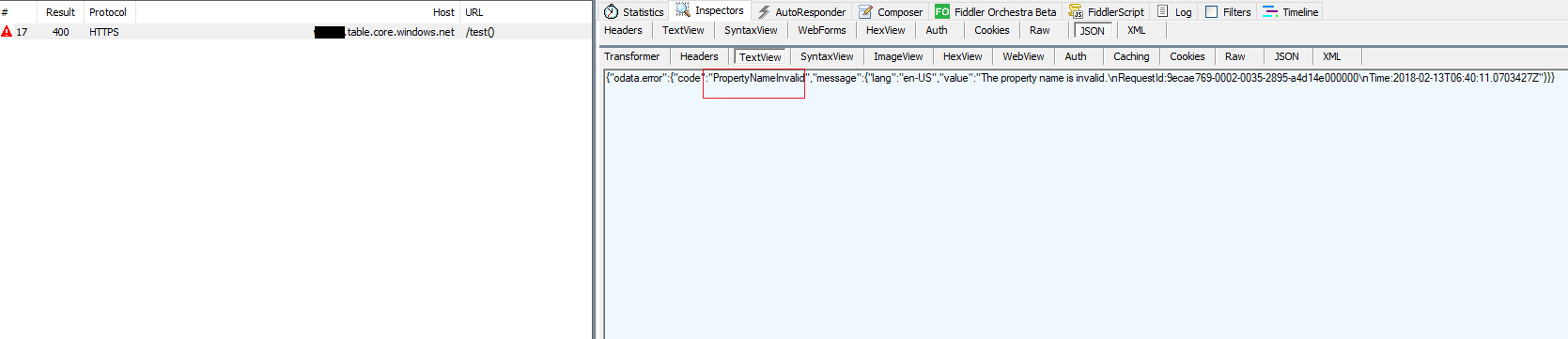
因此,请尝试用以下代码更改属性名。
$hash.Add('VM_Name','VM')  #VM Name is invalid
$hash.Add('Resource_Group',$virtual_machine_resource_group_name) #Resource Group is invalid
$hash.add('Location',$virtual_machine_location)
$hash.add('VM_Size',$virtual_machine_size) #VM size is invalid
$hash.add('Operating_System',"windows")
Add-StorageTableRow -table $table -partitionKey ("CA") -rowKey $unique_id -property $hash有关蔚蓝表属性名称的详细信息,请参阅此文档。
poperty名称是区分大小写的字符串,大小可达255个字符。属性名称应遵循C#标识符的命名规则。
测试结果:

页面原文内容由Stack Overflow提供。腾讯云小微IT领域专用引擎提供翻译支持
原文链接:
https://stackoverflow.com/questions/48751670
复制相关文章
相似问题
腾讯云开发者

Copyright © 2013 - 2026 Tencent Cloud. All Rights Reserved. 腾讯云 版权所有
深圳市腾讯计算机系统有限公司 ICP备案/许可证号:粤B2-20090059  粤公网安备44030502008569号
腾讯云计算(北京)有限责任公司 京ICP证150476号 | 京ICP备11018762号