
DatePickerDialog失踪天数
DatePickerDialog失踪天数
提问于 2018-02-11 16:09:10
当我创建一个DatePickerDialog时,我有一个非常奇怪的行为。没有特别的主题或任何定制,我得到所有的白色背景上的白色文本,所以没有显示的日子。你可以在这里看到截图:
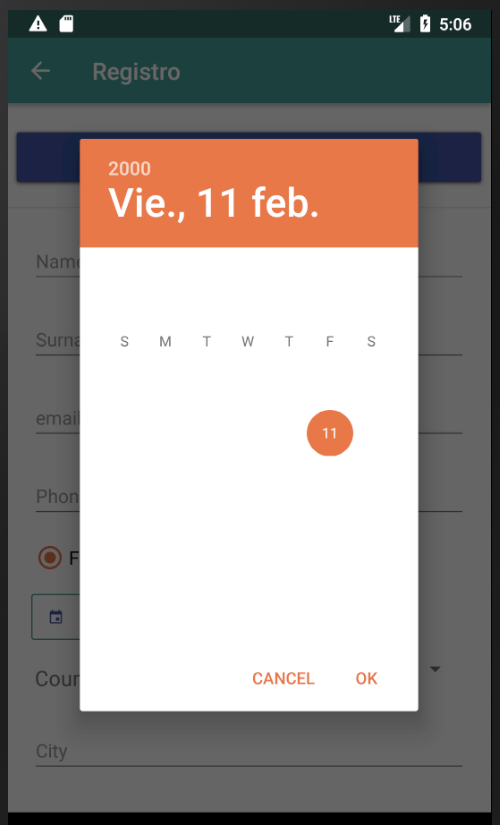
知道什么是不对的吗?
编辑
这里有我创建对话框的代码,没有什么特别之处。
        Date date = DateUtils.getDateMinusYears(18);
        Calendar calendar = new GregorianCalendar();
        calendar.setTime(date);

        final SimpleDateFormat dateFormatter = new SimpleDateFormat("dd-MM-yyyy", Locale.US);

        datePickerDialog = new DatePickerDialog(this, new DatePickerDialog.OnDateSetListener()
        {

            public void onDateSet(DatePicker view, int year, int monthOfYear, int dayOfMonth)
            {
                Calendar newDate = Calendar.getInstance();
                newDate.set(year, monthOfYear, dayOfMonth);
                mTextDateBirth.setText(dateFormatter.format(newDate.getTime()));
                mImgIconDate.setVisibility(View.GONE);

                btnDate.setBackgroundResource(R.drawable.global_background_with_border_orange);
            }
        }, calendar.get(Calendar.YEAR), calendar.get(Calendar.MONTH), calendar.get(Calendar.DAY_OF_MONTH));
    }
datePickerDialog.show();回答 1
Stack Overflow用户
发布于 2018-02-11 16:19:15
试着玩颜色
 <style name="datepicker" parent="Theme.AppCompat.Light.Dialog">
            <item name="colorPrimary">@color/colorPrimary</item>
            <item name="colorPrimaryDark">@color/colorPrimaryDark</item>
            <item name="colorAccent">@color/colorPrimary</item>
        </style>
java
     private int mYear, mMonth, mDay;


               final Calendar c = Calendar.getInstance();
                    mYear = c.get(Calendar.YEAR);
                    mMonth = c.get(Calendar.MONTH);
                    mDay = c.get(Calendar.DAY_OF_MONTH);

                    DatePickerDialog datePickerDialog = new
 DatePickerDialog(yourActivity.this, R.style.datepicker,
                            new DatePickerDialog.OnDateSetListener()
                            {
                                @Override
                                public void onDateSet(DatePicker view, int year, int monthOfYear, int dayOfMonth)
                                {
                                    youredittext.setText(dayOfMonth + "-" + (monthOfYear + 1) + "-" + year);
                                }
                            }, mYear, mMonth, mDay);
datePickerDialog.show();页面原文内容由Stack Overflow提供。腾讯云小微IT领域专用引擎提供翻译支持
原文链接:
https://stackoverflow.com/questions/48733524
复制相关文章
相似问题
腾讯云开发者

Copyright © 2013 - 2026 Tencent Cloud. All Rights Reserved. 腾讯云 版权所有
深圳市腾讯计算机系统有限公司 ICP备案/许可证号:粤B2-20090059  粤公网安备44030502008569号
腾讯云计算(北京)有限责任公司 京ICP证150476号 | 京ICP备11018762号