
ggplot2中不同叠加颜色的对比分析
ggplot2中不同叠加颜色的对比分析
提问于 2018-02-09 23:05:42
我有一个更大的数据集,类似于以下内容:
example = data.frame(
  person = c(1,1,1, 2,2,2, 3,3,3),
  score =  c(5,1,2, 3,5,1, 1,2,2),
  round =  c(1,2,3, 1,2,3, 1,2,3)
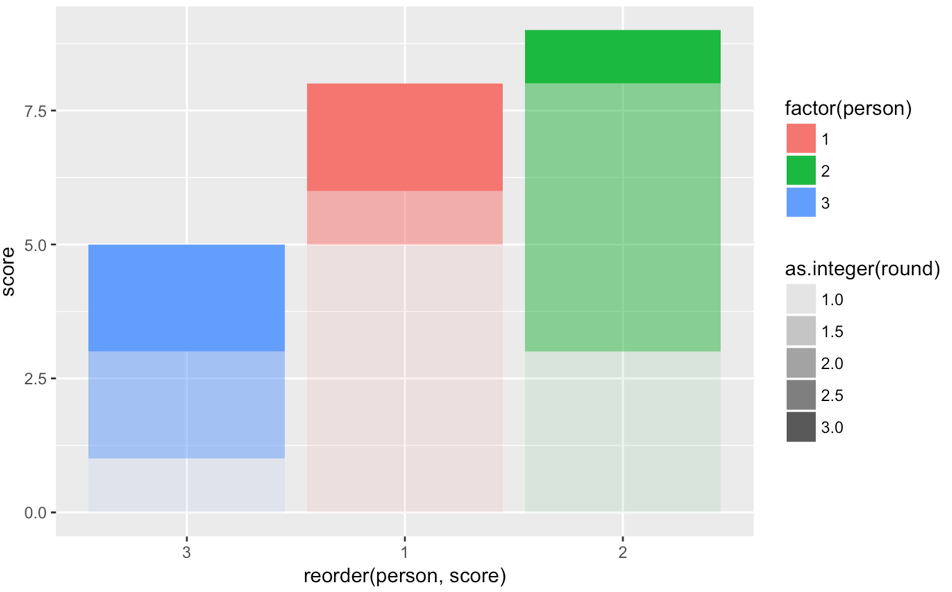
)我试图绘制它,这样每个人都有他们自己的颜色,并且在堆栈中任何时候都会像渐变一样形成条形。我所能得到的最接近的方法是允许alpha按轮变化:
library(ggplot2)
ggplot(data = example,
       aes(x = reorder(person, score),
           y = score,
           fill = factor(person),
           alpha = as.integer(round))) +
  geom_col()
如何通过对比改变颜色来创建一个适当的渐变呢?
回答 2
Stack Overflow用户
回答已采纳
发布于 2018-02-09 23:13:06
你可以直接做
ggplot(data = example, aes(x = reorder(person, score), y = score,
fill = interaction(person, as.integer(round)))) + geom_col()然后用scale_fill_manual定义颜色值来定义渐变。
编辑
简单的例子是:
colornames = sort(levels(interaction(example$person, as.integer(example$round))))
colors = c(
  paste0("red", 1:3),
  paste0("green", 1:3),
  paste0("blue", 1:3)
)

ggplot(data = example, aes(x = reorder(person, score), y = score,
  fill = interaction(person, as.integer(round)))) + geom_col() +
scale_fill_manual(values = setNames(colors, colornames))如果您有很多人员或圆圈,您可能希望使用colorRamp或rgb编程设置颜色。
编辑2
或者使用半透明的白色列来攻击它:
ggplot(data = example, aes(x = reorder(person, score), y = score, fill = factor(person))) +
  geom_col() + geom_col(aes(alpha = as.integer(round)), fill = "white") +
scale_alpha(NULL, guide = FALSE, range = c(0, 0.4))Stack Overflow用户
发布于 2018-02-10 18:54:29
这里的诀窍(受@mikeck的启发)是在原始透明度之下创建坚实的颜色条:
ggplot(data = example, aes(x = reorder(person, score), y = score)) +
  # Base bar color (black is another good color to try)
  geom_col(fill = "white") +
  # Overlay with the colored transparency
geom_col(aes(fill = factor(person), alpha = round))页面原文内容由Stack Overflow提供。腾讯云小微IT领域专用引擎提供翻译支持
原文链接:
https://stackoverflow.com/questions/48715394
复制相关文章
相似问题
腾讯云开发者

Copyright © 2013 - 2026 Tencent Cloud. All Rights Reserved. 腾讯云 版权所有
深圳市腾讯计算机系统有限公司 ICP备案/许可证号:粤B2-20090059  粤公网安备44030502008569号
腾讯云计算(北京)有限责任公司 京ICP证150476号 | 京ICP备11018762号