
Account Kit高级UI自定义
Account Kit高级UI自定义
提问于 2018-02-09 11:13:44
我的默认颜色是紫色(#9b59b6),我想把顶部的标题(蓝色)颜色也改成紫色。我的红色手册在在Android中自定义Account Kit UI上实现了这样的风格,但没有运气进一步改变顶部标题的颜色为紫色。
//Delauft color: purple
UIManager uiManager = new SkinManager(SkinManager.Skin.CONTEMPORARY, ContextCompat.getColor(this, R.color.default_color), R.drawable.register_screen, SkinManager.Tint.WHITE, 0.1);
configurationBuilder.setUIManager(uiManager);在我的style.xml里
<style name="AppBaseTheme" parent="android:style/Theme.Light.NoTitleBar">
    <item name="colorPrimary">#9b59b6</item>
    <item name="colorPrimaryDark">#9b59b6</item>
    <item name="colorAccent">#9b59b6</item>
    <!-- other elements-->
</style>
其他活动运作良好。
我有这样的应用程序:
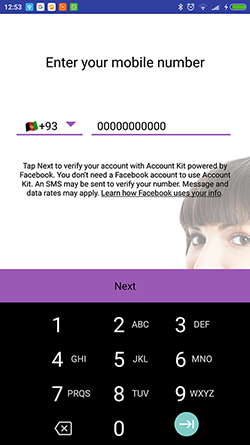
更新
解决方案:在AndroidManifest中
<activity android:name="com.facebook.accountkit.ui.AccountKitActivity" android:theme="@style/CustomFbStyle" tools:replace="android:theme"/>在style.xml中
<style name="CustomFbStyle" parent="Theme.AccountKit">
<item name="colorPrimary">#9b59b6</item>
<item name="colorPrimaryDark">#9b59b6</item>
</style>回答 1
Stack Overflow用户
发布于 2018-02-09 11:45:35
请检查您正在使用的主题,即Appbasetheme主题与您在清单的应用程序标记中提到的相同。
  <application
    android:label="@string/app_name"
    android:largeHeap="true"
    android:supportsRtl="true"
    android:theme="@style/AppbaseTheme">
或者,您也可以通过在清单中为类赋予android:主题标记来对特定的类使用特定的主题。
页面原文内容由Stack Overflow提供。腾讯云小微IT领域专用引擎提供翻译支持
原文链接:
https://stackoverflow.com/questions/48704592
复制相关文章
相似问题
腾讯云开发者

Copyright © 2013 - 2026 Tencent Cloud. All Rights Reserved. 腾讯云 版权所有
深圳市腾讯计算机系统有限公司 ICP备案/许可证号:粤B2-20090059  粤公网安备44030502008569号
腾讯云计算(北京)有限责任公司 京ICP证150476号 | 京ICP备11018762号