
节点安装网络驱动器的设置路径
我试图使用windows-network-drive模块和fs模块写入Node中的映射网络驱动器。
networkDrive.mount('\\\\server', 'Z', 'username', 'password')
  .then(driveLetter => {

  let filePath;

  filePath = path.join(driveLetter + ":\\path\\to\\directory", "message.txt");

  fs.writeFile(filePath, "text", (err) => {
    if (err) throw err;
    console.log('The file has been saved!');
  });
})
.catch(err => {
  console.log(err)
});
如何获得写入远程位置的连接和路径?
我需要通过驱动器的字母吗?如果是的话,我该如何定位?
(节点:4796) UnhandledPromiseRejectionWarning: ChildProcessError:命令失败: net:"\server“/P:Yes /user:username密码系统错误67已经发生。 找不到网络名称。
net use Z: "\server" /P:Yes /user:username password(与错误代码2一起退出) 在回调(C:\app\location\node_modules\child-process-promise\lib\index.js:33:27) 在ChildProcess.exithandler (child_process.js:279:5) 在ChildProcess.emit (events.js:159:13) 在maybeClose (内部/子进程.16:943:16) 在Process.ChildProcess._handle.onexit (内部/子进程. at :220:5) 姓名:“儿童加工错误”, 代码: 2, childProcess: { ChildProcess:{ ChildProcess super_:Function }, 功能, _forkChild:功能, 职能, execFile:功能, 产卵:功能, spawnSync:功能: spawnSync, execFileSync:功能: execFileSync, execSync:函数: execSync }, 标准:“”, stderr:‘系统错误67发生了。\r\n\r\n网络名称找不到。\r\n\r’}
这段代码记录Z
networkDrive.mount('\\\\server\\path\\to\\directory', 'Z', 'mdadmin', 'Password1!')
  .then(function (driveLetter) {
    console.log(driveLetter);
    fs.writeFile('L_test.txt', 'list', (err) => {
      if (err) throw err
    })
});回答 2
Stack Overflow用户
发布于 2018-02-12 14:31:15
若要从IIS中托管的REST服务进行写入,需要正确设置服务器上的权限。
- 您需要设置站点的应用程序池的标识。
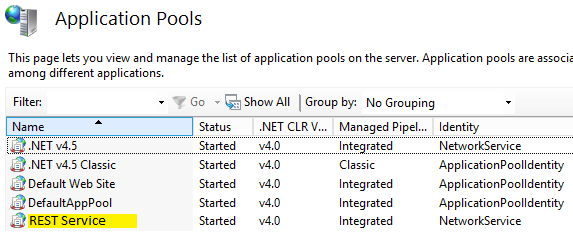
- 您需要授予写入权限,以便将该帐户或帐户组与要写入的文件夹匹配。
注意:如果您通过操作系统将文件夹映射到网络驱动器信函,则该文件夹仅在用户帐户级别上定义。
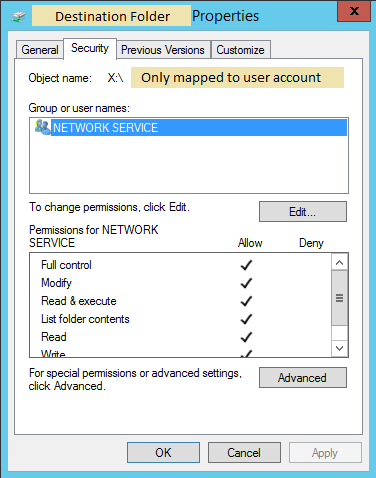
- 因此,如果您已经将文件夹位置映射到驱动器号(在本例中为“X:”),而不是写到
fs.writeFile('X:/test.txt', 'text', (err) => {
  if (err) throw err
})
你必须写到完整路径
fs.writeFile('\\\\servername\\path\\to\\director\\test.txt', 'text', (err) => {
  if (err) throw err
})注意:反斜杠需要转义,所以Windows文件系统将显示类似于\\servername\path\to\directory的内容。
这个答复包括用户answer和Ctznkane525的建议。
Stack Overflow用户
发布于 2018-02-09 03:31:18
我不确定您有什么错误,下面是几个使用窗口-网络驱动器。时的提示
逃逸特写
Windows使用\来分隔目录。是一个特殊的角色中的JavaScript字符串,必须像这样转义。在字符串中,C:\file.txt将是C:\file.txt。
在可以使用时使用POSIX分离字符
由于使用转义文件读取路径会带来额外的困难,我建议使用/代替。windows-网络驱动器应该能够很好地处理这两个问题。例如,C:\file.txt将是字符串中的C:/file.txt。
示例
我试图使这个匹配您的例子,但做了一些更改,以便它将在任何windows机器上工作。
let networkDrive = require("windows-network-drive");

/**
 * https://github.com/larrybahr/windows-network-drive
 * Mount the local C: as Z:
 */
networkDrive.mount("\\\\localhost\\c$", "Z", undefined, undefined)
    .then(function (driveLetter)
    {
        const fs = require("fs");
        const path = require("path");
        let filePath;

        /**
         * This will create a file at "Z:\message.txt" with the contents of "text"
         * NOTE: Make sure to escape '\' (e.g. "\\" will translate to "\")
         */
        filePath = path.join(driveLetter + ":\\", "message.txt");
        fs.writeFile(filePath, "text", (err) =>
        {
            if (err) throw err;
            console.log('The file has been saved!');
        });
});https://stackoverflow.com/questions/48697419
复制相似问题
腾讯云开发者

Copyright © 2013 - 2026 Tencent Cloud. All Rights Reserved. 腾讯云 版权所有
深圳市腾讯计算机系统有限公司 ICP备案/许可证号:粤B2-20090059  粤公网安备44030502008569号
腾讯云计算(北京)有限责任公司 京ICP证150476号 | 京ICP备11018762号