
从windows系统变量激活Maven配置文件
我有下面的maven配置文件配置
<profiles>
    <profile>
        <id>dev</id>
        <activation>
            <activeByDefault>true</activeByDefault>
            <property>
                <name>spring.profiles.active</name>
                <value>dev</value>
            </property>
        </activation>
    </profile>
    <profile>
        <id>test</id>
        <activation>
            <property>
                <name>spring.profiles.active</name>
                <value>test</value>
            </property>
        </activation>
    </profile>
</profiles>我在application.properties里有这个
spring.profiles.active=dev因此,dev是我对spring和maven配置文件的默认设置。
然后,我将Windows变量SPRING_PROFILES_ACTIVE设置为test值,以显式使用测试概要文件。
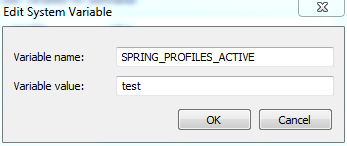
根据文档,它应该覆盖我的属性文件中的dev值。
69.5设置活动Spring配置文件 Spring有这样一个API,但是通常您会设置一个系统属性(spring.profiles.active)或一个OS环境变量(SPRING_PROFILES_ACTIVE)。例如,使用-D参数启动应用程序(请记住将其放在主类或jar存档之前): $ java -jar -Dspring.profiles.active=production演示-0.0.1-SNAPSHOT.jar 在Spring中,您还可以在application.properties中设置活动配置文件。 spring.profiles.active=production --以这种方式设置的值集被系统属性或环境变量设置所取代,而不是由SpringApplicationBuilder.profiles()方法代替。因此,后一种Java可以用于在不更改默认值的情况下增强概要文件。 有关更多信息,请参见“Spring功能”一节中的概要文件。
现在,当我运行我的Spring应用程序时,它使用的是Spring中的test配置文件,但是maven配置文件激活并没有发现这一点,并且仍然在使用dev配置文件。
我尝试将SPRING_PROFILES_ACTIVE设置为<property>元素中的名称,以确保它与小写.版本和大写_版本无关,但这没有帮助。
如果我在使用-Dspring.profiles.active=test运行maven时提供变量,它就能工作。
任何帮助都是非常感谢的。
编辑:显然,当我将war部署到tomcat ( catalina.properties包含spring.profiles.active=test )时,这也不起作用。同样,Spring使用test,但是Maven仍然停留在dev上。
回答 2
Stack Overflow用户
发布于 2018-02-08 20:27:02
不幸的是,你想要做的事情是不可能的。配置文件只能从命令行激活,在某些情况下只能从settings.xml激活。见this answer。This one包括指向JIRA问题的链接,讨论挑战以及其他人试图使其工作的内容。
系统属性在command line上设置。
Stack Overflow用户
发布于 2018-02-08 21:35:46
如何使用环境变量激活概要文件?
<profiles>
    <profile>
        <id>dev</id>
        <activation>
            <activeByDefault>true</activeByDefault>
            <property>
                <name>spring.profiles.active</name>
                <value>dev</value>
            </property>
        </activation>
    </profile>
    <profile>
        <id>test</id>
        <activation>
            <property>
                <name>env.SPRING_PROFILES_ACTIVE</name>
                <value>test</value>
            </property>
        </activation>
    </profile>
</profiles>https://stackoverflow.com/questions/48693617
复制相似问题
腾讯云开发者

Copyright © 2013 - 2026 Tencent Cloud. All Rights Reserved. 腾讯云 版权所有
深圳市腾讯计算机系统有限公司 ICP备案/许可证号:粤B2-20090059  粤公网安备44030502008569号
腾讯云计算(北京)有限责任公司 京ICP证150476号 | 京ICP备11018762号