
找出两点间的角度
找出两点间的角度
提问于 2018-02-06 17:50:56
我试图使一个图像移动到我的鼠标指针。基本上,我得到了点之间的角度,然后沿着x轴移动,通过角度的余弦,沿着y轴移动,这是角度的正弦波。
然而,我没有一个很好的方法来计算角度。我得到x的差和y的差,用Δy/Δx的arctangent,象限1的角度是正确的,但其他三个象限是错的。象限2在-1到-90度之间.象限3总是等于象限1,象限4总是象限4。有一个方程,我可以用它从1-360度求出两点之间的夹角吗?。
注意:我不能使用atan2(),也不知道向量是什么。
回答 4
Stack Overflow用户
回答已采纳
发布于 2018-02-07 13:13:57
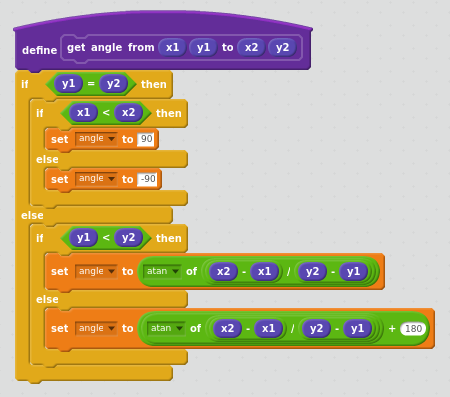
关于atan2的答案是正确的。作为参考,这里是划痕块形式的atan2:
Stack Overflow用户
发布于 2020-06-10 05:01:03
// This working code is for Windows HDC mouse coordinates gives the angle back that is used in Windows. It assumes point 1 is your origin point
// Tested and working on Visual Studio 2017 using two mouse coordinates in HDC.
//
// Code to call our function.
float angler = get_angle_2points(Point1X, Point1Y, Point2X, Point2Y);


// Takes two window coordinates (points), turns them into vectors using the origin and calculates the angle around the x-axis between them.
// This function can be used for any HDC window. I.e., two mouse points.
float get_angle_2points(int p1x, int p1y, int p2x,int p2y)
{
    // Make point1 the origin, and make point2 relative to the origin so we do point1 - point1, and point2-point1,
    // Since we don’t need point1 for the equation to work, the equation works correctly with the origin 0,0.
    int deltaY = p2y - p1y;
    int deltaX = p2x - p1x; // Vector 2 is now relative to origin, the angle is the same, we have just transformed it to use the origin.

    float angleInDegrees = atan2(deltaY, deltaX) * 180 / 3.141;

    angleInDegrees *= -1; // Y axis is inverted in computer windows, Y goes down, so invert the angle.

    //Angle returned as:
    //                      90
    //            135                45
    //
    //       180          Origin           0
    //
    //
    //           -135                -45
    //
    //                     -90


    // The returned angle can now be used in the C++ window function used in text angle alignment. I.e., plf->lfEscapement = angle*10;
    return angleInDegrees;
}Stack Overflow用户
发布于 2018-02-06 19:53:56
如果无法直接使用atan2(),则可以自行实现其内部计算:
atan2(y,x) =    atan(y/x)   if x>0
                atan(y/x) + π   if x<0 and y>0
atan(y/x) - π if x<0 and y<0页面原文内容由Stack Overflow提供。腾讯云小微IT领域专用引擎提供翻译支持
原文链接:
https://stackoverflow.com/questions/48649067
复制相关文章
相似问题
腾讯云开发者

Copyright © 2013 - 2026 Tencent Cloud. All Rights Reserved. 腾讯云 版权所有
深圳市腾讯计算机系统有限公司 ICP备案/许可证号:粤B2-20090059  粤公网安备44030502008569号
腾讯云计算(北京)有限责任公司 京ICP证150476号 | 京ICP备11018762号