
设置Neo4j时无法解析dns/tls
我正试图在我的node.js项目中像这样使用node.js:
var neo4j = require('neo4j-driver').v1;
// neo4j cypher helper module
const USERNAME = "neo4j";
const PASSWORD = "neo4j";
const URI = "bolt://localhost:7687";

const driver = neo4j.driver(URI, neo4j.auth.basic(USERNAME, PASSWORD));
const session = driver.session();当我运行webpack时,它会给出以下错误:
找不到./node_modules/neo4j-driver/lib/v1/internal/host-name-resolvers.js模块中的错误:错误:无法在'/home/nikita/Desktop/kipnis_prototype/BrainImmuneConnectome/node_modules/neo4j-driver/lib/v1/internal‘中解析'dns’
readline,tls,net也有类似的错误。怎么能解决呢?
我的webpack.config.js
var path = require('path');

module.exports = {
  entry: {
    app: './views/index.js'
    //vendor: ["react","react-dom"]
  },
  output: {
   filename: 'bundle.js',
   path: path.resolve(__dirname, './public')
 },
  devtool: "#eval-source-map",
  module: {
   rules: [{
       test: /\.jsx?$/,
       exclude: /node_modules/,
       use: {
           loader: 'babel-loader?cacheDirectory=true',
       }
   }]
  },
  node: {
    fs: 'empty'
  },
  resolve: {
     extensions: ['.js', '.jsx']
  }
};我确信数据库一切都很好。该错误类似于以下github线程:
https://github.com/neo4j/neo4j-javascript-driver/issues/192
然而,我的进口是正确的,所以我很困惑。
更新
安装loader-utils无助于解决这个问题:Why can't webpack find any module from my React Webapp?
更新
在向neo4j-driver提供整个路径之后:
var neo4j_driver = require('../node_modules/neo4j-driver/lib/browser/neo4j-web.min.js');webpack运行良好,因此我认为它现在找到了驱动程序,但是,当我尝试运行该应用程序时,会显示另一个错误:
Neo4jError: Fatal: No compatible transport available. Need to run on a
platform with the WebSocket API.
更新
我发现我不能指定整个路径,而且应该是require("neo4j-driver")。然后在下面的链接中:
https://github.com/request/request/compare/master...pho3nixf1re:webpack-tests
externals节在webpack配置文件中指定:
...
  externals: {
    fs: '{}',
    tls: '{}',
    net: '{}',
    console: '{}'
}将此部分添加到我的webpack.config.js中,允许运行webpack和应用程序,而不给出node.js控制台中的错误,但是,浏览器在本例中会生成另一个与neo4j-driver明显相关的错误。
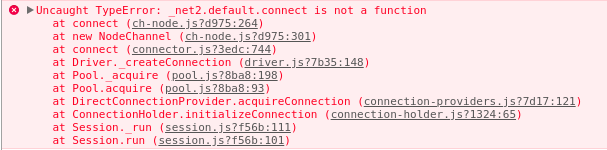
更新
前面Update中的错误是由于不适当的node.js模块导入造成的,所以在修复了这个应用程序开始正常工作之后,这个问题现在就解决了。
回答 1
Stack Overflow用户
发布于 2018-02-06 02:58:59
将externals部分添加到webpack.config.js解决了这个问题:
externals: {
    fs: '{}',
    tls: '{}',
    net: '{}',
    dns: '{}',
    readline: '{}'
}https://stackoverflow.com/questions/48632757
复制相似问题
腾讯云开发者

Copyright © 2013 - 2026 Tencent Cloud. All Rights Reserved. 腾讯云 版权所有
深圳市腾讯计算机系统有限公司 ICP备案/许可证号:粤B2-20090059  粤公网安备44030502008569号
腾讯云计算(北京)有限责任公司 京ICP证150476号 | 京ICP备11018762号