
单击期间Selenium中的ElementNotVisibleException
我正在尝试点击一个HTML看起来像
<div class="product-details-options-size clearfix">
   <p>Choose memory capacity </p>
   <div class="btn-group" data-toggle="buttons">
      <div class="active"> <label class="btn plain active"> <input type="radio" name="storageSize" value="32" autocomplete="off" checked="">32GB </label> </div>
      <div class=""> <label class="btn plain "> <input type="radio" name="storageSize" value="128" autocomplete="off">128GB </label> </div>
   </div>
</div>
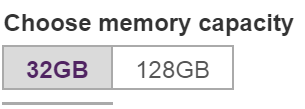
它的代码是:
btn = browser.find_elements_by_xpath("//input[@type='radio' and @name='storageSize']")
print("Storage size: ", btn[1].get_attribute('value')) #prints 128
btn[1].click()
我能够打印出按钮的值,但当我尝试单击该按钮时,我得到:
ElementNotVisibleException: Message: element not visible
  (Session info: chrome=62.0.3202.75)
(Driver info: chromedriver=2.35.528161 (5b82f2d2aae0ca24b877009200ced9065a772e73),platform=Windows NT 6.3.9600 x86_64)回答 1
Stack Overflow用户
发布于 2018-01-31 02:55:56
因为按钮是CSS按钮。从您的HTML中我们可以知道有一个Radio button,但是从页面上看,按钮不像单选按钮,这是因为css改变了按钮的位置,使其不像单选按钮。
你有没有注意到有一个斜面靠近单选按钮,为了改变单选按钮的位置,CSS可以将标签放在顶部,用css:index来覆盖单选按钮。不管CSS是怎么做到的。您现在不能单击单选按钮,因为标签覆盖它,您必须单击Lable。
为什么您可以打印按钮值,因为您通过getAtttibute('value')获得按钮值,如果您的代码更改为print("Storage size: ", btn[1].text),它将打印空字符串。
这是Selenium设计:
如果用户体验中看不到一个元素,则Selenium将在单击它时报告
ElementNotVisible,并在获取其文本内容时返回空字符串。因为sendKeys(),单击(),getText()将充当用户体验。但是getAttribute()并不是用户体验,所以它不关心元素是否可见,一旦标记有了您想要的属性,您就可以得到属性值。
正如我前面提到的,您应该单击标签,因此将代码更改为
browser.find_element_by_xpath("//label[contains(.,'128GB')]").click();https://stackoverflow.com/questions/48533134
复制相似问题
腾讯云开发者

Copyright © 2013 - 2026 Tencent Cloud. All Rights Reserved. 腾讯云 版权所有
深圳市腾讯计算机系统有限公司 ICP备案/许可证号:粤B2-20090059  粤公网安备44030502008569号
腾讯云计算(北京)有限责任公司 京ICP证150476号 | 京ICP备11018762号