
如何将我的照片从FlashAir同步到Google?
基于这个答案:https://photo.stackexchange.com/a/92941/71846
我正在尝试设置我的新东芝FlashAir与我的Google帐户同步。
这里的说明是:http://www.fixstars.com/en/news/?p=451
但是,我对第二步的第1部分有问题(我怀疑这些步骤实际上已经过时了)。
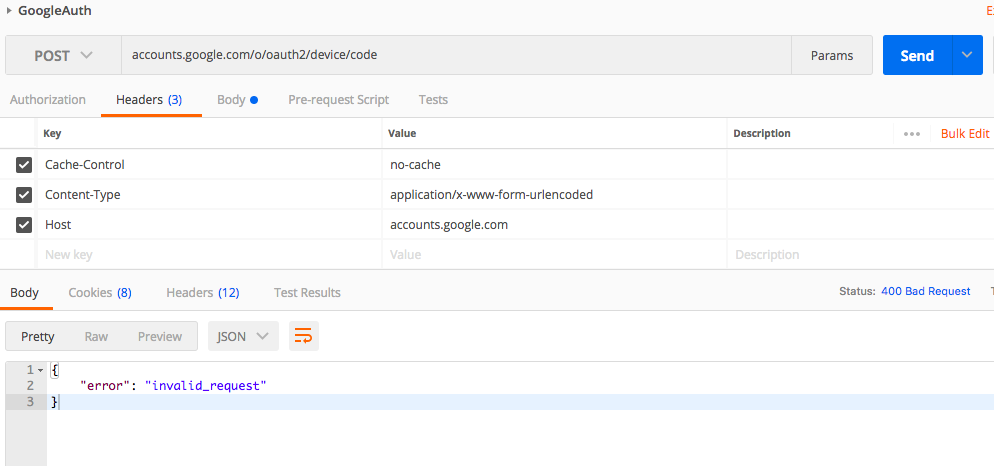
我忽略了表单数据中的信息,因为我的Google键就在那里。
在说明中,它提到:“注意:谷歌告诉你使用”https://www.googleapis.com/auth/drive“作为作用域,但这将返回一个”Invalid_scope:未被授权请求范围“。使用/need/代替将授予我们所需的Google授权。”
因此,我还尝试使用“https://www.googleapis.com/auth/drive”作为作用域,但在JSON响应中得到了相同的“无效请求”。
回答 1
Stack Overflow用户
发布于 2018-01-30 23:20:24
我认为在您的问题中,在检索刷新令牌的过程中可能会出现问题。那么使用Drive怎么样?下面的流程是从您的问题中的https://photo.stackexchange.com/a/92941/71846的Google示例的第1部分到第3部分。此流检索使用驱动器API的刷新令牌。
流动:
- 在你的浏览器上。
- 在https://console.developers.google.com/创建新项目
- 在
https://console.cloud.google.com/apis/library/drive.googleapis.com/?project=### project ID ###的“库”,启用驱动程序接口。 - 转到
https://console.cloud.google.com/apis/credentials?project=### project ID ###的“凭据”。 - 创建凭据
- 选择“帮助我选择”
- 在“您使用哪个API?”处,选择“驱动器API”。
- 在“您将从哪里调用API?”,选择“其他UI (例如Windows,CLI工具)”。
- 在“您将访问哪些数据?”处,选择“用户数据”。
- 单击“我需要什么凭据?”
- 在“创建一个OAuth 2.0客户机ID的名称”,输入名称。
- 单击“创建客户端ID”。
- 点击“完成”通过这个,回到凭据屏幕。
- 单击创建的凭据。
- 复制“客户ID”和“客户机密”
1. Please input your clientId and access `https://accounts.google.com/o/oauth2/auth?client_id=### clientId ###&response_type=code&redirect_uri=urn:ietf:wg:oauth:2.0:oob&scope=https://www.googleapis.com/auth/drive`
    - By authorizing, the code is retrieved.
    - Copy "code".
- 在你的终端上。
- 使用curl命令检索刷新令牌。请输入您的clientId,客户端机密和检索的代码。
curl -X POST https://accounts.google.com/o/oauth2/token -d "client_id=### clientId ###" -d "client_secret=### client secret ###" -d "redirect_uri=urn:ietf:wg:oauth:2.0:oob" -d "grant_type=authorization_code" -d "code=### code ###"
- 使用curl命令检索刷新令牌。请输入您的clientId,客户端机密和检索的代码。
注意:
- 如果您已经启用了驱动器API并检索了客户端ID和客户端机密,您可以从5开始。如果没有工作,请从1开始。
如果我误解了你的问题,我很抱歉。
https://stackoverflow.com/questions/48528877
复制相似问题
腾讯云开发者

Copyright © 2013 - 2026 Tencent Cloud. All Rights Reserved. 腾讯云 版权所有
深圳市腾讯计算机系统有限公司 ICP备案/许可证号:粤B2-20090059  粤公网安备44030502008569号
腾讯云计算(北京)有限责任公司 京ICP证150476号 | 京ICP备11018762号