
无法让WebRTC与UV4L和janus一起工作
我正在尝试通过WebRTC设置来自覆盆子皮的视频流。我正在使用一个USBWeb摄像头,UV4L和Janus来完成同样的任务。WebRTC不起作用。
我遵循了概述这里的步骤,只不过我使用的是uv4l而不是gstreamer。我已经在同一网络上的另一台(Ubuntu)机器上安装了janus网关。
我的janus (在Ubuntu上)在开始时显示如下:
$ /opt/janus/bin/janus -F /opt/janus/etc/janus
Janus commit: 1e06290078268279ca69d5aaf0a76831973b3457
Compiled on:  Tue Jan 30 00:53:34 IST 2018

---------------------------------------------------
  Starting Meetecho Janus (WebRTC Gateway) v0.3.0
---------------------------------------------------

Checking command line arguments...
Debug/log level is 4
Debug/log timestamps are disabled
Debug/log colors are enabled
Adding 'vmnet' to the ICE ignore list...
Using 192.168.1.101 as local IP...
[WARN] Token based authentication disabled
Initializing recorder code
Initializing ICE stuff (Full mode, ICE-TCP candidates disabled, IPv6 support disabled)
STUN server to use: stun.l.google.com:19302
ICE handles watchdog started
  >> 74.125.200.127:19302 (IPv4)
Testing STUN server: message is of 20 bytes
  >> Our public address is 49.35.222.150
Crypto: OpenSSL pre-1.1.0
Fingerprint of our certificate: D2:B9:31:8F:DF:24:D8:0E:ED:D2:EF:25:9E:AF:6F:B8:34:AE:53:9C:E6:F3:8F:F2:64:15:FA:E8:7F:53:2D:38
[WARN] Data Channels support not compiled
Event handler plugins folder: /opt/janus/lib/janus/events
[FATAL] [janus.c:main:3687]     Couldn't access event handler plugins folder...
Plugins folder: /opt/janus/lib/janus/plugins
Loading plugin 'libjanus_streaming.so'...
Sessions watchdog started
JANUS Streaming plugin initialized!
Loading plugin 'libjanus_recordplay.so'...
Streaming watchdog started
JANUS Record&Play plugin initialized!
Loading plugin 'libjanus_sip.so'...
Record&Play watchdog started
JANUS SIP plugin initialized!
Loading plugin 'libjanus_videoroom.so'...
SIP watchdog started
JANUS VideoRoom plugin initialized!
Loading plugin 'libjanus_textroom.so'...
VideoRoom watchdog started
JANUS TextRoom plugin initialized!
Loading plugin 'libjanus_voicemail.so'...
TextRoom watchdog started
JANUS VoiceMail plugin initialized!
Loading plugin 'libjanus_audiobridge.so'...
VoiceMail watchdog started
JANUS AudioBridge plugin initialized!
Loading plugin 'libjanus_videocall.so'...
AudioBridge watchdog started
JANUS VideoCall plugin initialized!
Loading plugin 'libjanus_nosip.so'...
VideoCall watchdog started
JANUS NoSIP plugin initialized!
Loading plugin 'libjanus_echotest.so'...
NoSIP watchdog started
JANUS EchoTest plugin initialized!
Transport plugins folder: /opt/janus/lib/janus/transports
Loading transport plugin 'libjanus_pfunix.so'...
EchoTest watchdog started
[WARN] Unix Sockets server disabled (Janus API)
[WARN] Unix Sockets server disabled (Admin API)
[WARN] No Unix Sockets server started, giving up...
[WARN] The 'janus.transport.pfunix' plugin could not be initialized
Loading transport plugin 'libjanus_http.so'...
HTTP webserver started (port 8088, /janus path listener)...
[WARN] HTTPS webserver disabled
[WARN] Admin/monitor HTTP webserver disabled
[WARN] Admin/monitor HTTPS webserver disabled
JANUS REST (HTTP/HTTPS) transport plugin initialized!
HTTP/Janus sessions watchdog started
我就是这样在pi上启动UV4L的:
pi@raspberrypi:~ $ uv4l --driver uvc --device-id 046d:082b --server-option '--max-streams=25' --server-option '--max-threads=29' --server-option '--port=8090' --server-option '--janus-gateway-url=http://192.168.1.101:8088'
<notice> [core] Trying to loading driver 'uvc' from built-in drivers...
<notice> [core] Loading driver 'uvc' from external plug-in's...
<notice> [driver] Video functionality 'Webcam C170' recognized at 046d:082b
<notice> [core] Device detected!
<notice> [core] Registering device node /dev/uv4l
pi@raspberrypi:~ $访问http://PIIP:8090/stream/video.mjpeg显示来自家庭网络的流。值得注意的一点是,当uv4l启动时,它不会导致任何新日志出现在janus窗口上。是因为我的配置不正确/不完整吗?
最后,当我访问链接http://ip-of-server/janus-gateway-streamtest.html时,单击Start按钮什么都不会做。类似地,http://serverip/streamingtest.html显示了流的链接(在janus中配置的RPWC),但是当我们单击“观看或监听”时,它没有显示任何内容。
我确信某些设置是错误的..。那是哪一个?
编辑1:
评论之后,我再次确认是否正确设置了http://piip:8090/janus中的设置(见下图),并单击了“开始”按钮
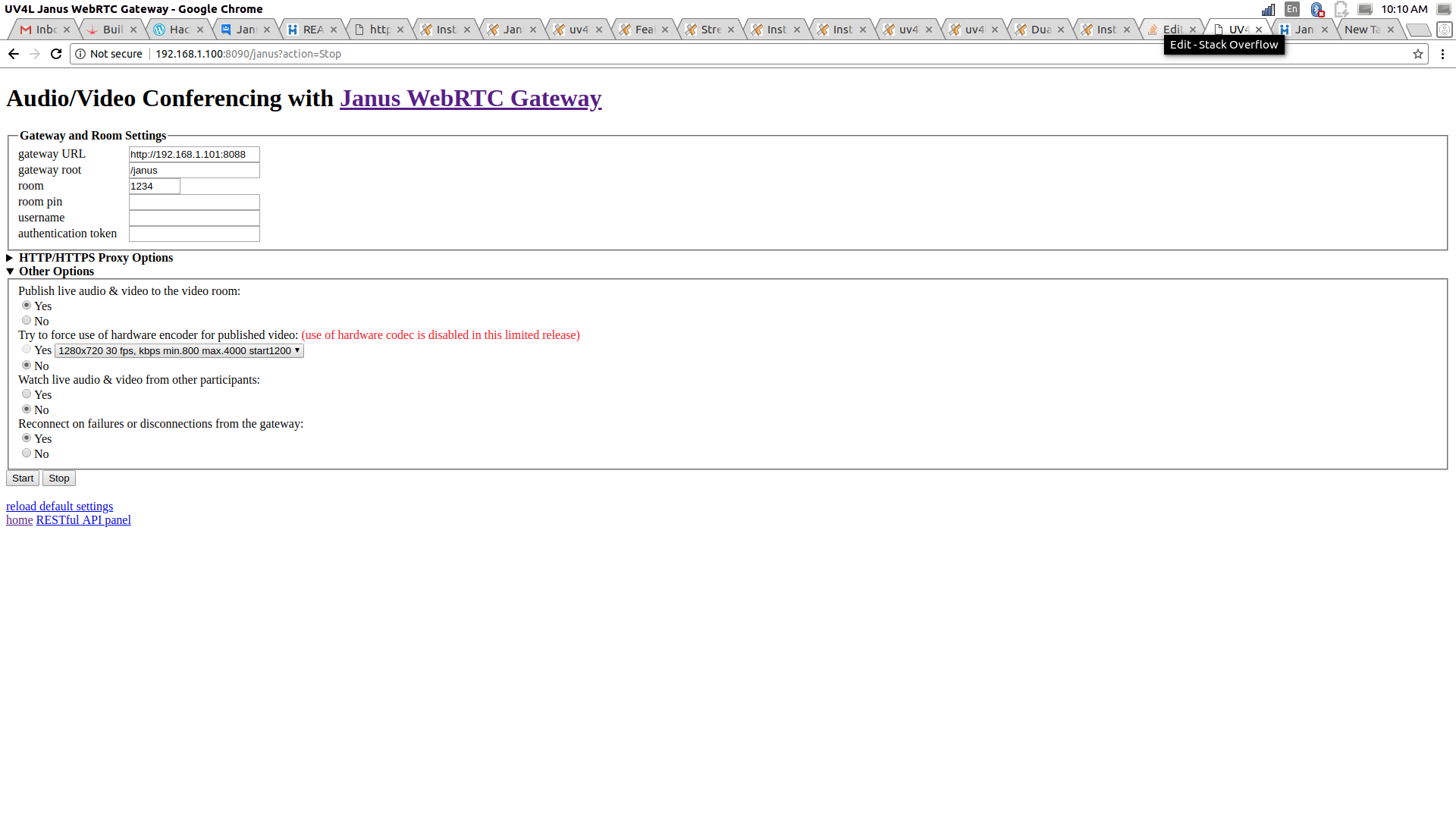
我试着打开http://192.168.1.101/videoroomtest.html,我可以看到我的提要,但是-我假设janus会表现得更像一个信令服务器,在我的例子中,janus似乎是在做重放/应答服务器。理想情况下,如果建立了连接,如果janus服务器出现故障,那么流仍然不应该中断。但是,我手动阻止了janus,流停止了。如何将uv4l配置为使用janus作为信令,而不是作为中继服务器(如转弯)。另外,这也是我在janus控制台上得到的:
Creating new session: 4606856182184138
Creating new handle in session 4606856182184138: 2281485457416758
Creating new handle in session 4606856182184138: 6811320978768068
[6811320978768068] Creating ICE agent (ICE Full mode, controlling)
[6811320978768068] The DTLS handshake has been completed
WebRTC media is now available
[WARN] [6811320978768068] Not video and not audio? dropping (SSRC 1029175205)...回答 1
Stack Overflow用户
发布于 2018-01-29 21:20:57
UV4L与gstreamer无关,与Janus的流无关。不要把东西混在一起。
也就是说,当你在Raspberry Pi中插入USB摄像头时,应该会自动识别它。您不必手动运行uv4l。来自文档
由于最新版本的UV4L,应该不再需要手动加载驱动程序使用你的摄像头。在您第一次重新启动之后,只需插入(或拔掉)网络摄像头就可以让系统服务识别它,并使uv4l自动加载(或卸载)。如果已经安装了UV4L流服务器,则每次附加或分离摄像头时,都会自动创建或销毁相应的服务器实例。服务器将侦听的端口在配置文件(即/etc/uv4l/uv4l-uvc.conf)中指定,默认为8090。您通常不需要修改配置文件。
在你连接好相机后,服务器应该自动启动。打开http://rpi_address:8090/janus的Janus网页,填充指向Janus实例的字段gateway URL,最后按Start开始流到房间。
https://stackoverflow.com/questions/48509632
复制相似问题
腾讯云开发者

Copyright © 2013 - 2026 Tencent Cloud. All Rights Reserved. 腾讯云 版权所有
深圳市腾讯计算机系统有限公司 ICP备案/许可证号:粤B2-20090059  粤公网安备44030502008569号
腾讯云计算(北京)有限责任公司 京ICP证150476号 | 京ICP备11018762号