
为什么VS2015调试器不能在监视窗口中正确显示函数地址?
为什么VS2015调试器不能在监视窗口中正确显示函数地址?
提问于 2018-01-29 14:50:47
Visual 2015调试器中的C++代码。站台:窗口10
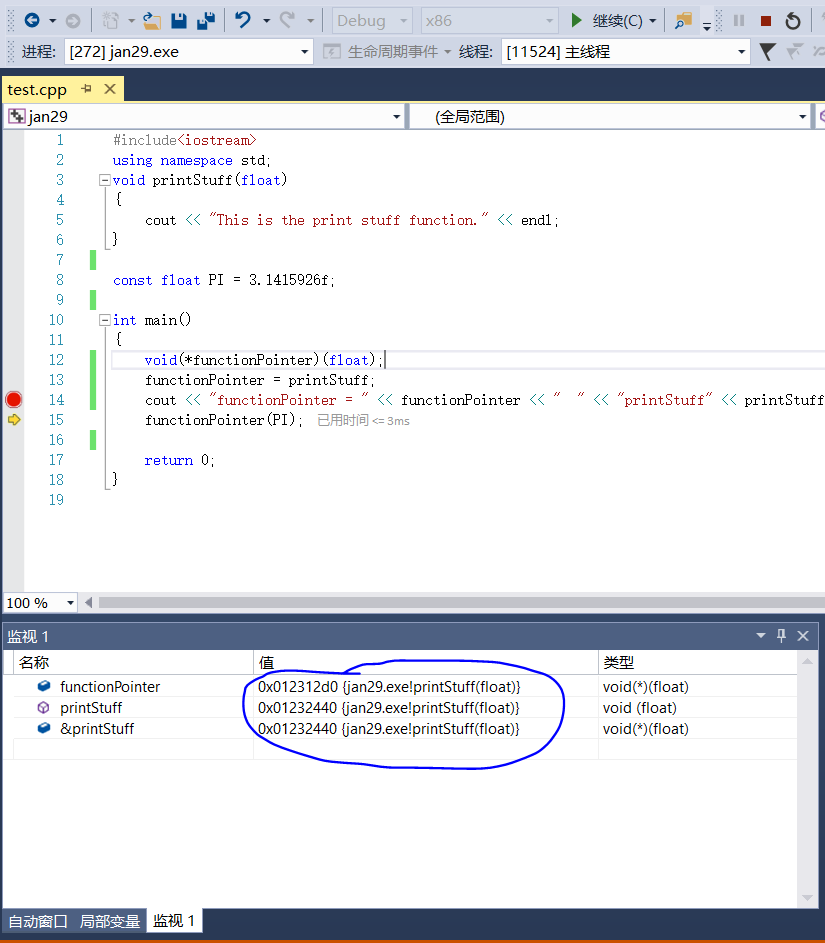
表窗上写着:
NamefunctionPointer Value:0x012812d0 Type:void(*)(float)
NameprintStuff Value:0x01282440 Type:void(float)
Name&printStuff Value:0x01282440 Type:void(*)(float)
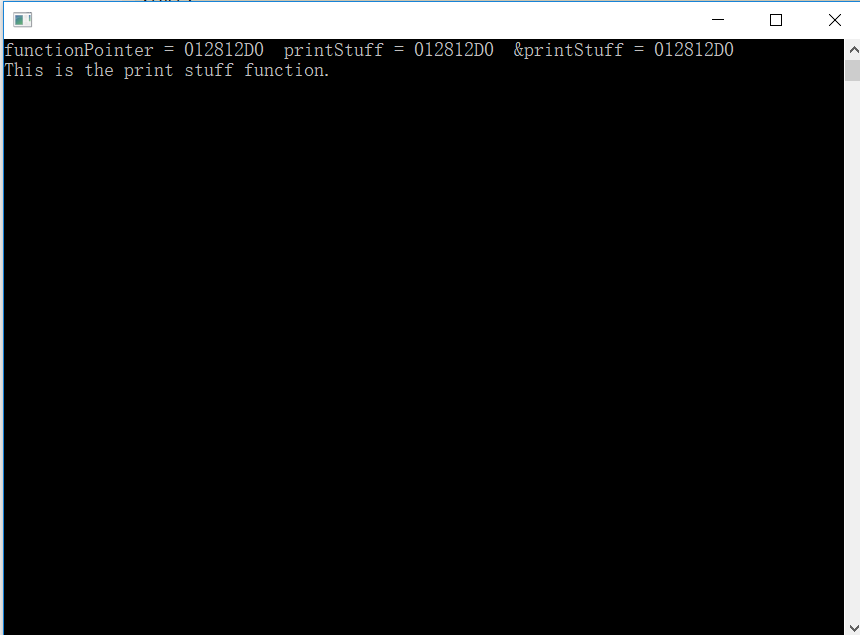
但是,输出窗口显示:
functionPointer = 012812D0 printStuff = 0x012812D0 &printStuff = 0x012812D0这是打印填充函数
#include<iostream>
using namespace std;
void printStuff(float)
{
    cout << "This is the print stuff function." << endl;
}

const float PI = 3.1415926f;

int main()
{
    void(*functionPointer)(float); // *functionPointer is a pointer
    functionPointer = printStuff;  // *functionPointer point to function printstuff
    cout << "functionPointer = " << functionPointer << "  " << "printStuff = " << printStuff << "  " << "&printStuff = " << &printStuff << endl;
    functionPointer(PI);

    return 0;
}
输出
回答 1
Stack Overflow用户
发布于 2018-01-29 19:43:55
这种行为似乎是由于增量链接。当启用该函数时,该函数组装在一个内存地址中,而另一个地址包含一个跳转表条目,其中一个跳转指令指向“真实”地址。函数总是通过调用跳转表来调用。如果禁用增量链接,那么跳转表中的“绕行”就会消失,您的示例案例也只显示了一个地址。
其他所有内容似乎都显示了跳转表的地址,但是'printStuff‘和'&printStuff’监视表达式显示了函数代码所在的实际地址。
页面原文内容由Stack Overflow提供。腾讯云小微IT领域专用引擎提供翻译支持
原文链接:
https://stackoverflow.com/questions/48504008
复制相关文章
相似问题
腾讯云开发者

Copyright © 2013 - 2026 Tencent Cloud. All Rights Reserved. 腾讯云 版权所有
深圳市腾讯计算机系统有限公司 ICP备案/许可证号:粤B2-20090059  粤公网安备44030502008569号
腾讯云计算(北京)有限责任公司 京ICP证150476号 | 京ICP备11018762号