
向ImageSpan添加背景
向ImageSpan添加背景
提问于 2018-01-29 08:43:44
我试图添加一个背景跨度的图像。我可以将背景跨度设置为字符串,但同一字符串中的imagespan不显示背景。
这是我想要的示例,所选的部分显示具有背景跨度的图像和文本。
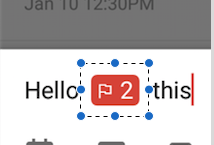
这就是我尝试过的。
    public void applySpannable(String lastString, String changeString, int type, String title) {

        String totalString = lastString + title;
        Spannable spanText = new SpannableString(totalString);

        Drawable d;
        if (type == 1) {
            d = getResources().getDrawable(R.drawable.type_flag_bg_red);
        } else {
            d = getResources().getDrawable(R.drawable.type_flag_bg_red);
        }
        d.setBounds(0, 0, d.getIntrinsicWidth(), d.getIntrinsicHeight());
        ImageSpan span = new ImageSpan(d, ImageSpan.ALIGN_BASELINE);

        ForegroundColorSpan foregroundSpan = new ForegroundColorSpan(Color.WHITE);
        BackgroundColorSpan backgroundSpan = new BackgroundColorSpan(Color.RED);

        spanText.setSpan(foregroundSpan, lowerBound, upperBound, Spannable.SPAN_EXCLUSIVE_INCLUSIVE);
        spanText.setSpan(backgroundSpan, lowerBound, upperBound, Spannable.SPAN_EXCLUSIVE_INCLUSIVE);
        spanText.setSpan(span, lastString.length(), lastString.length()+1, Spannable.SPAN_INCLUSIVE_EXCLUSIVE);


        edtAddTask.setText(spanText);
        edtAddTask.setSelection(edtAddTask.getText().toString().length());
    }
字符串显示带有背景,但透明图像显示没有背景。我在图像位置之前设置了较低的索引。
谢谢
回答 1
Stack Overflow用户
发布于 2020-02-17 04:48:54
您不能同时使用BackgroundColorSpan和ImageSpan。这个想法是从带有背景和图像层的ImageSpan创建一个LayerDrawable。请查看以下代码:
为java:尝试以下操作
Spannable span = new SpannableString("This is   ic launcher with background");
Drawable myImage = context.getResources().getDrawable(R.drawable.ic_launcher_foreground);
ShapeDrawable background = new ShapeDrawable();
background.getPaint().setColor(Color.RED);
LayerDrawable layerDrawable = new LayerDrawable(new Drawable[]{background, myImage});
layerDrawable.setBounds(0, 0, 64, 64);
ImageSpan image = new ImageSpan(layerDrawable, ImageSpan.ALIGN_BASELINE);
span.setSpan(image, 8, 9, Spannable.SPAN_INCLUSIVE_EXCLUSIVE);

textView.setText(span);
For kotlin:
val span: Spannable = SpannableString("This is   ic launcher with background")
val myImage: Drawable = resources.getDrawable(R.drawable.ic_launcher_foreground)
val background = ShapeDrawable()
background.paint.color = Color.RED
val layerDrawable = LayerDrawable(arrayOf(background, myImage))
layerDrawable.setBounds(0, 0, 64, 64)
val image = ImageSpan(layerDrawable, ImageSpan.ALIGN_BASELINE)
span.setSpan(image, 8, 9, Spannable.SPAN_INCLUSIVE_EXCLUSIVE)

textView.setText(span)页面原文内容由Stack Overflow提供。腾讯云小微IT领域专用引擎提供翻译支持
原文链接:
https://stackoverflow.com/questions/48497328
复制相关文章
相似问题
腾讯云开发者

Copyright © 2013 - 2026 Tencent Cloud. All Rights Reserved. 腾讯云 版权所有
深圳市腾讯计算机系统有限公司 ICP备案/许可证号:粤B2-20090059  粤公网安备44030502008569号
腾讯云计算(北京)有限责任公司 京ICP证150476号 | 京ICP备11018762号