
DataGridViewTextBoxCell.ReadOnly = true,但仍然可以更改选定的值。
DataGridViewComboBoxCell.ReadOnly = true, but can still change the selected value也有同样的问题,但用户对我无法实现的答案感到满意。
我得到了一个包含多个列的dataGridView,其中一个是checkBoxColumn,它应该激活或禁用另一个带有文本的列:
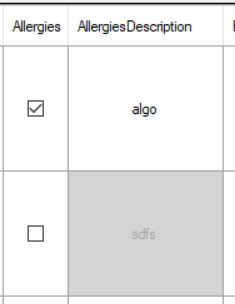
现在,一旦加载了dataGridView,我得到的代码就工作得很好:我点击复选框,它们就像预期的那样工作。
问题是,我希望dataGridView禁用没有相应的过敏细胞检查加载时间的AllergiesDescription细胞。我编写了一个代码,当发现未检查的过敏细胞时,应该迭代行并执行禁用的单元格代码。但不管怎么说,都没用!它将所有想要的属性设置为单元格(如readonly = true),但单元格仍然是可编辑的:
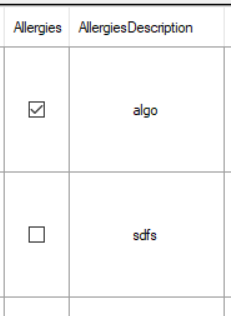
在下面分享我的代码:
    private void dataGridView_CellContentClick(object sender,
        DataGridViewCellEventArgs cellEvent)
    {
        if (cellEvent.ColumnIndex == AllergiesCheckBoxColumn.Index)
            toggleAllergiesDescriptionHabilitation(cellEvent.RowIndex);
    }

    private void toggleAllergiesDescriptionHabilitation(int rowIndex)
    {
        int columnIndex = AllergiesDescriptionTextBoxColumn.Index;
        DataGridViewRow row = dataGridView.Rows[rowIndex];
        var allergiesDescriptionCell = (DataGridViewTextBoxCell)row.Cells[columnIndex];
        var currentCell = (DataGridViewCheckBoxCell)dataGridView.CurrentCell;
        if ((bool)currentCell.EditedFormattedValue)
            enableCell(allergiesDescriptionCell);
        else
            disableCell(allergiesDescriptionCell);
    }

    private void enableCell(DataGridViewTextBoxCell cell)
    {
        cell.ReadOnly = false;
        cell.Style.BackColor = Color.White;
        cell.Style.ForeColor = Color.Black;
        cell.Style.SelectionBackColor = Color.Blue;
        cell.Style.SelectionForeColor = Color.White;
    }

    private void disableCell(DataGridViewTextBoxCell cell)
    {
        cell.ReadOnly = true;
        cell.Style.BackColor = Color.LightGray;
        cell.Style.ForeColor = Color.DarkGray;
        cell.Style.SelectionBackColor = Color.LightGray;
        cell.Style.SelectionForeColor = Color.DarkGray;
    }
正如我所说的,当我检查过敏checkBox时,相应的AllergiesDescription单元就会像预期的那样启用或禁用。但是:
    public People(PersistenceManager persistenceManager)
    {
        InitializeComponent();
        //other stuff
        disableNotCheckedAllergiesDescription();
    }

    private void disableNotCheckedAllergiesDescription()
    {
        foreach (DataGridViewRow row in dataGridView.Rows)
        {
            Person person = (Person)row.DataBoundItem;
            if (person != null && !person.Allergies)
                disableNotCheckedAllergiesDescription(row);
        }
    }

    private void disableNotCheckedAllergiesDescription(DataGridViewRow row)
    {
        int columnIndex = AllergiesDescriptionTextBoxColumn.Index;
        var allergiesDescriptionCell = (DataGridViewTextBoxCell)row.Cells[columnIndex];
        disableCell(allergiesDescriptionCell);
    }
这不起作用,正如您可以看到的,它只对每个应该禁用的单元格执行disableCell代码,当我调试时,未检查的行正确地进入方法disableCell,它们的只读值被正确设置为true,但它们仍然是可编辑的。
回答 1
Stack Overflow用户
发布于 2018-01-27 00:24:13
从构造函数内部调用ReadOnly属性时,设置DataGridViewCells的属性似乎为时过早。试着移动这个电话:
disableNotCheckedAllergiesDescription();改为DataBindingComplete事件。
private void dgv_DataBindingComplete(object sender,
                                     DataGridViewBindingCompleteEventArgs e) {
  disableNotCheckedAllergiesDescription();
}https://stackoverflow.com/questions/48471264
复制相似问题
腾讯云开发者

Copyright © 2013 - 2026 Tencent Cloud. All Rights Reserved. 腾讯云 版权所有
深圳市腾讯计算机系统有限公司 ICP备案/许可证号:粤B2-20090059  粤公网安备44030502008569号
腾讯云计算(北京)有限责任公司 京ICP证150476号 | 京ICP备11018762号