
确定Windows更新分类
确定Windows更新分类
提问于 2018-01-22 13:12:30
从Windows库(WUAPILib)中,我可以访问IUpdate接口,但是我看不到有任何方法可以像控制面板中的Windows那样,将更新分类(关键、重要和可选)用于分组更新。
回答 1
Stack Overflow用户
回答已采纳
发布于 2018-01-24 07:55:22
在IUpdate的帮助下,您可以从更新ID中获取IcategoryCollection。
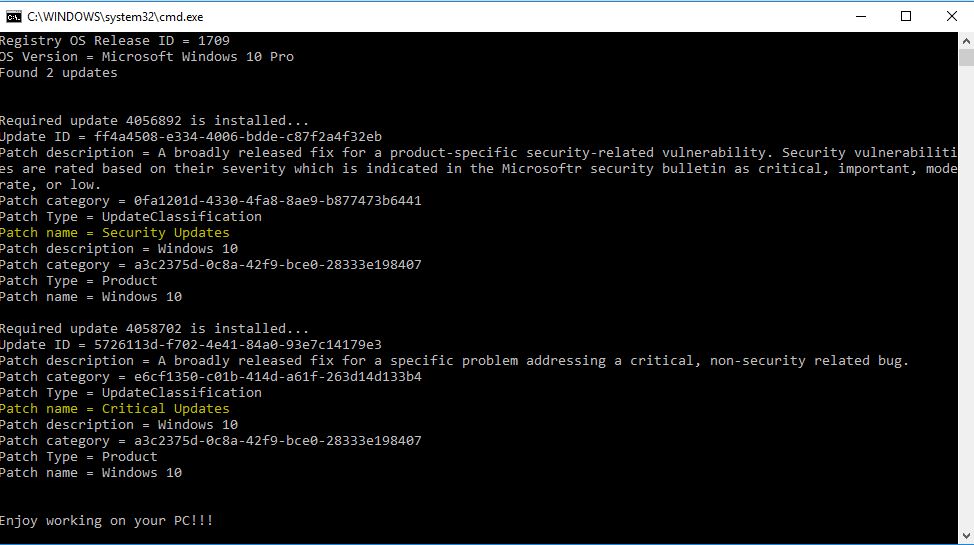
现在,第一个ICategory存储操作系统的更新类型分类。请特别注意放置评论的行:
Console.WriteLine("Patch name = " + ic.Name.ToString());
// In the ICategory collection, first element ICategory stores information of "Update Classification";
// whereas second Icategory element stores the product type information.
测试代码:
UpdateSession uSession = new UpdateSession();
IUpdateSearcher uSearcher = uSession.CreateUpdateSearcher();
uSearcher.Online = false;
ISearchResult sResult = uSearcher.Search("IsInstalled=1 And IsHidden=0");
Console.WriteLine("Found " + sResult.Updates.Count + " updates" + Environment.NewLine);
   foreach (IUpdate update in sResult.Updates)
   {
          Console.WriteLine();
          Console.WriteLine("Required update " + update.KBArticleIDs[0].ToString() + " is installed...");
          Console.WriteLine("Update ID = "+update.Identity.UpdateID);
          ICategoryCollection icc = update.Categories;
          foreach (ICategory ic in icc)
          {
            Console.WriteLine("Patch description = " + ic.Description.ToString());
            Console.WriteLine("Patch category = " + ic.CategoryID.ToString());
            Console.WriteLine("Patch Type = " + ic.Type.ToString());
            Console.WriteLine("Patch name = " + ic.Name.ToString());
// only first ICategory element stores the patch name,
// which reveals the Classification information
          }
   }
样本输出:
页面原文内容由Stack Overflow提供。腾讯云小微IT领域专用引擎提供翻译支持
原文链接:
https://stackoverflow.com/questions/48382393
复制相关文章
相似问题
腾讯云开发者

Copyright © 2013 - 2026 Tencent Cloud. All Rights Reserved. 腾讯云 版权所有
深圳市腾讯计算机系统有限公司 ICP备案/许可证号:粤B2-20090059  粤公网安备44030502008569号
腾讯云计算(北京)有限责任公司 京ICP证150476号 | 京ICP备11018762号