
聊天机器人没有在微软团队中发送消息
对于一个天蓝色的聊天机器人,我希望它在回答之后问我一个简单的问题,例如,我可以给出反馈。我正在使用HeroCard类。
对话框
private async Task ShowWeatherResult(IDialogContext context, LuisResult result)
{
    bool found = false;
    foreach (var entity in result.Entities)
    {
        if (entity.Type.Equals(Entity_Location))
        {
            WeatherAPI weather = new WeatherAPI(entity.Entity);
            found = true;
            await context.PostAsync(weather.ForecastReport());
            await Task.Delay(500);

            // ask for happiness
            Attachment attachment = new Attachment()
            {
                ContentType = HeroCard.ContentType,
                Content = CardsBuilder.CreateHappinessCard()
            };
            var reply = context.MakeMessage();
            reply.Attachments.Add(attachment);
            await context.PostAsync(reply, CancellationToken.None);

            context.Wait(MessageReceivedAsync);
        }
    }
    if (!found)
    {
        await context.PostAsync($"I don't speak human fluently, try another question asking for a specific city!");
        context.Wait(MessageReceived);
    }
}


public virtual async Task MessageReceivedAsync(IDialogContext context, IAwaitable<IMessageActivity> result)
{
    var message = await result;

    if (message.Text != null)
    {
        //
        var happiness = new HappinessAPI();

        // Got an Action Submit
        string value = message.Text;
        //string submitType = value.Type.ToString();
        switch (value)
        {
            case "ShowGif":
                await context.PostAsync(happiness.ShowGif(context), CancellationToken.None);
                await Task.Delay(500);
                break;
            case "HappinessSearch":
                await context.PostAsync(happiness.GetJoke(context), CancellationToken.None);
                await Task.Delay(500);
                break;
            default:
                break;
        }
    }

    context.Wait(MessageReceived);
}
HerdoCard
    internal static HeroCard CreateHappinessCard()
    {
        HeroCard card = new HeroCard()
        {
            Title = "Hi!",
            Text = "Are you happy?",
            Buttons = new List<CardAction>()
            {
                new CardAction()
                {
                    Title = "Yes",
                    Text = "Yes",
                    DisplayText = "Yes",
                    Type = ActionTypes.PostBack,
                    Value = "ShowGif"
                },
                new CardAction()
                {
                    Title = "Meh...",
                    Text ="No",
                    DisplayText = "Meh...",
                    Type = ActionTypes.PostBack,
                    Value = "HappinessSearch"
                }
            }

        };

        return card;
    }
幸福
public class HappinessAPI
{
    internal IMessageActivity ShowGif(IDialogContext context)
    {
        Attachment attachment = new Attachment()
        {
            ContentType = HeroCard.ContentType,
            Content = new HeroCard()
            {
                Images = new List<CardImage>()
                {
                    new CardImage("https://upload.wikimedia.org/wikipedia/commons/thumb/8/85/Smiley.svg/220px-Smiley.svg.png")
                }
            }
        };
        var reply = context.MakeMessage();
        reply.Attachments.Add(attachment);

        return reply;
    }

    internal IMessageActivity GetJoke(IDialogContext context)
    {
        var request = WebRequest.Create("http://api.icndb.com/jokes/random");
        request.ContentType = "application/json; charset=utf-8";
        string text;
        var response = (HttpWebResponse)request.GetResponse();

        using (var sr = new StreamReader(response.GetResponseStream()))
        {
            text = sr.ReadToEnd();
        }
        var reply = context.MakeMessage();
        reply.Text = (string)(JObject.Parse(text))["value"]["joke"];

        return reply;
    }
}
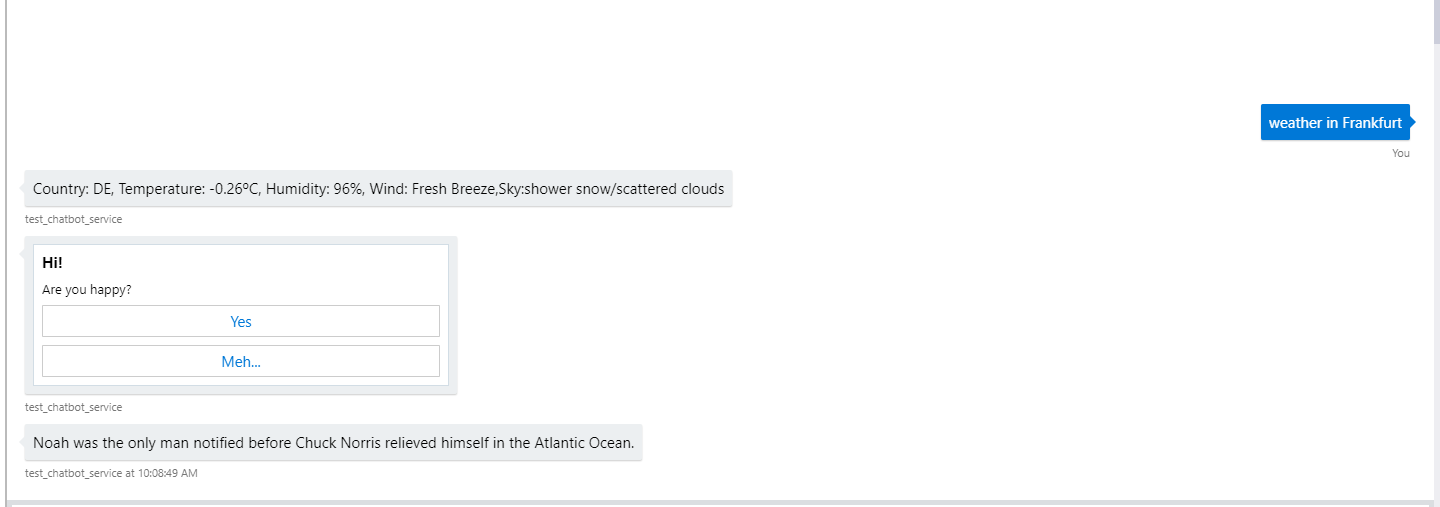
问题是,在使用WebChat在AzurePortal中进行测试时,它是有效的,但在微软团队中,对问题的响应却不起作用。
样本:Works in Webchat:
我:法兰克福的天气
机器人:“天很冷.随便吧”
你高兴吗?
我:点击“是/否”
机器人:发送一个笑话或微笑。
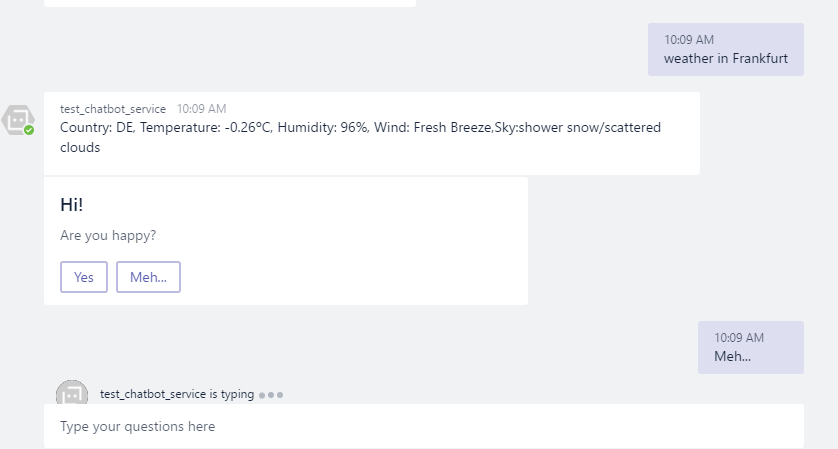
Doesn't work in Microsoft Teams
一切都很好,直到我点击“是/否”,然后它只是尝试做某事(“正在键入.”但在那之后什么都没发生。
编辑
我看到在微软团队中使用聊天机器人时,当我单击herocard时,聊天中会写入一条消息,而它不应该写,因为它被设置为ActionTypes.Postback。
编辑2
HeroCard现在看起来如下所示:
    internal static HeroCard CreateHappinessCard()
    {
        HeroCard card = new HeroCard()
        {
            Title = "Hi!",
            Text = "Are you happy?",
            Buttons = new List<CardAction>()
            {
                new CardAction()
                {
                    Title = "Yes",
                    Text = "ShowGif",
                    //DisplayText = null,
                    Type = ActionTypes.MessageBack,
                    Value= "{\"action\": \"ShowGif\" }"
                },
                new CardAction()
                {
                    Title = "Meh...",
                    Text ="HappinessSearch",
                    //DisplayText = null,
                    Type = ActionTypes.MessageBack,
                    Value = "{\"action\": \"HappinessSearch\" }"
                }
            }

        };

        return card;
    }
}但还是不起作用。没有消息被发送回机器人。如果我使用imBack类型,它会出现,但是消息会出现在聊天中,我不想要的东西和messageBack应该工作。
按照提供的代码编辑3
对话框
    private async Task ShowLuisResult(IDialogContext context, LuisResult result)
    {
        await context.PostAsync($"You have reached {result.Intents[0].Intent}. You said: {result.Query}");

        context.Call(new HeroCardDialog(), MessageReceivedAsync);
    }

    public async Task MessageReceivedAsync(IDialogContext context, IAwaitable<object> result)
    {
        var message = await result;

        if (message != null)
        {
            //

        }

        //context.Wait(MessageReceived);
        context.Done<object>(null);
    }
HeroCardDialog
public class HeroCardDialog : IDialog<object>
{
    public async Task StartAsync(IDialogContext context)
    {
        if (context == null)
        {
            throw new ArgumentNullException(nameof(context));
        }

        //Set the Last Dialog in Conversation Data
        context.UserData.SetValue("HeroCardId", "HerdoCard Dialog");

        var message = context.MakeMessage();
        var attachment = GetHeroCard();

        message.Attachments.Add(attachment);

        await context.PostAsync((message));

        context.Done<object>(null);
    }

    private static Attachment GetHeroCard()
    {
        var heroCard = new HeroCard()
        {
            Title = "Hi!",
            Text = "Are you happy?",
            Buttons = new List<CardAction>()
                {
                    new CardAction()
                    {
                        Title = "Yes",
                        Text = "ShowGif",
                        DisplayText = null,
                        Type = ActionTypes.MessageBack,
                        Value= "{\"msgback\" : \"ShowGif\"}"
                    },
                    new CardAction()
                    {
                        Title = "Meh...",
                        Text ="HappinessSearch",
                        DisplayText = null,
                        Type = ActionTypes.MessageBack,
                        Value= "{\"msgback\" : \"HappinessSearch\"}"
                    }
                }

        };

        return heroCard.ToAttachment();
    }
}回答 1
Stack Overflow用户
发布于 2018-01-17 12:18:58
微软团队不支持PostBack。请检查微软团队中的支持的按钮活动列表。
我们建议您使用messageBack,因为您可以创建一个完全自定义的操作。
https://stackoverflow.com/questions/48297536
复制相似问题
腾讯云开发者

Copyright © 2013 - 2026 Tencent Cloud. All Rights Reserved. 腾讯云 版权所有
深圳市腾讯计算机系统有限公司 ICP备案/许可证号:粤B2-20090059  粤公网安备44030502008569号
腾讯云计算(北京)有限责任公司 京ICP证150476号 | 京ICP备11018762号