
如何将组件的行高添加到awt中的面板中?
如何将组件的行高添加到awt中的面板中?
提问于 2018-01-14 22:13:58
我正在尝试创建具有输入类别和整体能力的面板。
在图片中,您可以看到JTextField,窗口底部有一个JButton。
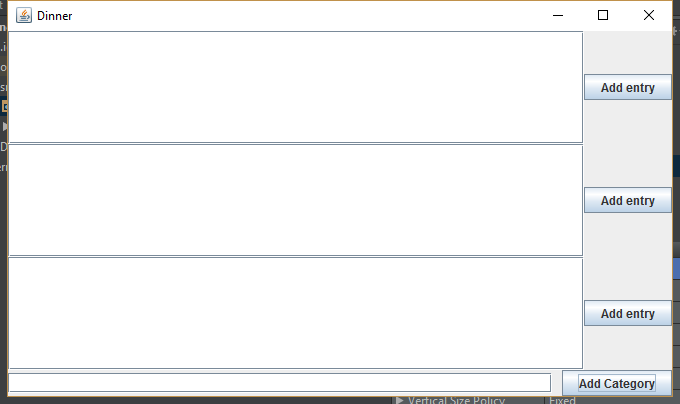
如果用户添加类别,则上面板中将出现包含组件的新行。
问题是,新添加的行没有包装,它占用了所有的空间。
如何强制每增加的行都将其高度(如下面所示)围起来?
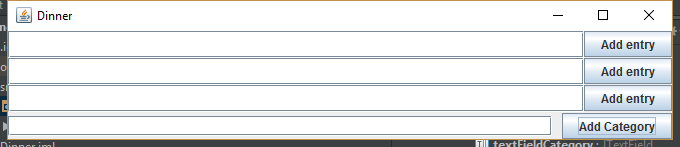
这是我的代码:
.java:
public class Dinner {
    private JPanel panelRoot;
    private JTextField textFieldCategory;
    private JButton buttonAddCategory;
    private JPanel panelInput;
    private JPanel panelControl;

    public static void main(String[] args) {
        new Dinner().doStuff();
    }

    private void doStuff() {
        panelInput.setLayout(new BoxLayout(panelInput, BoxLayout.Y_AXIS));

        buttonAddCategory.addActionListener(new ActionListener() {
            @Override
            public void actionPerformed(ActionEvent e) {
                JPanel jPanel = new JPanel();
                jPanel.setLayout(new BoxLayout(jPanel, BoxLayout.X_AXIS));

                JTextField jTextField = new JTextField();
                jPanel.add(jTextField);
                JButton jButton = new JButton("Add entry");
                jPanel.add(jButton);
                panelInput.add(jPanel);

                panelRoot.revalidate();
            }
        });

        showWindow();
    }

    private void showWindow() {
        JFrame frame = new JFrame("Dinner");
        frame.setContentPane(panelRoot);
        frame.setDefaultCloseOperation(JFrame.EXIT_ON_CLOSE);
        frame.setMinimumSize(new Dimension(680, 0));
        frame.pack();
        frame.setVisible(true);
    }
}
.form:
<?xml version="1.0" encoding="UTF-8"?>
<form xmlns="http://www.intellij.com/uidesigner/form/" version="1" bind-to-class="xxx.Dinner">
  <grid id="27dc6" binding="panelRoot" layout-manager="BorderLayout" hgap="0" vgap="0">
    <constraints>
      <xy x="20" y="20" width="500" height="400"/>
    </constraints>
    <properties/>
    <border type="none"/>
    <children>
      <grid id="57444" binding="panelInput" layout-manager="BorderLayout" hgap="0" vgap="0">
        <constraints border-constraint="Center"/>
        <properties/>
        <border type="none"/>
        <children/>
      </grid>
      <grid id="59d09" binding="panelControl" layout-manager="GridLayoutManager" row-count="1" column-count="2" same-size-horizontally="false" same-size-vertically="false" hgap="-1" vgap="-1">
        <margin top="0" left="0" bottom="0" right="0"/>
        <constraints border-constraint="South"/>
        <properties/>
        <border type="none"/>
        <children>
          <component id="1076b" class="javax.swing.JTextField" binding="textFieldCategory">
            <constraints>
              <grid row="0" column="0" row-span="1" col-span="1" vsize-policy="0" hsize-policy="6" anchor="8" fill="1" indent="0" use-parent-layout="false">
                <preferred-size width="150" height="-1"/>
              </grid>
            </constraints>
            <properties/>
          </component>
          <component id="d75cb" class="javax.swing.JButton" binding="buttonAddCategory">
            <constraints>
              <grid row="0" column="1" row-span="1" col-span="1" vsize-policy="0" hsize-policy="3" anchor="0" fill="1" indent="0" use-parent-layout="false"/>
            </constraints>
            <properties>
              <text value="Add Category"/>
            </properties>
          </component>
        </children>
      </grid>
    </children>
  </grid>
</form>回答 1
Stack Overflow用户
发布于 2018-01-14 22:27:23
- 添加BorderLayout类型的容器BorderLayout
- 将每个新的BoxLayout JPanel添加到BorderLayout.PAGE_START;
Keep BoxLayout From Expanding Children复本
都归功于作者。
页面原文内容由Stack Overflow提供。腾讯云小微IT领域专用引擎提供翻译支持
原文链接:
https://stackoverflow.com/questions/48254706
复制相关文章
相似问题
腾讯云开发者

Copyright © 2013 - 2026 Tencent Cloud. All Rights Reserved. 腾讯云 版权所有
深圳市腾讯计算机系统有限公司 ICP备案/许可证号:粤B2-20090059  粤公网安备44030502008569号
腾讯云计算(北京)有限责任公司 京ICP证150476号 | 京ICP备11018762号