
固定夹d3旋转轮
固定夹d3旋转轮
提问于 2018-01-14 10:31:02
我正在试着“剪”这个纺车:https://bl.ocks.org/mpmckenna8/7f1f0adbf7d9ed7520b3950103e8094c
我只想让车轮的上半部可见。当我尝试用“夹子路径”来做这件事时,我最终会有一个半轮旋转。(见:https://codepen.io/icklerly/pen/JMBdGX)
svg.append("clipPath")       // define a clip path
.attr("id", "ellipse-clip") // give the clipPath an ID
.append("rect")
.attr("x", -100)
.attr("y", 0)
.attr("width",  200)
.attr("height", 200);
但我希望车轮旋转,夹子窗口总是在相同的位置顶部。
有什么建议吗?
回答 1
Stack Overflow用户
回答已采纳
发布于 2018-01-14 10:42:22
问题是在应用剪辑路径的位置上旋转g元素。相反,您可以在应用剪辑路径的地方添加另一个g,并将旋转保持在另一个g上。
所以这件事的结束语:
var hub = svg.append('g')
  .attr('transform', function(){
    return "translate(" + width/2  + "," + height/2 + ")"
  })
.attr('class', 'hub')
.attr("clip-path", "url(#rect-clip)")
这样做:
var hub = svg.append('g').attr("clip-path", "url(#rect-clip)") /* append first g with  clip-path */
  .append('g') /* then create the inside g with the remaining properties*/
  .attr('transform', function(){
    return "translate(" + width/2  + "," + height/2 + ")"
  })
.attr('class', 'hub')
您也可以调整剪辑路径,并简单地使其大小为车轮的一半,以避免使用负值x/y。
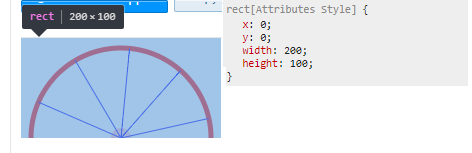
完整法典:
var svg = d3.select('svg')

var margin = 20;
var width = 200, // margin,
  height = 200 // margin;

svg.append("clipPath") // define a clip path
  .attr("id", "rect-clip") // give the clipPath an ID
  .append("rect")
  .attr("x", 0) // position the x-centre
  .attr("y", 0) // position the y-centre
  .attr("width", 200) // set the x radius
  .attr("height", 100);


var hub = svg.append('g').attr("clip-path", "url(#rect-clip)").append('g')
  .attr('transform', function() {
    return "translate(" + width / 2 + "," + height / 2 + ")"
  })
  .attr('class', 'hub')

hub.append('circle')

  .attr('cx', 0)
  .attr('cy', 0)
  .attr('r', 10)
  .attr('fill', 'pink')

hub.append('circle')
  .attr('cx', 0)
  .attr('cy', 0)
  .attr('r', 90)
  .attr('stroke', 'red')
  .attr('stroke-width', 5)
  .attr('fill', 'none')

var linelen = [0, 90];

var line = d3.line().x(function(d) {
    return (0)
  })
  .y(function(d) {
    return (d)
  })
const numberSpokes = 10;

for (let i = 0; i < numberSpokes; i++) {
  var rotation = (360 / numberSpokes) * i;

  var spoke = hub
    .append('path')
    .datum(linelen)
    .attr('d', line)
    .attr('stroke', 'blue')
    .attr('transform', 'rotate(' + rotation + ')')
    .attr('class', 'spoke')
}

const alreadyTransformed = hub.attr('transform')

rotateIt(false)

function rotateIt(much) {

  //console.log(alreadyTransformed)
  hub.transition().duration(4000)
    .attr('transform', alreadyTransformed + ' rotate(' + (much ? 0 : 180) + ')')
    .on('end', function() {
      rotateIt(!much)
    })

}<script src="https://d3js.org/d3.v4.min.js"></script>
<svg id="svger" width="200px" height="200px"></svg>
页面原文内容由Stack Overflow提供。腾讯云小微IT领域专用引擎提供翻译支持
原文链接:
https://stackoverflow.com/questions/48248669
复制相关文章
相似问题
腾讯云开发者

Copyright © 2013 - 2026 Tencent Cloud. All Rights Reserved. 腾讯云 版权所有
深圳市腾讯计算机系统有限公司 ICP备案/许可证号:粤B2-20090059  粤公网安备44030502008569号
腾讯云计算(北京)有限责任公司 京ICP证150476号 | 京ICP备11018762号