
移除导航条与区段标头之间的边界线
移除导航条与区段标头之间的边界线
提问于 2018-01-11 20:30:59
所以我现在的处境有点复杂,
问题:,只有在导航栏下,才有一条超薄的蓝线穿过我的自定义UITableViewSectionHeader ,而我不知道从哪里来:
我有:
- 嵌套在UIViewController中的表视图
- 一个GradientView (继承UIView)直接在我的NavigationBar下面
- 与我的TableView重叠的GradientView
- 自定义TableViewSectionHeader类(子类UITableViewCell)
[
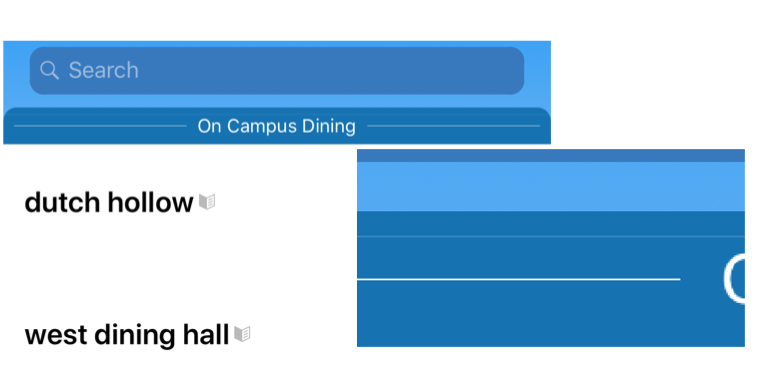
我的理论:
这条边框要么来自:-导航栏的底部边框-- tableview的顶部边框--可能是从节标头(但似乎不太可能)的分隔符-- GradientView的底部边框
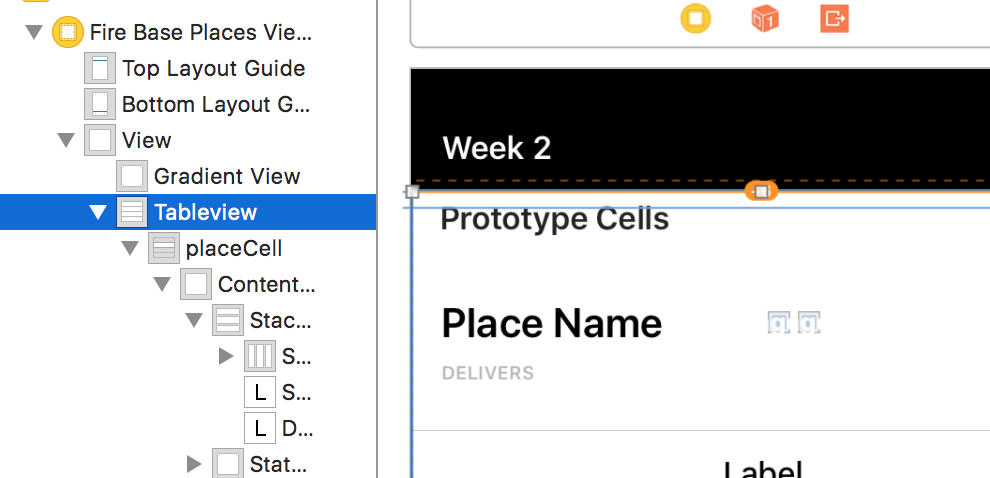
有人知道是什么导致了这条线吗?
我尝试用:ViewController删除它:
override func viewDidLoad() {
      //  self.tableview.separatorStyle = .none
    //    self.tableview.layer.borderWidth = 0
      //  self.view.layer.borderWidth = 0
}
GradientView:
required init?(coder aDecoder: NSCoder) {
    super.init(coder: aDecoder)
    self.layer.borderWidth = 0
}
SectionHeader:
        self.separatorInset.left = 1000
        self.layer.borderWidth = 0
有什么想法吗?
回答 1
Stack Overflow用户
发布于 2018-01-11 21:18:32
导航栏有一个图像视图,其行在小于或等于1 1px之间,您必须遍历NavigationController navigationBar来查找imageView并将其设置为隐藏。
您可以直接在navigationBar上循环并找到所有的subViews,或者如果您想要对视图有一个引用,那么在这里我将如何完成它。
var lineImageView: UIImageView? = { [unowned self] in
   // guard is great try to use it whenever you can
    guard let navigationBar = self.navigationController?.navigationBar else {
        return nil
    }

    return self.findLineImageView(for: navigationBar)
}()
现在,将这个函数循环起来,直到它找到一个imageView并返回到我们的lineImageView
// remember even **navigationBar** is a UI remember **UINavigationBar**
func findLineImageView(for view: UIView) -> UIImageView? {
    // as I said above the line is not more than 1px so we look for a view which is less than or equals to 1px in height
    if view is UIImageView && view.bounds.size.height <= 1 {
        return (view as! UIImageView)
    }
    // we loop till we find the line image view and return it
    for subview in view.subviews {
        if let imageView = findLineImageView(for: subview) {
            return imageView
        }
    }
    // if there is no imageView with that height we return nil that's why we return an optional UIImageView
    return nil
}现在是魔法部分。在viewWillApear中,将lineImageView设置为隐藏
override func viewWillAppear(_ animated: Bool) {
    super.viewWillAppear(animated)
    // remember as I said the lineImageView we returned an optional that's why it has question mark which means we are safe
    lineImageView?.isHidden = true
}页面原文内容由Stack Overflow提供。腾讯云小微IT领域专用引擎提供翻译支持
原文链接:
https://stackoverflow.com/questions/48215349
复制相关文章
相似问题
腾讯云开发者

Copyright © 2013 - 2026 Tencent Cloud. All Rights Reserved. 腾讯云 版权所有
深圳市腾讯计算机系统有限公司 ICP备案/许可证号:粤B2-20090059  粤公网安备44030502008569号
腾讯云计算(北京)有限责任公司 京ICP证150476号 | 京ICP备11018762号