
试图使用处理来捕获运行时错误-2147188160 (80048240)
我试图使用On Error GoTo Handle捕捉一个不一致的
运行时错误-2147188160 (80048240)
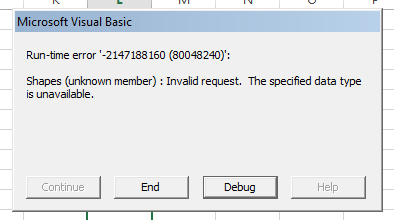
我的代码从excel模板生成4个电源点,保存并关闭它们。下面是我在底部的实验错误处理:
'Exit PowerPoint
PPT.Quit
Exit Sub

Handle:
If Err.Number = -2147188160 Then
    PPT.Quit
    MsgBox "Hey look I broke!"
End If
End Sub但是在我的测试中,当我碰到错误时,我不会收到任何错误消息,但是我的代码也不会运行。这使我相信,我正在捕捉错误,但其他东西并没有触发。我以前尝试过解决错误的根本原因,但是解决方案只是在我的代码中添加Application.Wait,我觉得这是不必要的。
在一个完美的世界中,我只想捕捉错误,关闭PowerPoint并让它立即再次运行代码。有洞察力吗?
对于那些感兴趣的人来说,完整的子例程-错误的位置不一致:
Public Declare Function GetWindowThreadProcessId Lib "user32" _
      (ByVal hwnd As Long, lpdwprocessid As Long) As Long
Sub GeneratePowerPoints()

'For using powerpoint
Dim dummyfile As String
Dim PPT As PowerPoint.Application
Dim myPresentation As PowerPoint.Presentation
Dim MySlide As Object
Dim MyShape As Object

Dim j As Long, allhotels() As Variant, sourcerange As Range, sourcebook As String
Dim d As Date, e As Date, f As Date, lastmonth As String, twomonthsago As String, threemonthsago As String

'Get some month names
d = DateAdd("m", -1, Now)
e = DateAdd("m", -2, Now)
f = DateAdd("m", -3, Now)
lastmonth = Format(d, "mmmm")
twomonthsago = Format(e, "mmmm")
threemonthsago = Format(f, "mmmm")

sourcebook = "BT Strat Sheet.xlsm"
allhotels = Array("SBH", "WBOS", "WBW", "WCP")
dummyfile = "P:\BT\BT 2017\BT Strategy Meetings\2017\Hotel Strat Meeting Dummy File.pptx"

On Error GoTo Handle
For j = 0 To 3

    Set PPT = New PowerPoint.Application
    PPT.Visible = True
    PPT.Presentations.Open Filename:=dummyfile

    'SLIDE ONE
    Set sourcerange = Workbooks(sourcebook).Worksheets(allhotels(j)).Range("A2:J21")
    sourcerange.Copy
    PPT.ActivePresentation.Slides(1).Shapes.PasteSpecial DataType:=2
    Set MyShape = PPT.ActivePresentation.Slides(1).Shapes(PPT.ActivePresentation.Slides(1).Shapes.Count)

    'Set size
    MyShape.Left = 152
    MyShape.Top = 152
    MyShape.Height = 500
    MyShape.Width = 650

    'SLIDE TWO
    Set sourcerange = Workbooks(sourcebook).Worksheets(allhotels(j)).Range("A82:J91")
    sourcerange.Copy
    PPT.ActivePresentation.Slides(2).Shapes.PasteSpecial DataType:=2
    Set MyShape = PPT.ActivePresentation.Slides(2).Shapes(PPT.ActivePresentation.Slides(2).Shapes.Count)

    'Set size
    MyShape.Left = 152
    MyShape.Top = 92
    MyShape.Height = 500
    MyShape.Width = 650

    'SLIDE TWO
    Set sourcerange = Workbooks(sourcebook).Worksheets(allhotels(j)).Range("A94:J103")
    sourcerange.Copy
    PPT.ActivePresentation.Slides(2).Shapes.PasteSpecial DataType:=2
    Set MyShape = PPT.ActivePresentation.Slides(2).Shapes(PPT.ActivePresentation.Slides(2).Shapes.Count)

    'Set size
    MyShape.Left = 152
    MyShape.Top = 300
    MyShape.Height = 500
    MyShape.Width = 650

    'SLIDE THREE
    Set sourcerange = Workbooks(sourcebook).Worksheets(allhotels(j)).Range("A24:J43")
    sourcerange.Copy
    PPT.ActivePresentation.Slides(3).Shapes.PasteSpecial DataType:=2
    Set MyShape = PPT.ActivePresentation.Slides(3).Shapes(PPT.ActivePresentation.Slides(3).Shapes.Count)

    'Set size
    MyShape.Left = 152
    MyShape.Top = 152
    MyShape.Height = 500
    MyShape.Width = 650

    'SLIDE FOUR
    Set sourcerange = Workbooks(sourcebook).Worksheets(allhotels(j)).Range("A58:J67")
    sourcerange.Copy
    PPT.ActivePresentation.Slides(4).Shapes.PasteSpecial DataType:=2
    Set MyShape = PPT.ActivePresentation.Slides(4).Shapes(PPT.ActivePresentation.Slides(4).Shapes.Count)

    'Set size
    MyShape.Left = 152
    MyShape.Top = 120
    MyShape.Height = 500
    MyShape.Width = 650

    'SLIDE FOUR
    Set sourcerange = Workbooks(sourcebook).Worksheets(allhotels(j)).Range("A46:J55")
    sourcerange.Copy
    PPT.ActivePresentation.Slides(4).Shapes.PasteSpecial DataType:=2
    Set MyShape = PPT.ActivePresentation.Slides(4).Shapes(PPT.ActivePresentation.Slides(4).Shapes.Count)

    'Set size
    MyShape.Left = 152
    MyShape.Top = 335
    MyShape.Height = 500
    MyShape.Width = 650

    'SLIDE FIVE
    Set sourcerange = Workbooks(sourcebook).Worksheets(allhotels(j)).Range("A70:J79")
    sourcerange.Copy
    PPT.ActivePresentation.Slides(5).Shapes.PasteSpecial DataType:=2
    Set MyShape = PPT.ActivePresentation.Slides(5).Shapes(PPT.ActivePresentation.Slides(5).Shapes.Count)

    'Set size
    MyShape.Left = 152
    MyShape.Top = 152
    MyShape.Height = 500
    MyShape.Width = 650

    'Find and replace month placeholders
    'Straight boilerplate
    Dim sld As Slide, shp As PowerPoint.Shape, i As Long

    For Each sld In PPT.ActivePresentation.Slides
        For Each shp In sld.Shapes
            If shp.HasTextFrame Then
                If shp.TextFrame.HasText Then
                    shp.TextFrame.TextRange.Text = Replace(shp.TextFrame.TextRange.Text, "LastMonth", lastmonth)
                End If
            End If
        Next shp
    Next sld

    For Each sld In PPT.ActivePresentation.Slides
        For Each shp In sld.Shapes
            If shp.HasTextFrame Then
                If shp.TextFrame.HasText Then
                    shp.TextFrame.TextRange.Text = Replace(shp.TextFrame.TextRange.Text, "TwoMonthsAgo", twomonthsago)
                End If
            End If
        Next shp
    Next sld

    For Each sld In PPT.ActivePresentation.Slides
        For Each shp In sld.Shapes
            If shp.HasTextFrame Then
                If shp.TextFrame.HasText Then
                    shp.TextFrame.TextRange.Text = Replace(shp.TextFrame.TextRange.Text, "ThreeMonthsAgo", threemonthsago)
                End If
            End If
        Next shp
    Next sld

    'Save it
    PPT.ActivePresentation.SaveAs "P:\BT\BT File Drop-off Location\" & allhotels(j) & " " & lastmonth & " Strat Meeting.pptx"

    'Close it
    PPT.ActivePresentation.Close
Next j

'Exit PowerPoint
PPT.Quit
Exit Sub

Handle:
Call KillProcess(PPT)
MsgBox "Hey look I broke!"

End Sub
Sub KillProcess(ByVal app As PowerPoint.Application)

    ' This is OK Here, Because We Can Assume If We Get No Handle Back, There's No Handle To Cleanup
    ' Don't Normally Do This
    On Error Resume Next

    Dim windowProcessId As Long
    windowProcessId = ProcIDFromWnd(app.ActiveWindow.hwnd)

    Dim oServ As Object
    Dim cProc As Variant
    Dim oProc As Object

    Set oServ = GetObject("winmgmts:")
    Set cProc = oServ.ExecQuery("Select * from Win32_Process Where ProcessId=" & windowProcessId)

    For Each oProc In cProc

          MsgBox "Killing Process " & windowProcessId   ' used to display a message for testing pur
          errReturnCode = oProc.Terminate()
    Next

End Sub
Function ProcIDFromWnd(ByVal hwnd As Long) As Long
   Dim idProc As Long

   ' Get PID for this HWnd
   GetWindowThreadProcessId hwnd, idProc
   ProcIDFromWnd = idProc
End Function编辑:在Absinthe的建议下,我得以debug.print确认错误号确实是-2147188160。现在,只有当出现错误时,我才能成功地运行代码,但是我不能让PowerPoint退出--我必须亲自关闭PowerPoint,然后我可以看到MsgBox在我的excel屏幕上:
'Exit PowerPoint
PPT.Quit
Exit Sub

Handle:
Debug.Print Err.Number
If Err.Number = -2147188160 Then
PPT.Quit
MsgBox "Oh look I broke!"
End If回答 2
Stack Overflow用户
发布于 2018-01-15 02:42:47
如果PowerPoint没有退出,很可能是由于一些公开引用的缘故。由于错误,您处于一种奇怪的状态,所以我建议您终止与主窗口句柄关联的进程(在异常状态下不会建议这样做)。
在这种情况下,您需要知道哪些PPT进程是由自动化启动的,并终止了这些进程。
该进程在开始时获取进程(仅在PPT),在结束时获取进程,并终止新的进程。
Public PpProcesses() As Integer

Sub GeneratePowerPoints()


    Call SaveProcesses

'For using powerpoint
Dim dummyfile As String
Dim PPT As PowerPoint.Application
Dim myPresentation As PowerPoint.Presentation
Dim MySlide As Object
Dim MyShape As Object

Dim j As Long, allhotels() As Variant, sourcerange As Range, sourcebook As String
Dim d As Date, e As Date, f As Date, lastmonth As String, twomonthsago As String, threemonthsago As String

'Get some month names
d = DateAdd("m", -1, Now)
e = DateAdd("m", -2, Now)
f = DateAdd("m", -3, Now)
lastmonth = Format(d, "mmmm")
twomonthsago = Format(e, "mmmm")
threemonthsago = Format(f, "mmmm")

sourcebook = "BT Strat Sheet.xlsm"
allhotels = Array("SBH", "WBOS", "WBW", "WCP")
dummyfile = "P:\BT\BT 2017\BT Strategy Meetings\2017\Hotel Strat Meeting Dummy File.pptx"

On Error GoTo Handle
For j = 0 To 3

    Set PPT = New PowerPoint.Application
    PPT.Visible = True
    PPT.Presentations.Open Filename:=dummyfile

    'SLIDE ONE
    Set sourcerange = Workbooks(sourcebook).Worksheets(allhotels(j)).Range("A2:J21")
    sourcerange.Copy
    PPT.ActivePresentation.Slides(1).Shapes.PasteSpecial DataType:=2
    Set MyShape = PPT.ActivePresentation.Slides(1).Shapes(PPT.ActivePresentation.Slides(1).Shapes.Count)

    'Set size
    MyShape.Left = 152
    MyShape.Top = 152
    MyShape.Height = 500
    MyShape.Width = 650

    'SLIDE TWO
    Set sourcerange = Workbooks(sourcebook).Worksheets(allhotels(j)).Range("A82:J91")
    sourcerange.Copy
    PPT.ActivePresentation.Slides(2).Shapes.PasteSpecial DataType:=2
    Set MyShape = PPT.ActivePresentation.Slides(2).Shapes(PPT.ActivePresentation.Slides(2).Shapes.Count)

    'Set size
    MyShape.Left = 152
    MyShape.Top = 92
    MyShape.Height = 500
    MyShape.Width = 650

    'SLIDE TWO
    Set sourcerange = Workbooks(sourcebook).Worksheets(allhotels(j)).Range("A94:J103")
    sourcerange.Copy
    PPT.ActivePresentation.Slides(2).Shapes.PasteSpecial DataType:=2
    Set MyShape = PPT.ActivePresentation.Slides(2).Shapes(PPT.ActivePresentation.Slides(2).Shapes.Count)

    'Set size
    MyShape.Left = 152
    MyShape.Top = 300
    MyShape.Height = 500
    MyShape.Width = 650

    'SLIDE THREE
    Set sourcerange = Workbooks(sourcebook).Worksheets(allhotels(j)).Range("A24:J43")
    sourcerange.Copy
    PPT.ActivePresentation.Slides(3).Shapes.PasteSpecial DataType:=2
    Set MyShape = PPT.ActivePresentation.Slides(3).Shapes(PPT.ActivePresentation.Slides(3).Shapes.Count)

    'Set size
    MyShape.Left = 152
    MyShape.Top = 152
    MyShape.Height = 500
    MyShape.Width = 650

    'SLIDE FOUR
    Set sourcerange = Workbooks(sourcebook).Worksheets(allhotels(j)).Range("A58:J67")
    sourcerange.Copy
    PPT.ActivePresentation.Slides(4).Shapes.PasteSpecial DataType:=2
    Set MyShape = PPT.ActivePresentation.Slides(4).Shapes(PPT.ActivePresentation.Slides(4).Shapes.Count)

    'Set size
    MyShape.Left = 152
    MyShape.Top = 120
    MyShape.Height = 500
    MyShape.Width = 650

    'SLIDE FOUR
    Set sourcerange = Workbooks(sourcebook).Worksheets(allhotels(j)).Range("A46:J55")
    sourcerange.Copy
    PPT.ActivePresentation.Slides(4).Shapes.PasteSpecial DataType:=2
    Set MyShape = PPT.ActivePresentation.Slides(4).Shapes(PPT.ActivePresentation.Slides(4).Shapes.Count)

    'Set size
    MyShape.Left = 152
    MyShape.Top = 335
    MyShape.Height = 500
    MyShape.Width = 650

    'SLIDE FIVE
    Set sourcerange = Workbooks(sourcebook).Worksheets(allhotels(j)).Range("A70:J79")
    sourcerange.Copy
    PPT.ActivePresentation.Slides(5).Shapes.PasteSpecial DataType:=2
    Set MyShape = PPT.ActivePresentation.Slides(5).Shapes(PPT.ActivePresentation.Slides(5).Shapes.Count)

    'Set size
    MyShape.Left = 152
    MyShape.Top = 152
    MyShape.Height = 500
    MyShape.Width = 650

    'Find and replace month placeholders
    'Straight boilerplate
    Dim sld As Slide, shp As PowerPoint.Shape, i As Long

    For Each sld In PPT.ActivePresentation.Slides
        For Each shp In sld.Shapes
            If shp.HasTextFrame Then
                If shp.TextFrame.HasText Then
                    shp.TextFrame.TextRange.Text = Replace(shp.TextFrame.TextRange.Text, "LastMonth", lastmonth)
                End If
            End If
        Next shp
    Next sld

    For Each sld In PPT.ActivePresentation.Slides
        For Each shp In sld.Shapes
            If shp.HasTextFrame Then
                If shp.TextFrame.HasText Then
                    shp.TextFrame.TextRange.Text = Replace(shp.TextFrame.TextRange.Text, "TwoMonthsAgo", twomonthsago)
                End If
            End If
        Next shp
    Next sld

    For Each sld In PPT.ActivePresentation.Slides
        For Each shp In sld.Shapes
            If shp.HasTextFrame Then
                If shp.TextFrame.HasText Then
                    shp.TextFrame.TextRange.Text = Replace(shp.TextFrame.TextRange.Text, "ThreeMonthsAgo", threemonthsago)
                End If
            End If
        Next shp
    Next sld

    'Save it
    PPT.ActivePresentation.SaveAs "P:\BT\BT File Drop-off Location\" & allhotels(j) & " " & lastmonth & " Strat Meeting.pptx"

    'Close it
    PPT.ActivePresentation.Close
Next j

'Exit PowerPoint
PPT.Quit
Exit Sub

Handle:
MsgBox Err.Number
Call KillProcess
MsgBox "Hey look I broke!"

End Sub


Public Sub SaveProcesses()

    ReDim PpProcesses(1 To 1)

    Dim oServ As Object
    Dim cProc As Variant
    Dim oProc As Object

    Set oServ = GetObject("winmgmts:")
    Set cProc = oServ.ExecQuery("Select * from Win32_Process")

    For Each oProc In cProc

        If UCase(oProc.Name) = "POWERPNT.EXE" Or UCase(oProc.Name) = "POWERPNT" Then

            ReDim Preserve PpProcesses(1 To UBound(PpProcesses) + 1)
            PpProcesses(UBound(PpProcesses)) = oProc.ProcessId

        End If
    Next

End Sub

Sub KillProcess()

    Dim index As Integer
    index = -1

    Dim oServ As Object
    Dim cProc As Variant
    Dim oProc As Object

    Set oServ = GetObject("winmgmts:")
    Set cProc = oServ.ExecQuery("Select * from Win32_Process")

    For Each oProc In cProc

         If UCase(oProc.Name) = "POWERPNT.EXE" Or UCase(oProc.Name) = "POWERPNT" Then


            For i = LBound(PpProcesses) To UBound(PpProcesses)
                If PpProcesses(i) = oProc.ProcessId Then
                    index = i
                    Exit For
                End If
            Next i

            If index >= 0 Then
                'MsgBox ("Process Found " & oProc.ProcessId)
            Else
                oProc.Terminate
            End If
         End If
    Next

End SubStack Overflow用户
发布于 2018-01-10 00:26:23
这可能是由于在宏运行时引发了另一个错误号的错误。为了避免遗漏此错误,如果数字不是所需的数字,则可以添加另一条消息。
Handle:
If Err.Number = -2147188160 Then
    PPT.Quit
    MsgBox "Hey look I broke!"
else
    MsgBox("Run-time error '" & Err.Number & "': " & Err.Description, vbCritical, "Error")
End Ifhttps://stackoverflow.com/questions/48176590
复制相似问题
腾讯云开发者

Copyright © 2013 - 2026 Tencent Cloud. All Rights Reserved. 腾讯云 版权所有
深圳市腾讯计算机系统有限公司 ICP备案/许可证号:粤B2-20090059  粤公网安备44030502008569号
腾讯云计算(北京)有限责任公司 京ICP证150476号 | 京ICP备11018762号