
如何在形状的节点周围移动?
我试图在Excel中创建一个Sankey图,作为开始,我尝试为图表的左边部分创建一些“条目箭头”,这些箭头大致如下所示:
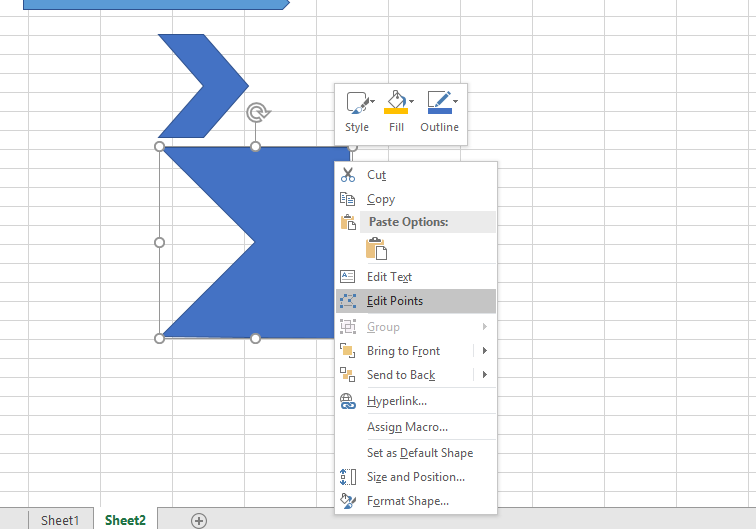
我做了一个雪佛龙箭头,然后把它的最右边的点拖到箭头的顶端。
现在,要对我所需的所有箭头执行此操作,我希望以编程的方式进行,但我不知道是否有任何方法可以对节点(?)做更多的工作。形状的。试着录制宏没有给我任何帮助。
到目前为止,宏在Debug.Print行上中止,可能是因为节点对象没有Left属性:P
Sub energiInn()
    Dim r As Range, c As Range
    Dim lo As ListObject
    Dim topp As Double, høgde As Double
    Dim i As Long, farge As Long
    Dim nd As Object

    Set lo = Tabell.ListObjects("Energi_inn_elektrolyse")
    Set r = lo.DataBodyRange
    topp = 50

    With SankeyDiagram.Shapes
        For i = 1 To r.Rows.Count
            høgde = Application.WorksheetFunction.Max(10, r.Cells(i, 2) / 50#)
            With .AddShape(Type:=msoShapeChevron, Left:=50, top:=topp, Width:=200, Height:=høgde)
                .Name = r.Cells(i, 1)
                farge = fargekart((i - 1) Mod UBound(fargekart))
                .Fill.ForeColor.RGB = RGB(farge Mod 256, (farge \ 256) Mod 256, farge \ 65536)
                For Each nd In .Nodes
                    Debug.Print nd.Left
                Next nd
            End With
            topp = topp + høgde
        Next i
    End With
    Debug.Print r.Address

End Sub
老实说,我不确定是否能做到这一点,但即使这是不可能的,最好能得到证实:)
回答 3
Stack Overflow用户
发布于 2018-01-09 14:14:58
你要找的是.Nodes.SetPosition。因为它的相对位置,这可能是一个挑战。您需要使用对象位置元素来确保点相对于形状移动。
With .AddShape(Type:=msoShapeChevron, Left:=50, Top:=topp, Width:=200, Height:=høgde)
    .Name = r.Cells(i, 1)
    .Nodes.SetPosition 2, .Left + .Width, .Top
    .Nodes.SetPosition 4, .Left + .Width, .Top + .Height
第一个参数是节点索引。接下来是x位置,我们希望一直到图形的右边,所以我们将形状的位置添加到形状的宽度上。最后是y的位置,第一点我们想在最上面的角落,所以我们使用形状顶部。最后一点,我们把高度加到最上面的位置,把它带到下角。
Stack Overflow用户
发布于 2018-01-09 14:00:47
我相信这将是更简单的绘制,这是自由的形式使用Shapes.BuildFreeform法,然后转换成形状使用FreeformBuilder.ConvertToShape法。
示例:
Sub drawEntryArrow()
  Dim x1 As Single, y1 As Single, w As Single, h As Single
  Dim oShape As Shape

  x1 = 10
  y1 = 10

  w = 200
  h = 200

  With ActiveSheet.Shapes.BuildFreeform(msoEditingAuto, x1, y1)
   .AddNodes msoSegmentLine, msoEditingAuto, x1 + w, y1
   .AddNodes msoSegmentLine, msoEditingAuto, x1 + w, y1 + h
   .AddNodes msoSegmentLine, msoEditingAuto, x1, y1 + h
   .AddNodes msoSegmentLine, msoEditingAuto, x1 + w / 2, y1 + h / 2
   .AddNodes msoSegmentLine, msoEditingAuto, x1, y1
   Set oShape = .ConvertToShape
  End With

End SubStack Overflow用户
发布于 2018-01-09 14:03:10
如果您只想去掉右边的点,只需删除节点(从左上角开始按顺时针方向计算chevron的节点):
.Nodes.Delete 3但是,要使用形状的nodes-property访问所有节点,只要处理标准形状类型,就不能访问坐标。
当您使用“编辑点”时,形状将其类型更改为msoShapeNotPrimitive --但我不知道如何使用VBA进行此操作。
UPDATE玩了一会儿(因为我很好奇)--举个例子,如果有人想手动更改形状:
    ' First change Shape Type:
    ' WILL NOT WORK: sh.AutoShapeType = msoShapeNotPrimitive
    ' Instead, add a node and remove it immediately. This changes the shape type.
    .Nodes.Insert c, msoSegmentLine, msoEditingCorner, 100, 100
    .Nodes.Delete c + 1

    ' Now access the x-coordinate of node 2 and the y-coordinate of node 3
    ' (note that we cannot access the coordinates directly)
    Dim pointsArray() As Single, x As Single, y As Single
    pointsArray = .Nodes(2).Points
    x = pointsArray(1, 1)
    pointsArray = .Nodes(3).Points
    y = pointsArray(1, 2)
    ' Now change the x-value of node 3
sh.Nodes.SetPosition 3, x, yhttps://stackoverflow.com/questions/48168130
复制相似问题
腾讯云开发者

Copyright © 2013 - 2026 Tencent Cloud. All Rights Reserved. 腾讯云 版权所有
深圳市腾讯计算机系统有限公司 ICP备案/许可证号:粤B2-20090059  粤公网安备44030502008569号
腾讯云计算(北京)有限责任公司 京ICP证150476号 | 京ICP备11018762号