
无法使用mysqli_connect()连接到数据库
因此,我决定重新开始研究编码,因为我已经放弃了一段时间,我一直试图为我的网站创建一个PHP登录系统。每次我尝试登录时,我都会收到一个连接错误,说明“连接失败”,方法是使用or die函数来测试是否存在问题。通常情况下我都会觉得很难过。我环顾了一下其他一些问题/有类似问题的人。但遗憾的是,我似乎找不到问题,也找不到解决办法。我看过我的剧本,似乎没有任何问题。我最好的猜测是由于我的MySQL数据库。但老实说我真的不确定。如果你们中的任何人能给我一些建议的话,那就太好了。谢谢,
另外,我环顾了PHP网站,看看是否有任何可能的函数,我可以添加,以确定问题,但我无法。我不确定这是否是一个愚蠢的问题,但除了使用死/退出之外,还有什么方法可以做到吗?我也尝试做imgs.beastfox.net,这是所有文件的位置所在。希望我给了你所有需要的信息。如果你需要其他细节,我希望我能帮上忙。我会再次指出,我已经到处寻找其他可能有帮助的文章,但我似乎找不出我的问题。另一件要注意的是,我是主持我的网站命名堆,如果这是任何关注。
谢谢你,大卫
-网站--
imgs.beastfox.net/php/login.php
Email:test@test.com
密码:测试
-密码--
<?php
    session_start();

    if(isset($_SESSION["id"]) || isset($_COOKIE["id"]))
    {
        header("Location: dashboard.php");
    }

    if(isset($_POST["login"]))
    {
        //Gather input variables
        $email = $_POST["email"];
        $password = $_POST["password"];
        //Hash password as pasword should be hashed in database for security reasons.  See md5 hashing
        $hash_password = md5($password);
        $remember_me = $_POST["remember_me"];


        //Connect to Database
$host="beastfox.net";
$username="{username}";
$password="{password}";
$db_name="{username}_login";
$tbl_name="login";

$con = mysqli_connect("beastfox.net","{username}","{password}","{username}_login","login")or die("cannot connect");


        //Check database to see if email registered to DB
        $sql = "SELECT id FROM users WHERE email='$email' LIMIT 1";
        $query = mysqli_query($con, $sql);
        $count_users = mysqli_num_rows($query);

        if($count_users == 1)
        {

            //Retrieve user details to perform login
            $sql = "SELECT * FROM users WHERE email='$email' LIMIT 1";
            $query = mysqli_query($con, $sql);
            while($row = mysqli_fetch_array($query))
            {
                $user_id = $row["id"];
                $user_password = $row["password"];

            }


            if($hash_password == $user_password)
            {
                if($remember_me == 1)
                {
                    //Set Cookie
                    $cookie_name = "id";
                    setcookie($cookie_name, $user_id, time() + (86400 * 30), "/");

                    header("Location: dashboard.php");
                }
                else
                {
                    //Set Session
                    $_SESSION["id"] = $user_id;
                    header("Location: dashboard.php");
                }
            }
            else
            {
                $error = '<p class="error">Password incorrect.</p>';
            }
        }
        else
        {
            $error = '<p class="error">Email address not registered.</p>';
        }

        mysqli_close($con);
?>
<!DOCTYPE html>
<html lang="en">
    <head>
    <meta charset="utf-8">
    <meta http-equiv="X-UA-Compatible" content="IE=edge">
    <meta name='viewport' content='width=device-width, initial-scale=1, maximum-scale=1, minimum-scale=1, user-scalable=no'/>
    <title>User Login</title>
    <link href="https://fonts.googleapis.com/css?family=Roboto:400,700,900" rel="stylesheet">

    <style type="text/css" media="screen">
        *{
            padding: 0;
            margin: 0;
            box-sizing: border-box;
            -webkit-font-smoothing: antialiased;
            -moz-osx-font-smoothing: grayscale;
            font-family: 'Roboto', sans-serif;
        }
        body, html{
            width: 100%;
            height: 100%;
        }

        body{
            position: relative;
            background: #2196f3; /* Old browsers */
            background: -moz-linear-gradient(top, #2196f3 0%, #1e88e5 40%, #1565c0 100%); /* FF3.6-15 */
            background: -webkit-linear-gradient(top, #2196f3 0%,#1e88e5 40%,#1565c0 100%); /* Chrome10-25,Safari5.1-6 */
            background: linear-gradient(to bottom, #2196f3 0%,#1e88e5 40%,#1565c0 100%); /* W3C, IE10+, FF16+, Chrome26+, Opera12+, Safari7+ */
            filter: progid:DXImageTransform.Microsoft.gradient( startColorstr='#2196f3', endColorstr='#1565c0',GradientType=0 ); /* IE6-9 */
            copy

        }

        label{
            display: block;

        }


        form{
            position: absolute;
            top:50%;
            left: 50%;
            transform: translate(-50%,-50%);
            width: 40%;
            padding: 30px;
            background: #FFF;
            -moz-box-shadow: 0 1px 2px 0 rgba(0,0,0,0.15);
            -webkit-box-shadow: 0 1px 2px 0 rgba(0,0,0,0.15);
            box-shadow: 0 1px 2px 0 rgba(0,0,0,0.15);
            border-radius: 5px;
        }

        .css-input {
             padding: 7px 10px;
             font-size: 15px;
             border-width: 1px;
             border-color: #CCCCCC;
             background-color: #FFFFFF;
             color: #455A64;
             width: 100%;
             border-style: solid;
             border-radius: 0px;
             box-shadow: inset 0px 0px 4px rgba(66,66,66,.14);
        }
         .css-input:focus {
             outline:none;
        }

        form p{
            display: block;
            margin-bottom: 20px;
        }

        .clear{
            clear: both;
        }

        .btn {
          background: #3498db;
          background-image: -webkit-linear-gradient(top, #3498db, #2980b9);
          background-image: -moz-linear-gradient(top, #3498db, #2980b9);
          background-image: -ms-linear-gradient(top, #3498db, #2980b9);
          background-image: -o-linear-gradient(top, #3498db, #2980b9);
          background-image: linear-gradient(to bottom, #3498db, #2980b9);
          -webkit-border-radius: 8;
          -moz-border-radius: 8;
          border-radius: 8px;
          text-shadow: 1px 1px 3px #666666;
          font-family: Arial;
          color: #ffffff;
          font-size: 17px;
          padding: 10px 25px 10px 25px;
          border: solid #1f628d 1px;
          text-decoration: none;
          margin-top: 20px;
          cursor: pointer;
        }

        .btn:hover {
          background: #3cb0fd;
          background-image: -webkit-linear-gradient(top, #3cb0fd, #3498db);
          background-image: -moz-linear-gradient(top, #3cb0fd, #3498db);
          background-image: -ms-linear-gradient(top, #3cb0fd, #3498db);
          background-image: -o-linear-gradient(top, #3cb0fd, #3498db);
          background-image: linear-gradient(to bottom, #3cb0fd, #3498db);
          text-decoration: none;
        }

        h1{
            color: #455A64;
            font-size: 22px;
            line-height: 22px;
            padding-bottom: 10px;
            border-bottom:1px solid #e9e9e9;
            margin-bottom: 20px;
        }

        label{
            display: block;
            padding-bottom: 10px;
            color: #546E7A;
        }

        label.remember{
            display: inline-block;
            line-height: 20px;
            cursor: pointer;
        }

        label.remember input{
            float: left;
            margin-top: 5px;
        }

        label.remember span{
            font-size: 14px;
            color: #1194EA;
            text-decoration: underline;
            padding-left: 6px;
        }

        p.error{
            padding-bottom: 0;
            margin-bottom: 0;
            color: #F44336;
            padding-top: 15px;
        }
    </style>


    </head>
    <body>

        <form method="post" action="login.php">
            <h1>Login to Dashboard</h1>
            <p>
                <label for="email">User Email</label>
                <input type="email" name="email" required="required" id="email" class="css-input" placeholder="Enter Email Address"/>
            </p>


            <p>
                <label for="password">Password</label>
                <input type="password" name="password" required="required" class="css-input" id="password" placeholder="Enter Password"/>
            </p>

            <label for="remember_me" class="remember">
                <input type="checkbox" name="remember_me" id="remember_me" value="1"/>
                <span>Remember Me</span>
            </label>

            <div class="clear"></div>

            <button type="submit" name="login" class="btn">Login</button>

            <?= $error; ?>
        </form>
    </body>
</html>
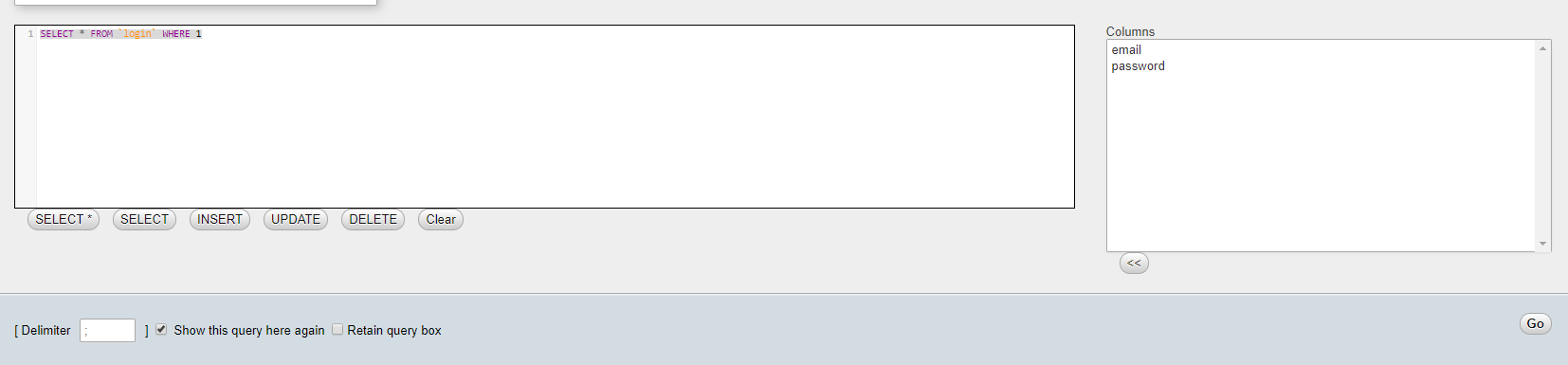
回答 1
Stack Overflow用户
发布于 2018-01-07 00:09:05
如果打开错误报告,则可以验证错误消息。
将以下内容添加到php脚本的顶部。
<?php

ini_set('error_reporting' -1);
ini_set('display_errors', 'on');

//...
结果:
警告: mysqli_connect()期望参数5是长的,字符串给定
您没有收到mysqli_connect_error消息的原因是您向mysqli_connect提供的参数无效。见手册。
mysqli_connect($host, $username, $password, $database_name, $port, $socket);https://stackoverflow.com/questions/48133013
复制相似问题
腾讯云开发者

Copyright © 2013 - 2026 Tencent Cloud. All Rights Reserved. 腾讯云 版权所有
深圳市腾讯计算机系统有限公司 ICP备案/许可证号:粤B2-20090059  粤公网安备44030502008569号
腾讯云计算(北京)有限责任公司 京ICP证150476号 | 京ICP备11018762号